Carrier Power
 Carrier Power is a measure of the power of a carrier signal without modulation.
The Carrier Power measurement is ACrms2/(reference impedance) to give Power which is then converted to dBm using 10 log (Power/0.001).
Configurable Measurement Parameters
This measurement is affected by the following settings (choose Measure > Thresholds...):
- Thresholds tab
To measure
- Click the toolbar's Amplitude tab.
- Click the toolbar's More buttons to locate the Carrier Power button.
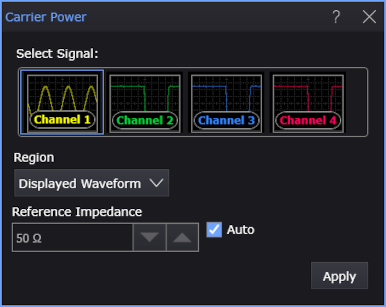
- Select the Region in which to make the measurement:
- Displayed Waveform — is what you see in the waveform window (which can be a zoomed-in view of the complete waveform).
- Entire Waveform — specifies the complete waveform.
- Region N — If regions are enabled for the selected signal, you can select one of those regions.
-
Reference Impedance — When the vertical Units are displayed (and measured) as power (that is, dBm or Watt), this control lets you specify the reference impedance of the Source so that power is calculated correctly. You can select automatically determined or manually entered values:
-
Auto — When selected, analog input channel reference impedances can be automatically determined by the type of probe detected (differential, common mode, single-ended) or by whether two channels are set up as Differential Channels or Common Mode Channels in the Channel dialog box.
For: The automatically determined Reference Impedance is: Single-ended input channels and almost all high-impedance probes 50 Ω Differential input channels1 and differential probes 100 Ω Common Mode input channels1 and common mode probes2 25 Ω NOTES:
1The Channel dialog box Differential Channels or Common Mode Channels selections take precedence over the detected probe type.
2Common mode is not available on high-impedance probes.All other sources (math functions, waveform memories, etc.) are assumed to be 50 Ω. If this is not correct, for example, when a waveform memory or math function source comes from a differential or common mode signal, you must clear the Auto selection and manually enter the appropriate reference impedance.
-
When Auto is not selected, you can manually enter a reference impedance value from 10 Ω to 200 Ω.
-
- Click OK.
SCPI Command
:MEASure:VERTical:CPOWer