RMS

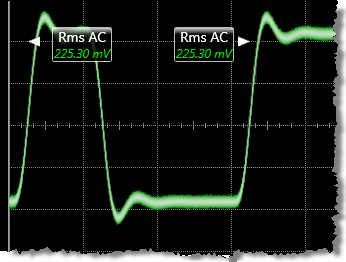 RMS is a measure of the AC or DC RMS of a pulse waveform. This measurement is compatible with PAM signals over the display, waveform, or region but not over a cycle. An annotation label is placed at the RMS result. The positions of the labels are dependent upon the configuration of the RMS measurement. You can configure the measurement to be made across the entire waveform display, a region, or across one cycle of the waveform.
The DC RMS measurement is the typical method of making an rms voltage measurement. This measurement is determined as followed:
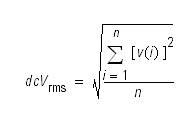
where:
n is the number of waveform points on screen and not the memory depth and v(i) is the voltage at the i th point on screen.
The AC RMS measurement is a modified rms measurement. It removes the DC component of the waveform from the calculation of the rms voltage. This measurement is determined as followed:
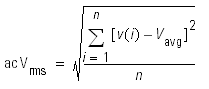
where:
n is the number of waveform points on screen and not the memory depth and v(i) is the voltage at the i th point on screen.
This command is PAM compatible when it is made over the display, waveform, or region. It is not PAM compatible when made over a cycle.
Configurable Measurement Parameters
This measurement is affected by the following settings (choose Measure > Thresholds...):
- Thresholds tab
To measure
- Click the toolbar's Amplitude tab.
- Click the toolbar's More buttons to locate the RMS button.
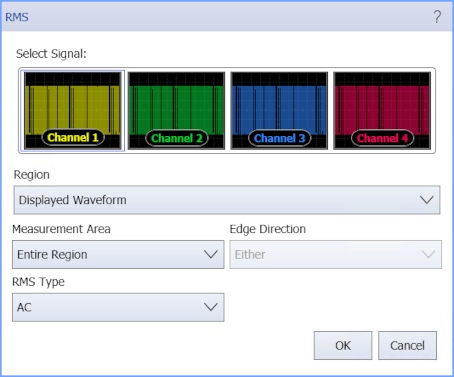
- Select the Region in which to make the measurement:
- Displayed Waveform — is what you see in the waveform window (which can be a zoomed-in view of the complete waveform).
- Entire Waveform — specifies the complete waveform.
- Region N — If regions are enabled for the selected signal, you can select one of those regions.
- Select the Measurement Area (Single Cycle or Entire Region).
- When measuring a Single Cycle, select the Edge Direction that identifies the cycle to measure:
- Rising or Falling — the cycle beginning with this edge that is nearest to the timebase reference is the cycle to measure.
- Select the RMS Type (DC or AC).
- Click OK.
SCPI Command
:MEASure:VERTical:VRMS