Period - Period
 The Period-Period measurement takes a group of cycles and measures the period from the first edge of the first cycle of the group to the final edge of the last cycle of the group. The n-period of the first group is measured and subtracted from the n-period of the second group. After shifting to the right by one cycle the next measurement is made The following figure shows how a Period-Period jitter measurement is made for N = 3.
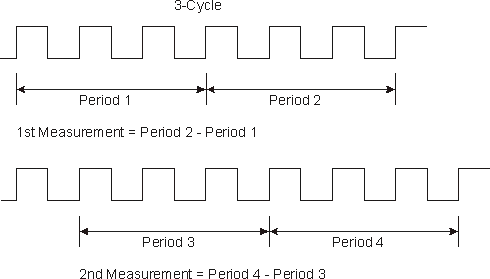
Once all of the groups of cycles of the waveform are measured the statistics are calculated. The statistics are the values accumulated over all of the trigger cycles that have occurred.
To perform what used to be called cycle-cycle jitter (or cyc-cyc jitter), use Period-Period and set N=1.
When measuring over the waveform, the Period - Period measurement is made on all the cycles of the waveform including any cycles that are not in the waveform window. When measuring in a region, the Period - Period measurement is made on all the cycles inside the region only.
Configurable Measurement Parameters
This measurement is affected by the following settings (choose Measure > Thresholds...):
- Thresholds tab
To measure
- Click the toolbar's Clock tab.
- Click the Period - Period button.
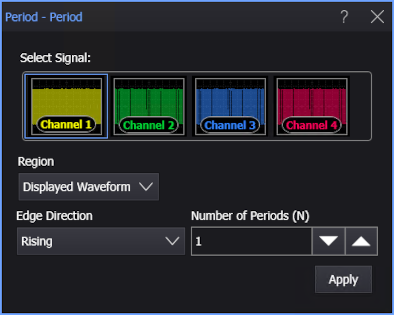
- Select the signal on which to make the measurement.
- Select the Region in which to make the measurement:
- Displayed Waveform — is what you see in the waveform window (which can be a zoomed-in view of the complete waveform).
- Entire Waveform — specifies the complete waveform.
- Region N — If regions are enabled for the selected signal, you can select one of those regions.
- Select the measurement units as either Second or Unit Interval.
- Specify the Edge Direction as Rising or Falling.
- Enter the Number of Periods (N) number of N consecutive periods.
- Click Apply.
SCPI Command
:MEASure:CLOCk:PPERiod