Pulse Width - Pulse Width
 The Pulse Width - Pulse Width measurement measures the positive (or negative) pulse width of the first cycle and subtracts it from the positive (or negative) pulse width of the second cycle for the first measurement result. Then, the second cycle of the waveform is measured and subtracted from the third cycle positive (or negative) pulse width for the second measurement result. This operation continues until all of the cycles of the waveform have been measured. The following figure shows two Pulse Width - Pulse Width measurements.
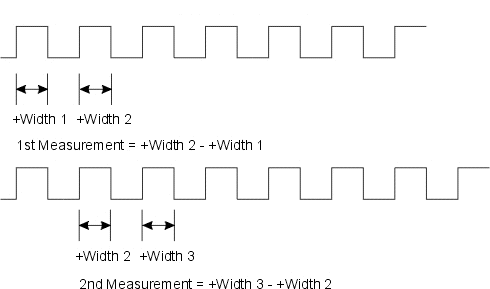
All of the measurement results are used to compute the statistics. The statistics are the values accumulated over all of the trigger cycles that have occurred.
When measuring over the waveform, the Pulse Width - Pulse Width measurement is made on all the cycles of the waveform including any cycles that are not in the waveform window. When measuring in a region, the Pulse Width - Pulse Width measurement is made on all the cycles inside the region only.
Configurable Measurement Parameters
This measurement is affected by the following settings (choose Measure > Thresholds...):
- Thresholds tab
To measure
- Click the toolbar's Clock tab.
- Click the Pulse Width - Pulse Width button.
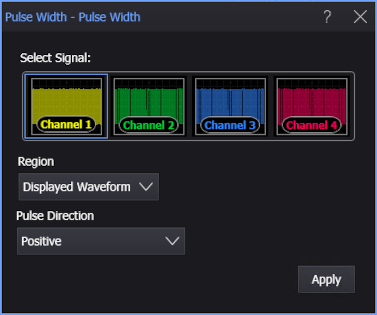
- Select the signal on which to make the measurement.
- Select the Region in which to make the measurement:
- Displayed Waveform — is what you see in the waveform window (which can be a zoomed-in view of the complete waveform).
- Entire Waveform — specifies the complete waveform.
- Region N — If regions are enabled for the selected signal, you can select one of those regions.
- Specify the Pulse Direction as either Positive or Negative.
- Click Apply.
SCPI Command
:MEASure:CLOCk:PPWidth