N-UI
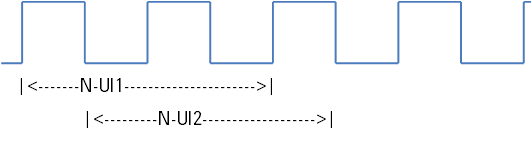
 The N-UI measurement measures the span of time of N consecutive unit intervals. The measurement then moves over one UI and measures the span of time of the next N consecutive unit intervals.
There are two modes that can be used to calculate the data width:
- In Automatic mode, the data rate is found by searching your waveform for the narrowest data pulse. When the Automatic mode has trouble finding the data rate due to excessive high-frequency jitter on the waveform, the Semi Automatic mode can be used.
- In the Semi Automatic mode, Infiniium starts by searching around the Nominal Data Rate that you specify then automatically finds the data rate.
When measuring over the waveform, the N-UI measurement is made on all the cycles of the waveform including any cycles that are not in the waveform window. When measuring in a region, the N-UI measurement is made on all the cycles inside the region only.
Configurable Measurement Parameters
This measurement is affected by the following settings (choose Measure > Thresholds...):
- Thresholds tab
To measure
- Click the toolbar's Data tab.
- Click the N-UI button.
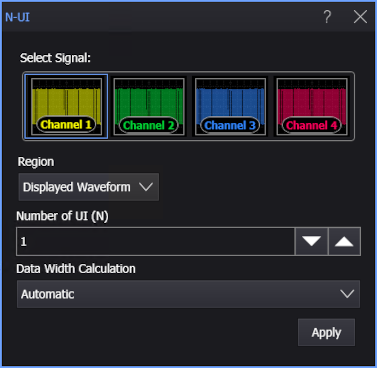
- Select the signal on which to make the measurement.
- Select the Region in which to make the measurement:
- Displayed Waveform — is what you see in the waveform window (which can be a zoomed-in view of the complete waveform).
- Entire Waveform — specifies the complete waveform.
- Region N — If regions are enabled for the selected signal, you can select one of those regions.
- Enter the Number of UI (N) number of N consecutive intervals.
- Select the Data Width Calculation as either Automatic or Semi Automatic.
- If the Data Width Calculation is Semi Automatic, specify the Nominal Data Rate for the selected signal.
- Click Apply.
SCPI Command
:MEASure:DATA:NUINterval