Data Rate
 The Data Rate measurement searches your waveform for the narrowest data pulse. The data rate statistics are calculated. The data rate frequency is calculated as one divided by the pulse width.
There are two modes that can be used to find the data:
- In Automatic mode, the data rate is found by searching your waveform for the narrowest data pulse. When the Automatic mode has trouble finding the data rate due to excessive high-frequency jitter on the waveform, the Semi Automatic mode can be used.
- In the Semi Automatic mode, Infiniium starts by searching around the Symbol Rate that you specify then automatically finds the data rate.
When measuring over the waveform, the Data Rate measurement is made on all the cycles of the waveform including any cycles that are not in the waveform window. When measuring in a region, the Data Rate measurement is made on all the cycles inside the region only.
Configurable Measurement Parameters
This measurement is affected by the following settings (choose Measure > Thresholds...):
- Thresholds tab
To measure
- Click the toolbar's Data tab.
- Click the Data Rate button.
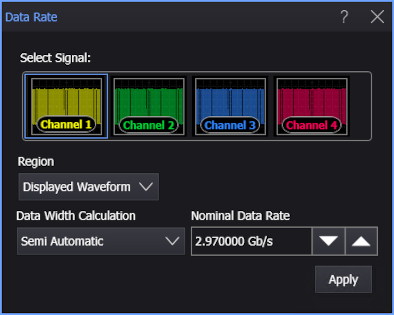
- Select the signal on which to make the measurement.
- Select the Region in which to make the measurement:
- Displayed Waveform — is what you see in the waveform window (which can be a zoomed-in view of the complete waveform).
- Entire Waveform — specifies the complete waveform.
- Region N — If regions are enabled for the selected signal, you can select one of those regions.
- Select the Data Width Calculation as either Automatic or Semi Automatic.
- If the Data Width Calculation is Semi Automatic, specify the Nominal Data Rate for the selected signal.
- Click Apply.
SCPI Command
:MEASure:DATA:DRATe