Period

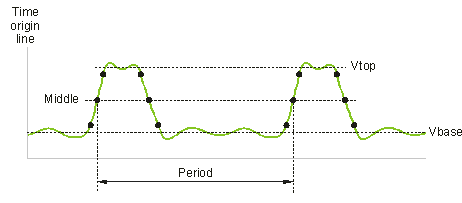
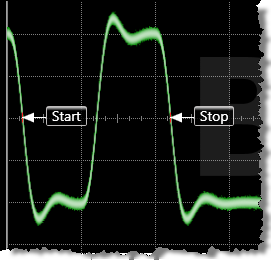 Period is a measure of the time between the first detected edge of a waveform and the next occurrence of the same type of edge. The measurement can be restricted to a region. The time between the edges of the waveform is taken at the middle threshold crossings. The default for the middle threshold is the 50% level. The period will not be calculated unless there is a complete waveform cycle visible on the display. Two waveform annotation labels mark the start and stop measurement points.
Period is determined as follows:
- Rising edge

- Falling edge

Configurable Measurement Parameters
This measurement is affected by the following settings (choose Measure > Thresholds...):
- Thresholds tab
To measure
- Click the toolbar's Time tab.
- Click the More buttons to locate the Period button.
- Click the button.
- Select the Region in which to make the measurement:
- Displayed Waveform — is what you see in the waveform window (which can be a zoomed-in view of the complete waveform).
- Entire Waveform — specifies the complete waveform.
- Region N — If regions are enabled for the selected signal, you can select one of those regions.
- Select the number of Occurrences to measure per acquisition:
- Measure One — makes one measurement per acquisition using edges closest to the timebase reference.
- Measure All — makes as many measurements per acquisition as possible using all edges in the acquisition. In this case, the measurement closest to the timebase reference is the "current" measurement (and is the one with annotations).
- Specify the Edge Direction as Rising or Falling. The measurement is made from rising edge to rising edge or falling edge to falling edge.
SCPI Command
:MEASure:HORizontal:PERiod