Multi-Purpose Button
A Multi-Purpose button can be configured to perform the often needed tasks on an oscilloscope or Infiniium 2026 Offline. The oscilloscope's front panel includes an actual Multi-Purpose button.
Click Setup > Multi-Purpose Button... to open this dialog box.
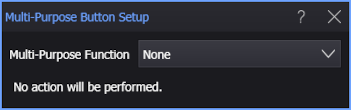
In the Multi-Purpose Function field, select the button's action:
- None. This is the Multi-Purpose button's factory default setting (Setup > Factory Default).
- Save Screen Image
- Run SCPI Script
- Load Instrument Setup
- Save Documentation Wizard File
Choosing Setup > Default Setup does not affect the Multi-Purpose button's current setting.