Run SCPI Script
SCPI Scripts
To configure the button to run SCPI scripts, select Run SCPI Script as shown in the following picture. SCPI scripts are recordings of your front-panel key presses translated into equivalent programming commands. Scripts allow you to automate the setup of complex instrument configurations and settings.
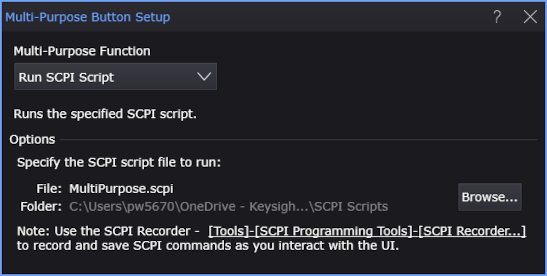
The MultiPurpose button will run a single script. This script does not exist, so you must create the script, give it any name that you want, and place it in the \Scripts user folder. This folder has a subfolder named \Multi-Purpose Button. You cannot save scripts to this folder as it is a shortcut to a folder that is write protected.
Click Browse to select the script which should be placed in the \Scripts user folder.
A Default Setup does not clear or reset the currently assigned SCPI script. To reset the dialog box to the default scripts, click Setup > Factory Default.
Default Script
Prerequisite
At least one waveform displayed.
Action
Several measurements are made.
Script
// MultiPurpose Default Scope Mode.scpi
:MEASure:HORizontal:RTIMe
:MEASure:HORizontal:FTIMe
:MEASure:HORizontal:PERiod
:MEASure:VERTical:VAMPlitude