Protocol Decode
When decoding, searching, and triggering on protocol data, follow this general procedure:
-
Open the Protocol Decode dialog box (Setup > Protocol Decode...).
-
Select your protocol type and set any parameters.
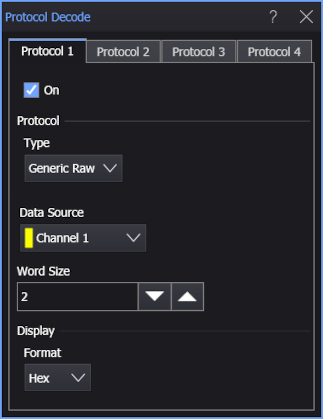
The Type lets you select:
- Generic 8b/10b — See Generic 8b/10b.
- Generic Raw — See Generic Raw.
- USB4 Gen 2-4 — See USB4 Gen 2-4.
To look at the decode, close all dialog boxes and use the Protocol listing window to navigate through the decoded data and see specific details.
Protocol Decode Results
When a protocol decode is enabled, decode information is displayed with the data source in the Waveform window and packet information is displayed in the Protocol listing window. The Protocol listing window lets you quickly navigate through the decode information.
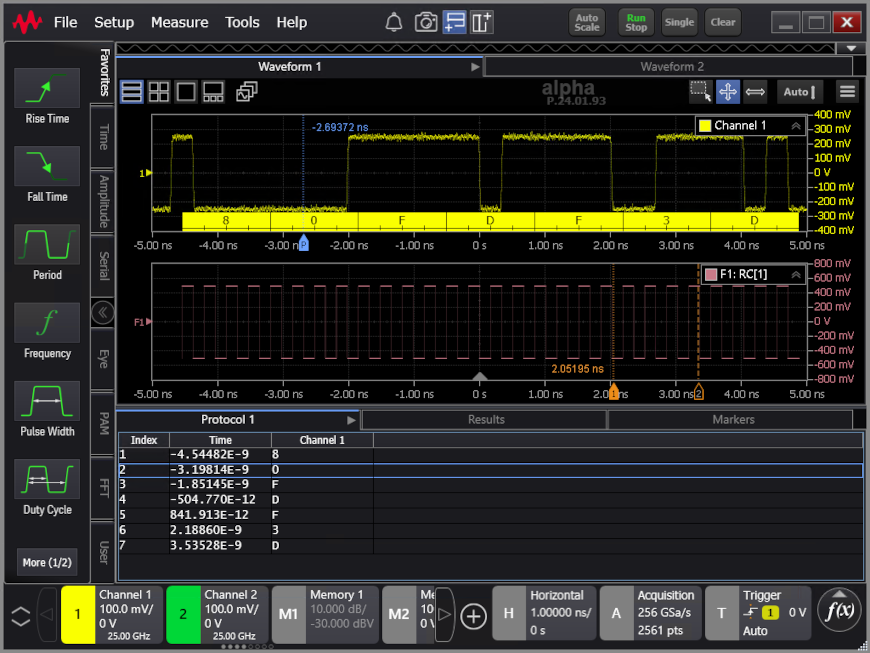
Selecting a row in the Protocol listing window moves the blue "P" protocol marker in the Waveform window. Likewise, moving the blue "P" protocol marker in the Waveform window selects the associated row in the Protocol listing window.