Front Panel Trigger Controls
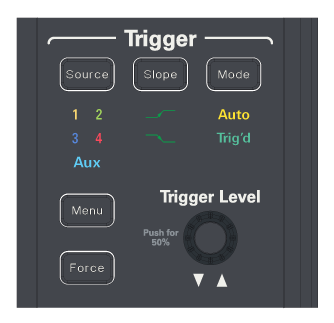
An oscilloscope has trigger controls on its front panel:
-
[Source] — Press this key until the desired trigger source LED is illuminated. You can choose any channel or the Aux input as the source for the selected trigger mode.
-
[Slope] — Press this key until the desired slope LED is lit. For example, with the Edge trigger mode, you can use this key to select between triggering on a rising or falling edge. For other trigger modes, this key toggles between positive and negative pulse options.
-
[Mode] — Press this key until the desired LED is lit (Trig'd or Auto).
When Trig'd is selected, the oscilloscope must find the trigger before saving and displaying captured data.
When Auto is selected, if a trigger does not occur within a certain amount of time, an acquisition is automatically saved and displayed. In Auto trigger mode, you are able to see your signals while setting up the desired trigger.
-
[Menu] — Press this key to open the graphical user interface trigger setup dialog box.
-
[Force] — Causes a trigger (on anything) and displays the acquisition.
This key is useful in the Trig'd trigger mode where acquisitions are made only when the trigger condition is met. In this mode, if no triggers are occurring (that is, the "Trig'd?" indicator is displayed), you can press [Force] to force a trigger and see what the input signals look like.
In the Auto trigger mode, when the trigger condition does not occur within a certain period of time, triggers are forced and the "Auto?" indicator is displayed.
-
Trigger Level — Turn this knob to adjust the vertical level at which the oscilloscope will trigger.
Push the Trigger Level knob to set the level to the middle of the waveform (50% of the waveform's amplitude).
In addition to the Trigger controls, these front panel keys and knobs can affect the trigger setup:
- [Default Setup] — Sets the High Bandwidth Edge trigger mode (rising, on channel 1), a 0 V trigger level, and the Auto trigger sweep (see Default Setup).
- [Auto Scale] — Sets the High Bandwidth Edge trigger mode and Auto trigger sweep on one of the input signals at the middle of the waveform (see [Auto Scale] Key).