Measurement Qualified Triggers
Measurement qualified triggers let you trigger when a measured value falls inside or outside a particular range of values. They let you set up triggers that are not available in the oscilloscope's hardware. For example, you could use a measurement qualified trigger to create a "duty cycle <30%, >70%" trigger.
With measurement qualified triggers, the oscilloscope's hardware trigger is used to make a waveform acquisition, and the measurement is performed across the acquisition. If one of the measured values meets the specified conditions (inside or outside specified limits), the measurement qualified trigger condition is true (the event occurs), and the waveform is displayed. If none of the measured values meet the specified conditions, the acquisition is discarded and not displayed.
With measurement qualified triggers, measurement results and statistics are collected on displayed waveforms only.
To set up measurement qualified triggers:
-
First, set up a hardware-based trigger that lets you see waveform events that you would like to further qualify with measurement. See Trigger Setup.
-
Add the analog input channel measurement or function measurement that you want to use to qualify triggers. See Measurements.
Measurements on functions are available to be used in measurement qualified triggers except when averaging functions or measurement trend functions are included in the function chain.
-
Select the colored portion of the Trigger badge.
-
In the Infiniium Scope Setup dialog box, select the Qualification tab.
-
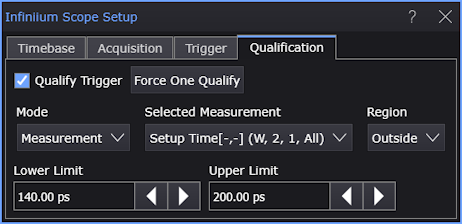
For the Mode control, select Measurement.
-
For the Selected Measurement control, select the measurement whose results you want to use to qualify triggers.
-
Enter the measurement Lower Limit.
-
Enter the measurement Upper Limit.
-
For the Region control, select whether qualifying measurement should be Inside or Outside the limits.
-
Finally, select Qualify Trigger to enable measurement qualified triggers.
For example, for the previous dialog box settings, the measurement qualified triggers might look like:
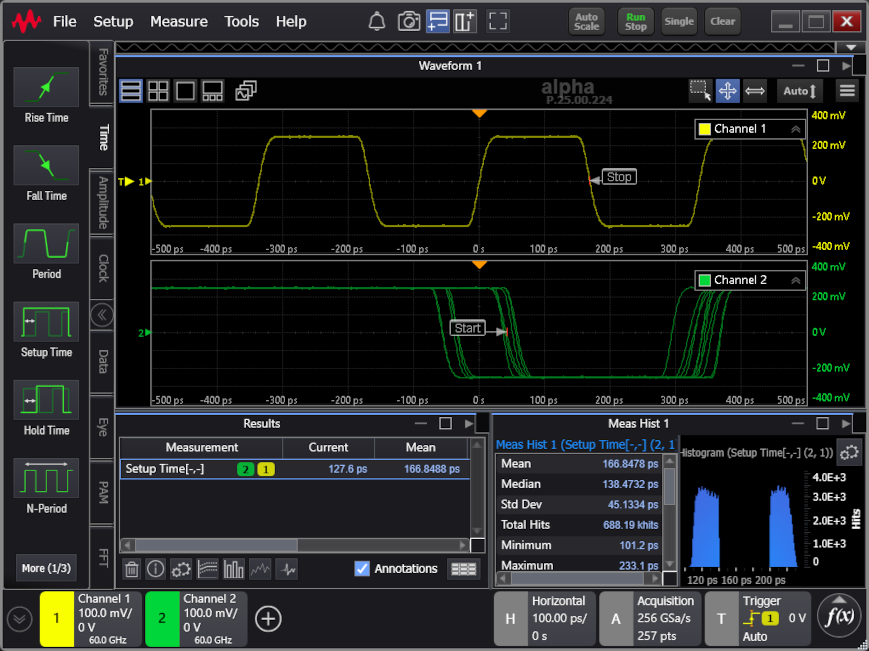
Notice that only waveforms where the measurements are outside the specified limits are displayed. The measurement histogram confirms that only measurements outside the range are being included in the results and statistics.
In cases where there is only one measurement occurrence per acquired waveform, the measured value closest to the horizontal reference is the "Current" result and is tracked by markers.
When All Occurrences in an Acquisition Are Measured
When a measurement that is made on all occurrences in an acquisition is used in the trigger qualification, any one measurement that meets the specified limits will cause the waveform to be displayed and all measurements made within the waveform, even ones outside the specified limits, will be included in the measurement results and statistics.
Note also that the measurement closest to the horizontal (t=0) reference that is listed as the "Current" result and is tracked by markers may not be one that falls within the specified limits.