Pulse Width
The Pulse Width trigger mode triggers on pulses narrower or wider than a specified time or pulses within or outside a specified time range.
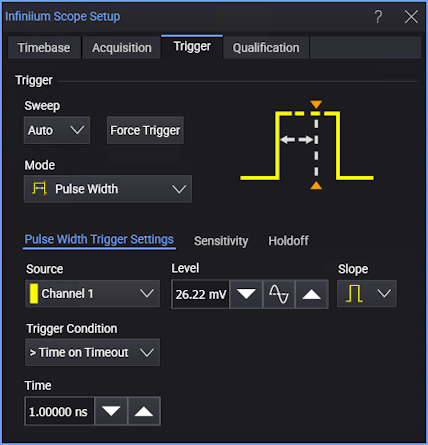
-
Source — Select one of the analog input channels.
-
Level — Enter the trigger threshold level in the field or use the increase, 50%, or decrease buttons. Other ways to set the trigger level include dragging the "T" trigger level indicator on the left side of a waveform content window or turning the front panel Trigger Level knob .
-
Slope — Select positive or negative pulses.
-
Trigger Condition — Selects what kind of pulses will cause a trigger:
- < Time — Pulses narrower than the specified Time. This is the same as the Glitch trigger mode.
- > Time on Pulse End — Pulses wider than the specified Time, triggering when the pulse ends.
- > Time on Timeout — Pulses wider than the specified Time, triggering when the width is exceeded. This is the same as the Timeout trigger mode.
- Range Inside — Pulses within the range specified by the > Time and < Time values.
- Range Outside — Pulses outside the range specified by the < Time and > Time values.