Lesson 3. Creating a Pre-Emphasis User Measurement Script
This Python example creates a pre-emphasis measurement that runs in the Infiniium / Python environment. The measurement takes one source waveform as an input and runs two dependent measurements. Dependent measurements are automatically run before the script and their measurement results are passed as variables to your script. Although not required, it is a good practice to give the XML file and script files the same or similar base filename, but using different filename extensions of course! As the number of your measurements grow, you'll appreciate being able to quickly associate the different files at a glance.
Color has been added to the following example lines of the XML and script code to make them easier to read.
- Complete Lesson 1, if you have not already done so.
- Display a single-valued waveform.
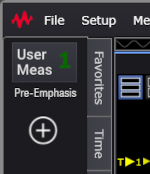
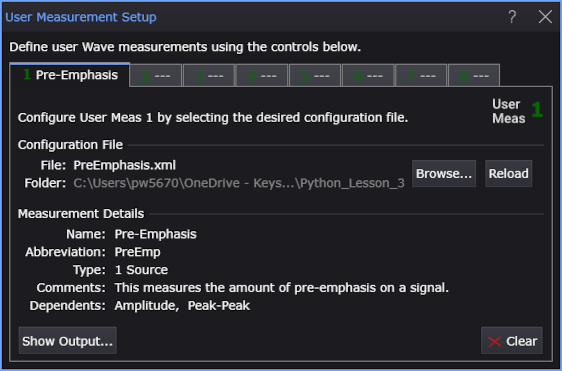
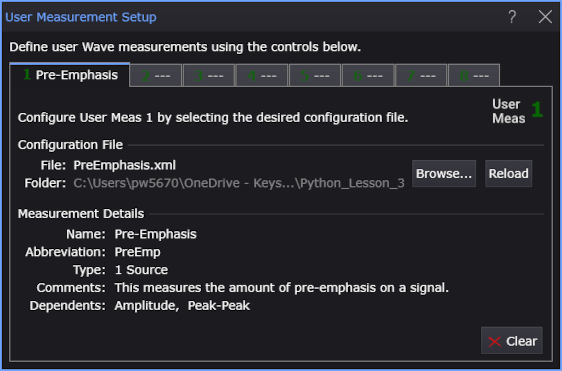
- Copy the following XML listing into a text editor. Save the file as PreEmphasis.xml in Infiniium's user measurements folder (\Documents\Keysight\Infiniium\User Measurements). Later, when this XML file is imported into the User Measurement Setup dialog box, it identifies the PreEmphasis.py script, populates the dialog box, and creates the user measurement button as shown in these figures.
- <?xml version="1.0" encoding="utf-8"?>
- <Measurement xmlns:xsd="http://www.w3.org/2001/XMLSchema"
- xmlns:xsi="http://www.w3.org/2001/XMLSchema-instance">
- <Script>PreEmphasis.py</Script>
- <Name>Pre-Emphasis</Name>
- <Abbreviation>PreEmp</Abbreviation>
- <!-- <Icon>MyPicture.png</Icon> -->
- <Comments>This measures the amount of pre-emphasis on a signal.</Comments>
- <MeasurementType>1 Source</MeasurementType>
- <ValidType>Wave</ValidType>
- <Dependent Name = "Amplitude">
- <SourceIndex>1</SourceIndex>
- </Dependent>
- <Dependent Name = "Peak-Peak">
- <SourceIndex>1</SourceIndex>
- </Dependent>
- </Measurement>
- Copy the following script into your text editor. Save the script as PreEmphasis.py in Infiniium's user measurements folder (\Documents\Keysight\Infiniium\User Measurements).
- Make a Single acquisition.
- Choose Measure > Measurements....
- At the bottom of the Add Measurements dialog box, click User Defined Wave Measurements....
- In the User Measurement Setup dialog box, select an available tab.
- Click Browse... and select your XML configuration file, PreEmphasis.xml.
- Add the measurement. Click on your new Pre-Emphasis measurement button.
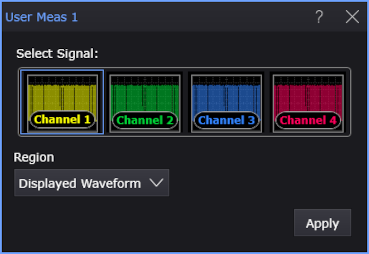
- In the User Meas dialog box, select the Signal and measurement Region; then, click Apply.
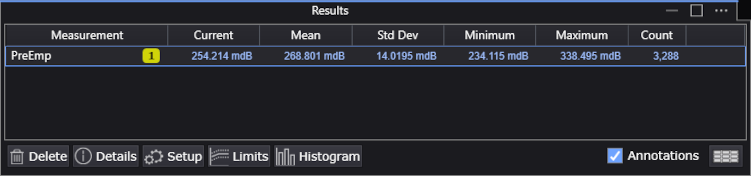
- In the Results content window, notice that the results of the two dependent measurements are not listed.
- Back in the User Measurement Setup dialog box, in the Pre-Emphasis measurement tab, click the Show Output... button. This button appears in the dialog box only after the measurement has been added. If the dialog box is already open, close it, and reopen it to see the Show Output... button.
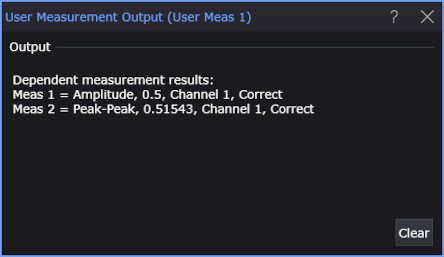
- In the displayed User Measurement Output dialog box, you should see the output of the print statement in your PreEmphasis.py script. The output of the print statements shows information about the dependent measurements.
|
|
|
|
| The <Icon> element is optional. This element allows you to place a picture on your user operator icon. | ||
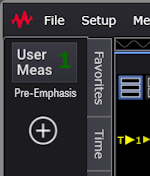 Example without Example without<Icon> element |
 Example with Example with<Icon> element |
|
The algorithm function name must be written in lower case. Naming the function Algorithm.m or ALGORITHM, for example, will break the script.
import numpy as np
import math

# Argument "variables" is a dictionary from Infiniium that
# maps from variable name to value.
def algorithm(variables):

    # Initialize local function variables with variables from Infiniium.
    # SrcData is an array of Y-data values of the input waveform.
    SrcData = variables['SrcData'] if 'SrcData' in variables else np.empty(0, dtype=np.float32)
    Source = variables['Source']   # Source of the input waveform.
    MeasurementData = variables['MeasurementData']   # Dependent measurement results.
    # Do nothing if there is no SrcData.
    num_samples = len(SrcData)
    if num_samples == 0:
        return {'ErrorMsg': 'No data'}

    # Find dependent measurement results in MeasurementData: V p-p and V amptd.
    # Print to User Measurement Output window.
    i = 1
    print('\nDependent measurement results:')
    for meas in MeasurementData:
        print(f'Meas {i} = {meas['Name']}, {meas['Result']}, {meas['Source1']}, {meas['Status']}')
        i = i + 1
        if (meas['Source1'] == Source):
            if (meas['Name'] == 'Peak-Peak'):
                Vpp = meas   # Peak-Peak measurement result.
            elif (meas['Name'] == 'Amplitude'):
                Vamptd = meas   # Amplitude measurement result.

    # Verify required measurements have been made.
    if (Vpp is None) or (Vamptd is None):
        ErrorMsg = 'Unable to retrieve "Peak-Peak" and "Amplitude" measurements.'
        return { 'ErrorMsg' : ErrorMsg }

    # Need to have status of V p-p and V amptd carry through
    if (Vpp['Status'] == 'Correct') and (Vamptd['Status'] == 'Correct'):
        Status = 'Correct'

    elif (Vpp['Status'] == 'Invalid') or (Vamptd['Status'] == 'Invalid'):
        ErrorMsg = 'Dependent measurements have invalid statuses.'

        # Return now before possibly setting to Questionable later.
        return { 'Status' : Status,
                 'ErrorMsg' : ErrorMsg }
    else:
        Status = 'Questionable'
        ErrorMsg = 'Dependent measurements have questionable statuses.'

    # Compute result.
    Result = 20 * math.log10(Vpp['Result'] / Vamptd['Result'])
    Units = 'dB'
    ErrorMsg = ''

    # Output the measurement results.
    output_variables = {
        'Result': Result,
        'Units': Units,
        'Status': Status,
        'ErrorMsg': ErrorMsg
    }
    return output_variables

# When testing from the command line.
if __name__ == "__main__":
    data = np.array([1.1, 2.2, 3.3, 4.4, 5.5], dtype=np.float32)
    input_variables = {
        'SrcData': data,
        'Source': 'Channel 1',
        'MeasurementData': [
            {
                'Name': 'Amplitude',
                'Result': 0.5,
                'Status': 'Correct',
                'Units': 'Volt',
                'Source1': 'Channel 1',
                'Source2': ''
            },
            {
                'Name': 'Peak-Peak',
                'Result': 0.51976,
                'Status': 'Correct',
                'Units': 'Volt',
                'Source1': 'Channel 1',
                'Source2': ''
            }
        ],
        'XOrg': 0.1,
        'XInc': 1.1
    }
    print(algorithm(input_variables))
|