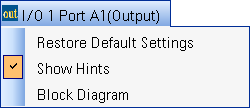
name is selected,
additional choices, including a selection to show or hide the Hints area,
are displayed.
name is selected,
additional choices, including a selection to show or hide the Hints area,
are displayed.The Output I/O setup pane is comprised of two buttons and five tabs located at the top of the page.
The four tabs are:
The name of the block (in this case, I/O 1 Port A1(Output)) is displayed
at the top of the setup pane. This name was assigned when the configuration
was selected. The name was confirmed when the external instrument connected
to the port was assigned in the Assign
External Instrument dialog box. This output I/O port is also displayed
in the External
Instrument Table and the block diagram. When the name is selected,
additional choices, including a selection to show or hide the Hints area,
are displayed.