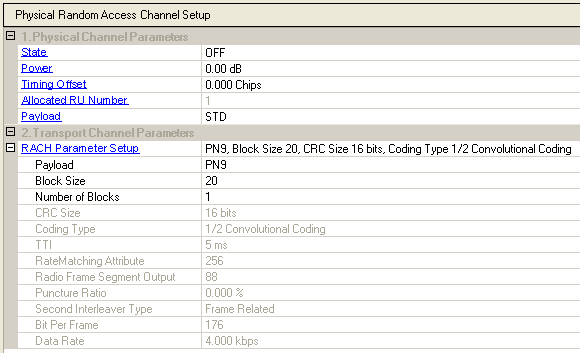
The Random Access Channel (RACH) of the common transport channels is mapped onto one or more uplink physical random access channels (PRACH). This allows the capacity of RACH to be flexibly scaled as needed.
Choice: ON | OFF
Default: ON
Double-click or use the drop-down menu to set the state of the current channel or .
Range: –60 to 0 dB
Default: 0 dB
Enter a value to set the current channel power. The CDP graph displays the normalized power of each RU in each timeslot after you generate the waveform. Refer to the Power Setting for the power calculation of the carriers, channels/timeslots and RUs.
Range: –8 to 8 chips
Default: 0.000 Chips
Enter a value to set the transmit timing offset for the current channel. The cell is active for uplink only.
Timing Offset property is only valid for uplink timeslots. For downlink timeslots, it is read-only. PRACH is always located in uplink timeslots.
This cell displays the number of allocated resource units for the current channel.
Selections: STD, PN9, PN15, User file
Default: STD
Click the  icon at the right
of the cell to select the data source type.
icon at the right
of the cell to select the data source type.
When you select the payload data source as the standard data encoding, RACH parameters are active to be configured.
Selections: PN9, PN15, 0, 1 text file
Default: PN9
Click the cell and the icon at the far right
of the cell to access the data menu.
|
PN9 |
select random sequence numbers |
|
PN15 |
select random sequence numbers |
|
0, 1 text file |
select this to load a user-defined 0, 1 text file as the data source. When this is selected as the data type, two new cells are added to the cell format.
|
Range: 0 to 5000.
Default: 20
Set the block size (information data) of the channel.
Range: 1 to 512
Default: 1
View the number of blocks of the current channel as specified in the standards for the channel depending on the link direction.
View the CRC size as specified for the channel.
View the coding type as specified for the channel.
View the TTI length (ms) as specified for the channel.
View the rate matching attribute to be used in coding the RACH.
View the radio frame segment output (bits) that depends on the currently configured channel information.
View the configured puncture ratio of the current channel that depends on the block size and rate matching attribute of the channel.
View the second interleaver type of the current channel which is fixed at Frame Related.
View the bits per frame of the current channel that depends on the currently configured channel information.
View the data rate of the current channel.
The Resource Unit Setup table enables you to configure the resource unit for each channel.
 to expand the Payload cell to access the
User File cell.
to expand the Payload cell to access the
User File cell.