18Remote Server Mode (Requires SA Option 233)
Remote server mode enables you to connect your FieldFox to compatible PC-based licensed software applications (e.g., 89600 VSA software1). Refer to https://www.keysight.com/find/assist/ and https://www.keysight.com/us/en/products/software/pathwave-test-software/89600-vsa-software.html. 89600 VSA (via the Remote Server feature) are compatible with the frequency converter heads, but cannot apply or edit the frequency head corrections. Refer to “Utilities” on page 862. The FieldFox can be used with both VDI and OML frequency extender. Refer to “Utilities” on page 862, the Configuration Guide at: https://www.keysight.com/us/en/assets/3125-1447/configuration-guides/FieldFox-Handheld-Analyzers-D-models.pdf, and to “Contacting Keysight” on page 5. FieldFox with a Remote Server mode does not display a mode softkey, because Remote Server mode is only enabled when you have a SA Option 233 on the FieldFox, compatible 89600 VSA software license loaded and running on a remote PC, and connected via LAN to your FieldFox. (i.e., Requires 89600 VSA software version ≥22.01). Refer to: https://www.keysight.com/find/assist/. When in Remote Server mode, most of the front panel hardkeys are locked and will beep, but perform no actions when pressed (i.e., the FieldFox front panel hardkeys are not relevant when connected via LAN to the 89600 VSA software on your remote PC). In Remote Server mode only: —System 7 hardkey lets you change the system settings —Esc (escape) hardkey lets you forcefully disconnect from the PC-based software To gracefully disconnect (recommended) from the software, exit using the PC-based software’s disconnect option or shutdown the software. Refer to “Initial Waiting for a Connection from a PC-based and Compatible Licensed Software or No Remote Connection” on page 579. If you to attempt connect a non-compatible FieldFox you will see the following error message: “Error: 38, The requested functionality is not available.” 

In this Chapter:
See Also
Connecting Using Remote Server
| IMPORTANT! When using a frequency converter head with remote server and 89600A VSA software, first verify the head has been selected in SA mode, before connecting to the VSA using IO Libraries. See also, “Utilities” on page 862. |
This section provides an overview of the FieldFox’s Remote Server mode instrument display messages that occur during the remote connection process. For more information on specific compatible PC-based licensed procedures refer to:
—“89600 VSA Software Overview (Requires N991xD/3xD and SA Option 233)” on page 581
Figure 18-1 Initial Waiting for a Connection from a PC-based and Compatible Licensed Software or No Remote Connection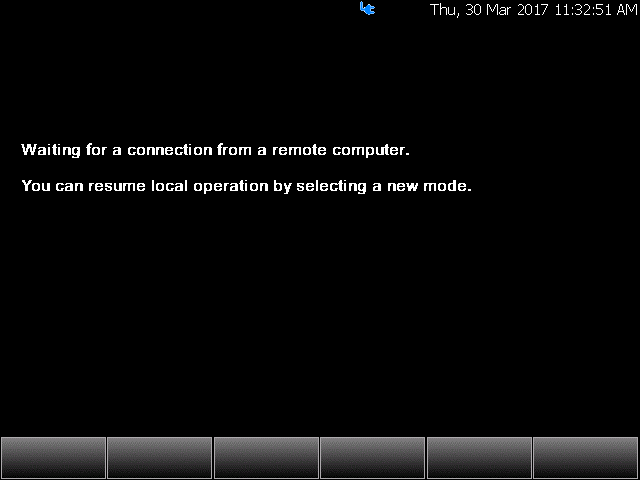
The graphic above shows the FieldFox in the process of connecting to a PC-based and compatible licensed software.
Figure 18-2 FieldFox Display When Remotely Connected to a PC-based Software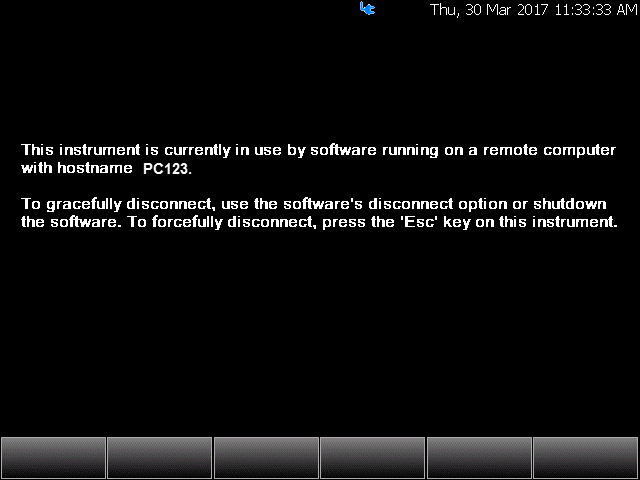
The graphic above shows the FieldFox successfully connected to a PC—with an example hostname “PC123”—and to a compatible licensed PC-based software.
Changing Frequency Converter Head Settings
If you want to change the frequency converter head settings while using the VSA, first it is necessary to disconnect from the 89600A VSA:
1.Disconnect from the 89600A VSA software, using the VSA’s disconnect icon ().
2.Change modes to another frequency converter compatible mode (e.g., SA/RTSA/IQA/...)
3.Change the settings on your frequency converter head.
The frequency range in the VSA should always reflect the frequency converter head settings when you last connected.
4.Reconnect the FieldFox to the VSA using the VSA’s software ().
For more information, refer to “89600 VSA Software Overview (Requires N991xD/3xD and SA Option 233)” on page 581.
89600 VSA Software Overview (Requires N991xD/3xD and SA Option 233) IMPORTANT! The following is a description of the 89600 VSA Software’s overall capabilities. Your instrument may not have all of the hardware and firmware required to use all of the 89600 VSA Software’s listed features. The FieldFox remote server mode, requires 89600 VSA Software with firmware version ≥22.01. FieldFox IQ Streaming supports streaming I/Q data to Keysight 89600 VSA software using the VITA 49 protocol over UDP. Configure the Destination LAN IP Address and Destination Port on the FieldFox to match the corresponding VITA 49 streaming settings in the 89600 VSA software. For details on configuring the VSA for streaming, refer to the build in VSA help VITA 49 streaming section. IQ Recording files saved in VITA 49 format (*.vita49) can also be imported directly into 89600 VSA software for offline analysis. If you have the FieldFox’s Remote Server (89600 VSA software connectivity), you can use the VSA software to capture and record your data as MATLAB files (*.mat). Learn more about FieldFox and 89600 VSA software, refer to: https://www.keysight.com/find/assist/. If you have Option 351 I/Q Analyzer option, you can directly save your data as MATLAB files (*.mat). Refer to Chapter 11, “IQ Analyzer (IQA) – Option 351”, on page 309 and to Chapter 33, “File Management”, on page 913.
Connecting the FieldFox remotely to a PC running the 89600 VSA software, will start the FieldFox’s Remote Server mode. The 89600 VSA software is powerful, PC-based software, offering the industry's most sophisticated general purpose and standards specific signal evaluation and troubleshooting tools for R&D engineers. Even for proprietary and non-standard signals in SATCOM or MILCOM applications, you can make signal quality measurements with customized IQ constellation. Reach deeper into signals, gather more data on signal problems, and gain greater insight.
—General-purpose analog and digital demodulators ranging from 2FSK to 4096QAM
—Flexible and custom IQ and OFDM signal analysis
—Standards specific modulation analysis including:
—Cellular: 5G, LTE & LTE-Advanced (FDD, TDD), W-CDMA, GSM/EDGE, cdma2000, 1xEV-DO, TD-SCDMA,
—Wireless connectivity: 802.11ax, 802.11n/ac, 802.11a/b/g/j/p, 802.16 WiMAX (fixed/mobile), 802.15.4 Wi-SUN
—RFID
—Digital satellite video and other satellite signals, radar, LMDS
—Up to 400K bin FFT, for the highest resolution spectrum analysis
—A full suite of time domain analysis tools, including signal capture and playback, time gating, and CCDF measurements
—Unlimited trace displays and the industry's most complete set of marker functions
—Easy-to-use Microsoft Windows graphical user interface
For a comprehensive FieldFox VSA mode help, refer to http://helpfiles.keysight.com/csg/89600B/WebHelp/89600.htm
For additional information on the 89600 VSA Software brochure, refer to https://www.keysight.com/us/en/assets/7018-02714/brochures/5990-6553.pdf
For Technical Overview, refer to https://www.keysight.com/us/en/assets/7018-02679/technical-overviews/5990-6405.pdf