Select Measurements Settings
This dialog box allows you to select measurement specific settings that appear in one of the following two situations:
- Multiple source waveforms are available on which to perform the measurement.
- There are selectable options such as measurement units.
The following examples show some, but not all, of the possible settings. The following picture shows the source waveform selection. You can click on the arrows to scroll through the selections. Or, you can use the mouse to horizontally drag the selections until you find the one that you want.
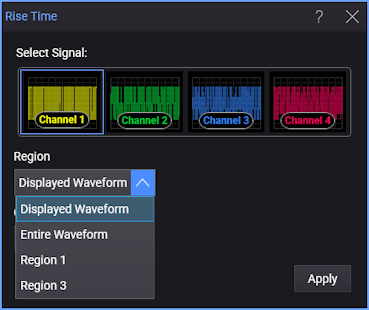
You can select the Region:
- Displayed Waveform — is what you see in the waveform window (which can be a zoomed-in view of the complete waveform).
- Entire Waveform — specifies the complete waveform.
- Region N — If regions are enabled for the selected signal, you can select one of those regions.
You can select the Occurrences:
- Measure One — makes one measurement per acquisition using edges closest to the timebase reference.
- Measure All — makes as many measurements per acquisition as possible using all edges in the acquisition. In this case, the measurement closest to the timebase reference is the "current" measurement (and is the one with annotations).
Some measurements have multiple signals to be selected:
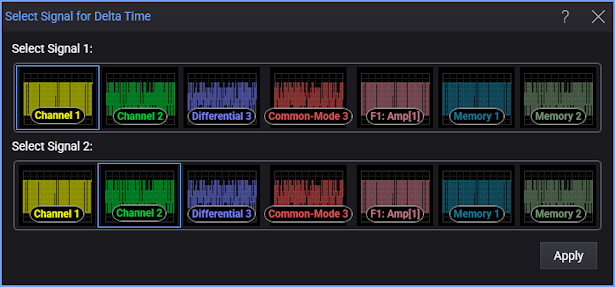
The following measurements have additional settings displayed in the dialog box:
Jitter Measurement
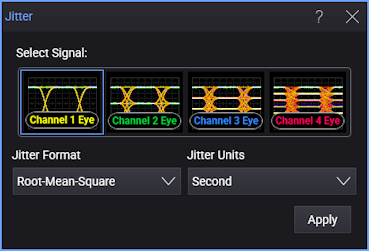
Selecting the Jitter measurement requires a selection of the Root-Mean-Square or Peak-to-Peak algorithm.
PAM Eye Height and Eye Width Measurements
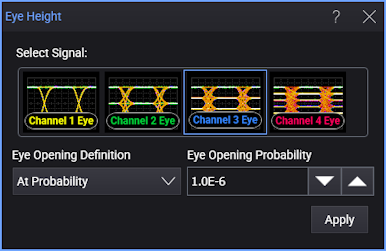
Select how the eye boundaries are located when making PAM Eye Heights and PAM Eye Widths measurements. The selections that you make in this dialog box apply to both the PAM Eye Height and Eye Width measurements.
The displayed dialog box fields depend on the selection made for the Eye Opening Definition field:
- At Probability
- Additional fields are displayed as shown in the following picture. Enter the desired BER in the Eye Opening Probability field, which represents the ratio of total hits in a waveform database column that can occur in the eye's opening. The probability can be set from 1 x 10⁻¹ to 1 x 10⁻⁹ with the default setting being 1 x 10⁻².
- Zero Hits
- The Eye Opening Definition field is the only field displayed in the dialog box. The eye width and height will be defined in an area that has no waveform data points.