Keysight Software Manager Utility
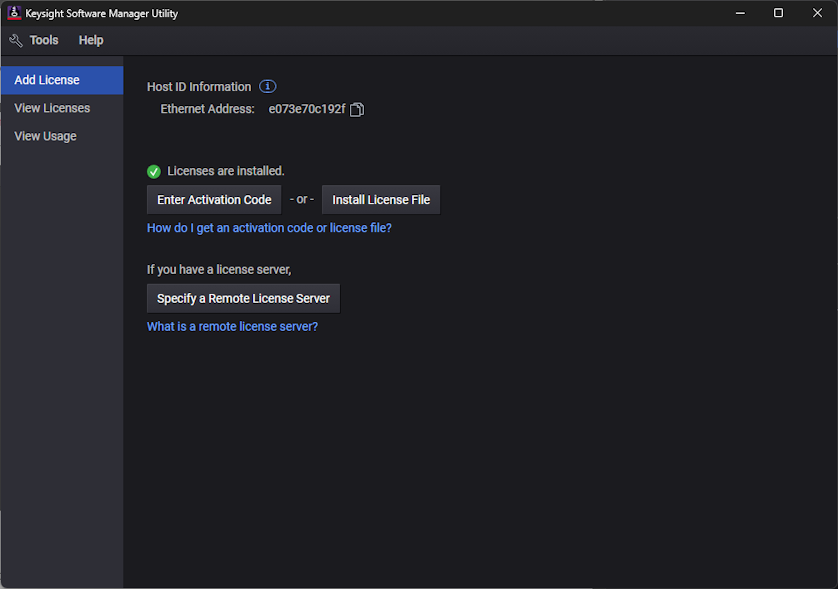
Use the Keysight Software Manager Utility to manage floating licenses and USB dongle-based licenses. Keysight Software Manager Utility is factory installed on Infiniium oscilloscopes, automatically installed with Infiniium 2026 Offline.
When you purchase a license, you will receive a license file which contains the licenses that unlock your licensed Keysight products. To obtain a license file for a certificate, visit the Keysight Software Manager website at www.keysight.com/find/ksm
To use a USB dongle-based licenses
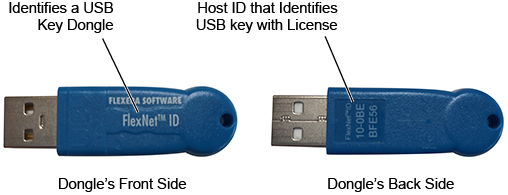
A USB portable license is tied to a USB key (dongle) rather than to a computer. The host ID, which is printed on the dongle's back side as shown in the following picture, identifies and ties the USB key to one or more licenses.
To use USB dongle-based licenses:
The installation involves these high-level steps.
- Download the following documents for instructions on installing the license server:
- Keysight Licensing Overview at www.keysight.com/find/licensing
- Keysight Licensing Administrator's Guide at www.keysight.com/find/licensingdoc
- Install the dongle driver on every XR8 oscilloscope or PC where the dongle license is used. Download the driver from www.keysight.com/find/LicensingUsbDriver. The driver files are provided in .zip format. Extract the files to a convenient location on the machine.
- Install the license file on every XR8 oscilloscope or PC where the dongle license is used.
- Connect the USB license dongle to a USB port on the XR8 oscilloscope or PC to enable the license.
To install and use a floating license server
The installation involves these high-level steps.
- Download the following documents for instructions on installing the license server:
- Keysight Licensing Overview at www.keysight.com/find/licensing
- Keysight Licensing Administrator's Guide at www.keysight.com/find/licensingdoc
- Download the Keysight License Server at www.keysight.com/find/licenseserver
- Using the instructions in the Licensing Administrator's Guide, install the Windows or Linux license server.
- Install your floating licenses as instructed in the Licensing Administrator's Guide.
- Open Keysight Software Manager Utility and, in the Add License tab, click Specify a Remote License Server. Enter the location of the license server installed in the previous step.
 When a floating license is installed with the Keysight Software Manager Utility, Keysight Software Manager Utility periodically checks the license server to refresh the status of licenses. In the View Licenses tab, click Refresh at any time to force an immediate check the server.
For information on using the Keysight Software Manager Utility application, click Help on the Keysight Software Manager Utility's menu.