Licensing
Use the Infiniium Licensing dialog box to launch the Keysight Software Manager Utility application that is used to install and manage Infiniium licenses. For an overview of Keysight licensing, see: www.keysight.com/find/licensing
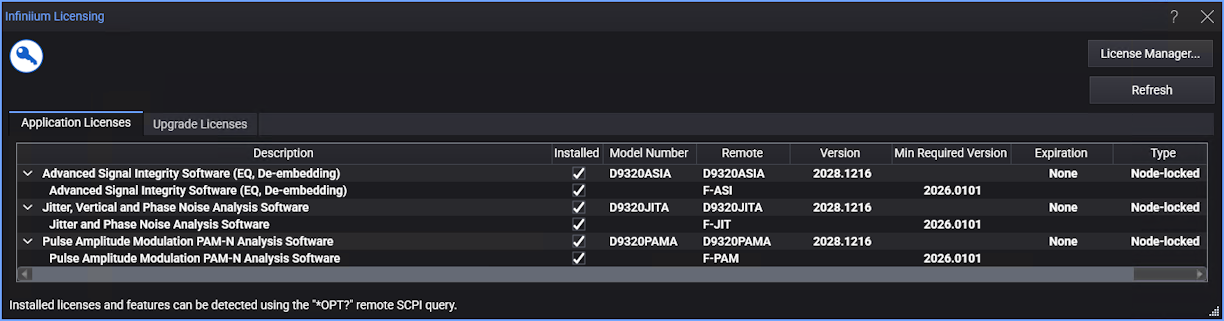
The dialog box has these buttons and tabs:
- Keysight Software Manager Utility... — Opens the Keysight Software Manager Utility application for installing and managing Infiniium licenses. See Keysight Software Manager Utility.
- Refresh — Forces an immediate check of the license server for floating license updates and refreshes the license status shown in the dialog box. Normally, this server check and status refresh happens periodically.
- Application Licenses — This tab shows the licenses available for supported oscilloscope applications like jitter analysis, advanced signal integrity analysis, PAM-N signal analysis, etc. See Application Licenses.
- Upgrade Licenses — This tab shows the licenses available for upgrading acquisition memory, bandwidth, DDC (frequency domain digital down-conversion mode with sample data for Keysight's Vector Signal Analysis), mmWave (frequency extension), and RTSA (Real-Time Spectrum Analysis). See Upgrade Licenses.
The dialog box tabs list all installed software package licenses and external application licenses. Expand the license listing to discover the actual installed licenses.
 While using Infiniium, the presence of this button alerts you that a feature, for example an NRZ TJ measurement, requires a license that currently is not installed. Clicking on this button opens the Feature Licensing dialog that describes feature and the license which enable the feature.

A problem can occur if Infiniium has started but more time is needed until Keysight License Service is available to confirm a USB dongle license or borrowed floating license. For more information, refer to message 164. The Keysight License Service is still initializing. This can take a few minutes.. See also message 165. Keysight License Service Error.