Bit Error Ratio (BER)
 Because NRZ and PAM signals can use forward error correction (FEC) with possible bit errors on the order of 1e5 or 1e6 bits, it becomes practical for an oscilloscope to measure BER (Bit Error Ratio).
The BER (Bit Error Ratio) measurement requires Clock Recovery and at least two error-free copies of an identical repeating bit pattern in acquisition memory (see Signal Type Setup). Typically, a PRBS test pattern is used.
For the BER measurement, you can make cumulative measurements (over many acquisitions) to measure a statistical BER level or you can make measurements per (for each) acquisition to help identify and locate burst errors.
You can enable Limit Test on BER measurements and stop acquisitions when a limit is reached. For the BER (Per Acq) measurement, you can count a certain number of failures or a certain number of failures within a range of bits (burst errors). See Measurement Limits.
With PAM signals, there are multiple bits per symbol, and one symbol error could mean multiple bit errors. As an example, PAM4 signals define four symbol levels (0, 1, 2, 3) that each represent two bits (00, 01, 10, 11). The following table shows the bit errors that are counted when one symbol is expected and a different symbol is captured.
| If this symbol is expected: | And this symbol is captured: | Then: |
|---|---|---|
| 3 (11 in binary) | 2 (10 in binary) | This is a 1-bit error. |
| 1 (01 in binary) | This is a 1-bit error. | |
| 0 (00 in binary) | This is a 2-bit error. |
Configurable Measurement Parameters
This measurement is affected by the following settings (choose Measure > Thresholds...):
- Thresholds tab
To measure
- Click the toolbar's Data tab.
-
If necessary, click the toolbar's More buttons to locate the Bit Error Ratio button.
- Click the button.
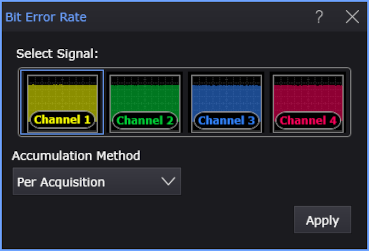
- Select the signal on which to make the measurement.
- Select the Accumulation Method:
- Per Acquisition — The measurement is made for each acquisition.
- Cumulative — The measurement accumulates data from multiple acquisitions.
- Click Apply.
Results
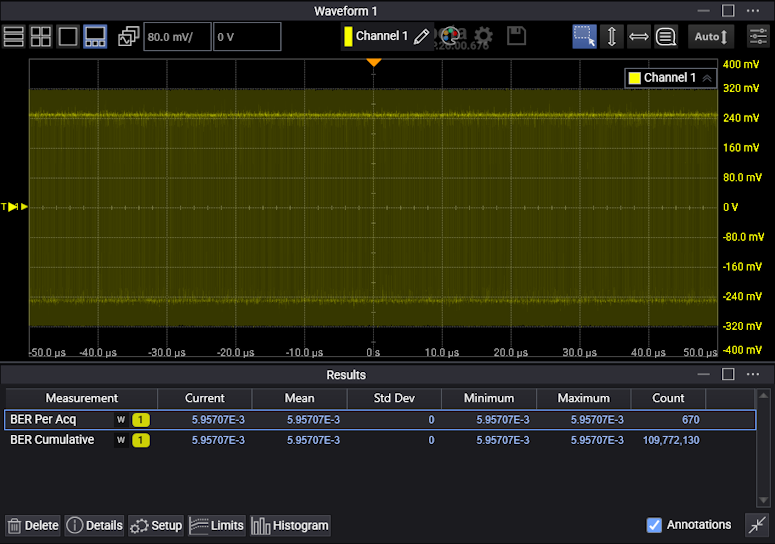
The Count in the measurement results indicates:
- For cumulative BER: How many bits have been observed.
- For per acq BER: How many acquisitions have been observed.
SCPI Command
:MEASure:DATA:BERatio