Deemphasis
 To measure Deemphasis, Clock Recovery must be performed to recover a clock for each bit in the data waveform. You need to configure clock recovery appropriately for your signal.
For every Deemphasis bit in the waveform, a value is computed using:
20 * log10(deemphasis voltage / transition voltage)
Where:
- Transition voltage is the voltage at the clock location of the preceding transition bit.
- Deemphasis voltage is the voltage at the clock location of deemphasis bits following a transition bit.
Due to random noise, many bits need to be averaged together to average out the noise. Therefore, the current value has little importance and the mean should be used.
This measurement makes as many measurements per acquisition as possible using all edges in the acquisition. The measurement closest to the timebase reference is the "current" measurement (and is the one with annotations).
Configurable Measurement Parameters
This measurement is affected by the following settings (choose Measure > Thresholds...):
- Thresholds tab
To measure
- Click the toolbar's Data tab.
-
If necessary, click the toolbar's More buttons to locate the Deemphasis button.
- Click the button.
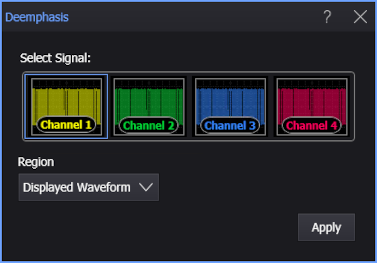
- Select the signal on which to make the measurement.
- Select the Region in which to make the measurement:
- Displayed Waveform — is what you see in the waveform window (which can be a zoomed-in view of the complete waveform).
- Entire Waveform — specifies the complete waveform.
- Region N — If regions are enabled for the selected signal, you can select one of those regions.
- Click Apply.
SCPI Command
:MEASure:DATA:DEEMphasis