Noise
 To measure Noise, Clock Recovery must be performed to recover a clock for each bit in the data waveform.
The Noise measurement measures the total Level 0, Level 1, or All (both level one and level zero) noise on the source signal.
This measurement makes as many measurements per acquisition as possible using all edges in the acquisition. The measurement closest to the timebase reference is the "current" measurement (and is the one with annotations).
Configurable Measurement Parameters
This measurement is affected by the following settings (choose Measure > Thresholds...):
- Thresholds tab
To measure
- Click the toolbar's Data tab.
-
If necessary, click the toolbar's More buttons to locate the Noise button.
- Click the button.
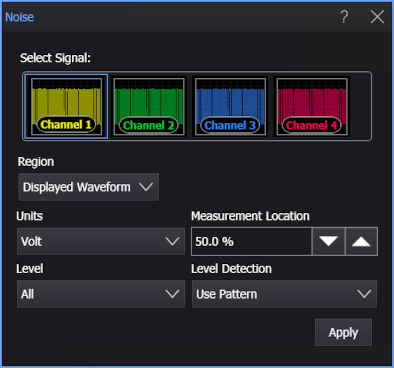
- Select the signal on which to make the measurement.
- Select the Region in which to make the measurement:
- Displayed Waveform — is what you see in the waveform window (which can be a zoomed-in view of the complete waveform).
- Entire Waveform — specifies the complete waveform.
- Region N — If regions are enabled for the selected signal, you can select one of those regions.
- Select the display Units. You can select Volt (V) or Unit Amplitude (UA).
-
Select the Measurement Location.This is the location within the bit where 0% is the beginning of the bit, 50% is the middle of the bit, and 100% is the end of the bit.
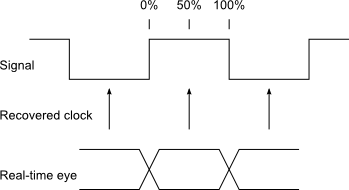
You can specify a location value from 5% to 95%.
- Select the Level on which noise is measured. You can choose Level 0, Level 1, or All.
-
Select the Level Detection method:
-
Use Pattern — Use this method when the serial data has a pattern that can be detected or is known.
When no pattern is found, the measurement results will be questionable.
-
Use Thresholds — Use this method when data is random and no pattern can be detected or when there is not enough data to detect the pattern or identify a known pattern.
In cases where noise crosses the threshold (like with a closed or closing data eye), using a pattern that is known (or loaded from a file) lets level 0 noise and level 1 noise be properly measured, and the measurement results show that noise is closing the eye. When using thresholds, noise crossing the threshold is counted for the wrong level, making the measurement results incorrect, without any indication other than maximum values on level 0 and minimum values on level 1 being limited by the threshold.
When the data eye is open, both level detection methods give accurate results.
-
- Click Apply.
SCPI Command
:MEASure:DATA:NOISe