Fall Time

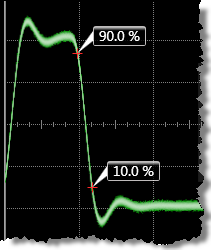 Fall time measures the transition time of the waveform's negative (falling) edge. This measurement may be compatible with PAM signals, depending on the PAM waveform.
The measurement can be restricted to a region. The measurement is made using the lower, middle, and upper threshold levels, which are based on the Waveform Top and Waveform Base measurements. Annotation labels identify the threshold levels on each end of the waveform's negative (falling) edge. The fall time will not be measured until the falling edge completes the transition through all three levels. The fall time equals the lower threshold crossing time minus the upper threshold crossing time.
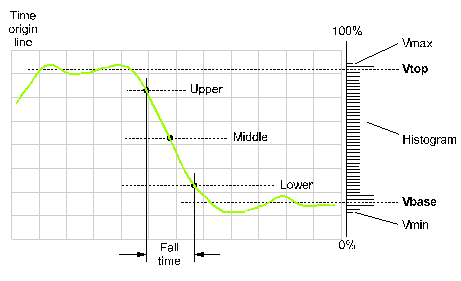
PAM Compatibility. Because this measurement is based on waveform top and base levels and the passing of the waveform's edge through lower, middle, and upper thresholds, the measurement is not designed for PAM signals. However, the measurement may be able to be made on PAM signals if the waveform top and base definitions are manually set. This can be attempted using the Thresholds tab of the Configure Measurements dialog box.
This measurement may be compatible with PAM signals, depending on the PAM waveform.
The default setting for the threshold levels are the 10% to 90% points on the transition. The top level is defined as the 100% level of the waveform. The base level is defined as the 0% level of the waveform.
The falling edge of the waveform must be displayed on the screen or region for fall time measurements.
If the signal has jitter, perform the eye fall time measurement for improved accuracy.
The measurement can be performed on any waveform that is displayed in a Waveform content window.
Configurable Measurement Parameters
This measurement is affected by the following settings (choose Measure > Thresholds...):
- Thresholds tab
To measure
- Click the toolbar's Time tab.
- Click the toolbar's More buttons to locate the Fall Time button.
- Click the button.
- Select the Region in which to make the measurement:
- Displayed Waveform — is what you see in the waveform window (which can be a zoomed-in view of the complete waveform).
- Entire Waveform — specifies the complete waveform.
- Region N — If regions are enabled for the selected signal, you can select one of those regions.
- Select the number of Occurrences to measure per acquisition:
- Measure One — makes one measurement per acquisition using edges closest to the timebase reference.
- Measure All — makes as many measurements per acquisition as possible using all edges in the acquisition. In this case, the measurement closest to the timebase reference is the "current" measurement (and is the one with annotations).
SCPI Command
:MEASure:HORizontal:FTIMe