Phase

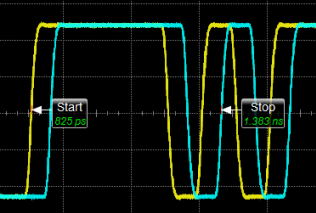 Phase measures the edge-to-edge phase differences on a single waveform or between two separate waveforms. When the measurement is selected, you can define the waveform, edge number, direction, and threshold used for the measurement start and stop points. Infiniium counts the waveform edges from the left edge of the display graticule, instead of at the reference point. An annotation label is placed at the start and stop positions.
The measurement can be performed on any single-valued waveform that is displayed in one of the Waveform content windows. The measurement annotation positions are shown in seconds from the reference position. The measurement results are in phase (°).
This measurement makes as many measurements per acquisition as possible using all edges in the acquisition. The measurement closest to the timebase reference is the "current" measurement (and is the one with annotations).
Upper, lower, and middle threshold levels are defined in the Thresholds tabbed page of the Configure Measurements dialog box. The edges you specify must appear on the display graticule.
You must have more than one source available on in order to select the edge of a second waveform as a source for the measurement.
This measurement is not compatible with PAM signals.
Configurable Measurement Parameters
This measurement is affected by the following settings (choose Measure > Thresholds...):
- Thresholds tab
To measure
-
Click the toolbar's Time tab.
-
If necessary, click the toolbar's More buttons to locate the Phase button.
-
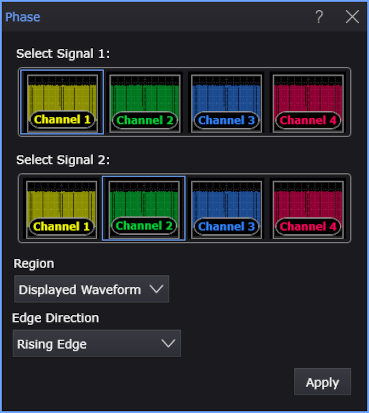
Click the button to open the Phase dialog box.
-
Select the signal(s) on which to make the measurement.
-
Select the Region in which to make the measurement:
- Displayed Waveform — is what you see in the waveform window (which can be a zoomed-in view of the complete waveform).
- Entire Waveform — specifies the complete waveform.
- Region N — If regions are enabled for the selected signal, you can select one of those regions.
If you want to make a two-source measurement (like Δt, Phase, or Crossing) within a region, global regions (which are defined for all signal sources) are required.
-
Select the edge direction as Rising Edge or Falling Edge.
-
Select the measurement units as Degree or Second.
-
Click Apply.
SCPI Command
:MEASure:HORizontal:PHASe