Qualified Triggers
Qualified triggers in software work along with the oscilloscope's hardware trigger to further qualify a waveform event you are interested in capturing.
Qualified triggers are software-based triggers, whereas the trigger modes found in the Infiniium Scope Setup dialog box Trigger tab are hardware-based. Being software-based, qualified triggers will lessen the waveform update rate.
Because hardware trigger and qualified triggers work together, you want to set up the hardware trigger to get you "close" to the desired event to increase the likelihood that the qualified trigger will find it.
To enable a qualified trigger:
-
Select the colored portion of the Trigger badge.
-
In the Infiniium Scope Setup dialog box , select the Qualification tab.
-
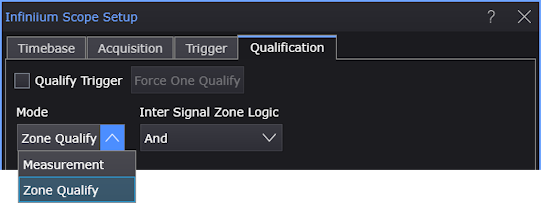
In the Qualification tab, select Qualify Trigger.
Qualified triggers are incompatible with acquisition averaging. Averaging is automatically turned off when qualified triggers are enabled. To minimize unexpected settings changes, averaging is not re-enabled when qualified triggers are disabled.
-
Use the Mode control to select the type of qualified trigger:
-
Measurement — See Measurement Qualified Triggers.
-
Zone Qualify — See Zone Qualified Triggers.
-
Protocol — See Protocol Qualified Triggers.
-
-
The Force One Qualify button will force one acquisition into the qualify trigger software post-processing system so you can see what signals look like when no qualified triggers are occurring. It is similar to the [Force] key for hardware triggers when the Sweep is set to Trig'd. See: How Qualified Triggers Interact with the Hardware Trigger Sweep.