Protocol Qualified Triggers
Protocol qualified triggers let you trigger when protocol decoded value(s) match specified value(s).
The oscilloscope's hardware trigger is used to make a waveform acquisition, and protocol decode is performed on the acquisition. If the decoded value(s) match the specified value(s), the protocol qualified trigger condition is true (the event occurs), and the waveform is displayed. If none of the decoded values meet the specified conditions, the acquisition is discarded and not displayed.
As with other qualified triggers, measurement results and statistics are collected on displayed waveforms only.
To set up protocol qualified triggers:
-
Set up a hardware-based trigger that will let you see the protocol decoded values that you would like to further qualify with. See Trigger Setup.
-
Enable protocol decode on an analog input channel or function signal that you want to use to qualify triggers. See Protocol Decode.
-
Select the colored portion of the Trigger badge.
-
In the Infiniium Scope Setup dialog box, select the Qualification tab.
-
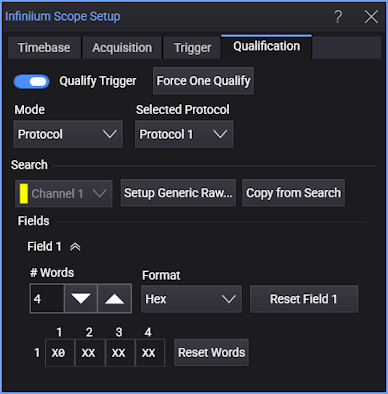
For the Mode control, select Protocol.
-
For Selected Protocol, select the protocol decode to use when setting up the qualified trigger. You can select Protocol 1 through Protocol 4. (None can be selected when a protocol decode is turned off or when you do not want to use any of the available protocol decodes.)
-
In the Search portion of the dialog box, use these controls to set up the protocol qualified trigger:
-
Setup (protocol type)... — Opens the Protocol Decode setup dialog box. See Protocol Decode.
-
Copy from Search — Copies the setup used for protocol search to the protocol qualified triggers setup. See Protocol Search.
-
Field N — Selects the field whose values you want to specify and the enables the controls for specifying those values.
-
# Words — Specifies the number of words you want to find in the field.
Selecting a word opens a pop-up dialog for specifying the word value.
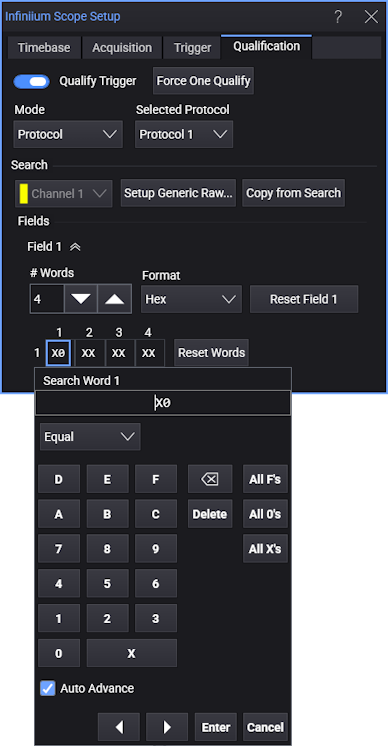
Note that you can use Equal or Or operators, backspace, Delete, TAB to the next word, enter All F's (ones), All 0's (zeros), or All X's (don't cares), Reset Word (reset the selected word value), navigate to the previous (◄) or next (►) word, Enter, or Cancel edits.
-
Format — Selects the number format for specifying word values: Hex, Decimal, or Binary.
The Hex and Binary options let you enter "don't care" values.
-
Reset Field N — Resets the Field N controls to their default values and resets the defined payload.
-
Reset Words — Resets the defined payload (without resetting the Field N controls).
-
For example, for the previous dialog box settings, the protocol qualified triggers might look like:
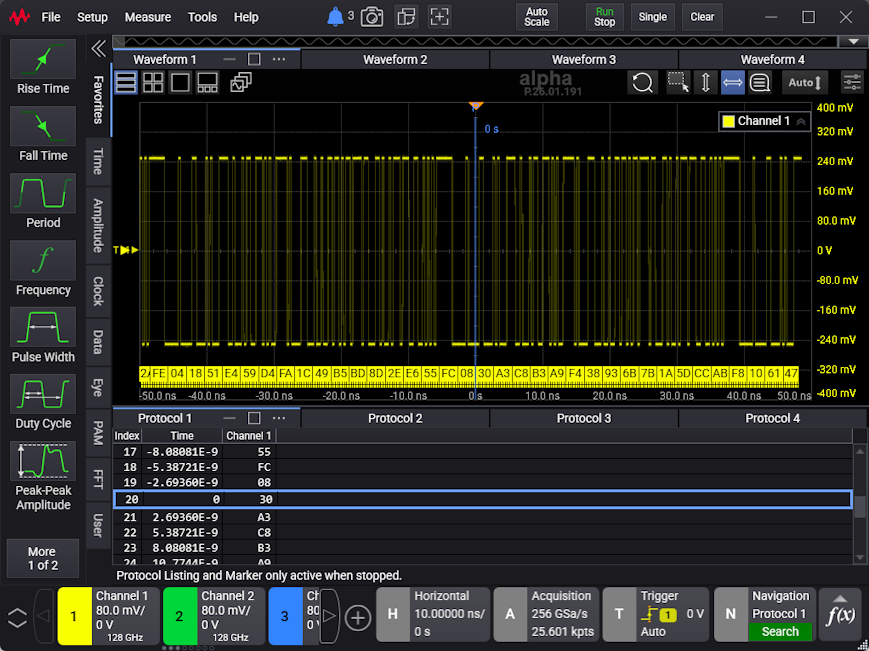
Only waveforms that have decoded value(s) that match the specification are displayed.