<Dependent> Element
Use the <Dependent> element to select a standard Infiniium measurement that automatically runs before the script performs its measurement on the source waveform. Up to four <Dependent> elements and therefore four dependent measurements can be selected for any single user measurement. The resulting dependent measurement data is passed from Infiniium to MATLAB or Python as a MeasurementData object. The dependent measurement data is organized in the same order that the measurements are listed in the XML file. The following fields shows the data available for each measurement in the structure.
| Measurement Data |
Method Used to Access Data |
|---|---|
| Name | MeasurementData(int).Name |
| Result | MeasurementData(int).Result |
| Status | MeasurementData(int).Status |
| Units | MeasurementData(int).Units |
| Source1 | MeasurementData(int).Source1 |
| Source2 | MeasurementData(int).Source2 |
MeasurementData takes an integer argument that selects the measurement. It indexes the measurement based on 1. For example, if the following eye measurements are listed in the XML file:
- <Dependent Name = "Rise Time" />
- <Dependent Name = "Fall Time" />
- <Dependent Name = "One Level" />
The result of Rise Time, the first measurement, is accessed within the MATLAB script by:
MeasurementData(1).Result
the result of Fall Time, the second measurement, is accessed by:
MeasurementData(2).Result
and, the result of One Level, the third measurement, is accessed by:
MeasurementData(3).Result
A separate <Dependent> statement is required for each measurement. Dependent measurements are not shown in Infiniium's displayed results table, unless the measurement is already listed. You do not need to manually turn on the selected measurement. Not all Infiniium measurements can be selected as a dependent. Only the measurements shown in the table in found in the Attributes section of this topic can be selected. The dependent measurements are shown on the associated tab in the User Measurement Setup dialog box.
|
|
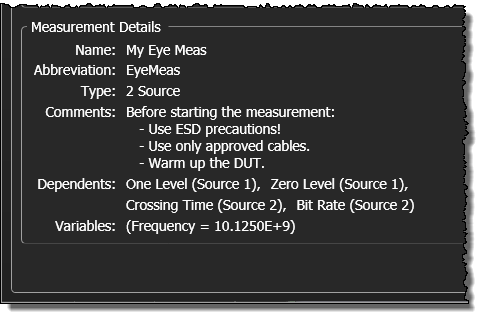
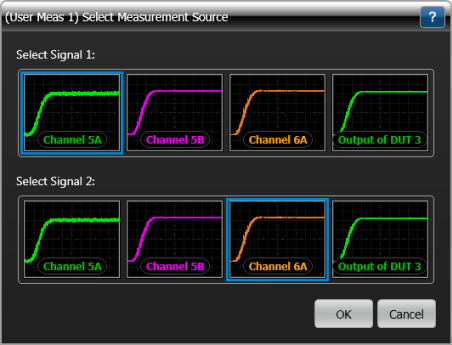
If the user measurement takes two waveform inputs as indicated by the <MeasurementType> element, the Select Measurement Source dialog box is displayed when the measurement is started. This dialog box is shown in the following picture. In this dialog box, you select which waveform will be input Signal 1 and which waveform will be input Signal 2. When a dependent measurement is selected for a dual-input user measurement, use the <Dependent> element's <SourceIndex> child element to select Signal 1 or Signal 2 as the input to the dependent measurement. The above picture shows an example of Source 1 (Signal 1) having been selected for the One Level dependent measurement.
For each dependent measurement that you define, a dictionary of key:value pairs named MeasurementData is made available to MATLAB scripts and passed to Python scripts via the algorithm function's variables argument. For example, if two dependent measurements Amplitude and Peak-Peak are defined, the following key:value pairs could be available:
'MeasurementData':[
{'Name': 'Amplitude', 'Status': 'Correct', 'Source1': 'Channel 1', 'Result': 0.496241, 'Units':'Volt'},
{'Name': 'Peak-Peak', 'Status': 'Correct', 'Source2': 'Channel 2', 'Result': 0.514348, 'Units':'Volt'},
 ....]
The maximum number of dependent measurements allowed is four.
If you have specified any dependent Infiniium measurements, you do not need to run these measurements before starting your user measurement. Dependent Infiniium measurements are automatically run.
Parent Elements
Child Elements
- <SourceIndex> (If missing, default source 1 waveform used.)
Attributes
- Name
- Identifies a Infiniium measurement.
- For a list of valid measurements, see Dependent Measurements.
Example
- <Measurement>
- …
- <Dependent Name = "Amplitude"> <!-- Amplitude measurement. -->
- <SourceIndex>1</SourceIndex> <!-- Measure source waveform 1. -->
- </Dependent>
- <Dependent Name = "Peak-Peak"> <!-- Peak-Peak Amplitude measurement. -->
- <SourceIndex>2</SourceIndex> <!-- Measure source waveform 2. -->
- </Dependent>
- <!-- As <SourceIndex> is missing, default source waveform 1 is selected. -->
- <Dependent Name = "Top"> <!-- Waveform Top measurement. -->
- </Dependent>
- …
- </Measurement>