Pulse Building
Import (Pulse Width Staggered)
Stores Pulse name.
|
SCPI Command |
[:SOURce]:RADio:PBUilding:WAVeform:PLLBrary:PULSe<pulseindex>:NAMe? |
|
SCPI Example |
RADio:PBUilding:WAVeform:PLLBrary:PULSe2:NAMe? |
|
Couplings |
|
|
Preset |
Pulse 1 |
|
State Saved |
Yes |
|
Initial S/W Revision |
A.18.00 |
Adds a new pulse to the end of the Pulse library for the project.
The default name is "Pulse 1", and each additional pulse is named "Pulse 2", "Pulse 3", and so on, with the number automatically incremented. Each pulse name must be unique. The SCPI command provides an optional name parameter.
|
SCPI Command |
[:SOURce]:RADio:PBUilding:WAVeform:PLLBrary:ADDPulse |
|
SCPI Example |
RADio:PBUilding:WAVeform:PLLBrary:ADDPulse |
|
Couplings |
|
|
Note |
|
|
Preset |
|
|
State Saved |
Yes |
|
Initial S/W Revision |
A.18.00 |
Deletes the selected Pulse from the Pulse library of the project.
|
SCPI Command |
[:SOURce]:RADio:PBUilding:WAVeform:PLLBrary:DELPulse <index> |
|
SCPI Example |
RADio:PBUilding:WAVeform:PLLBrary:DELPulse 2 |
|
Couplings |
|
|
Preset |
|
|
State Saved |
Yes |
|
Initial S/W Revision |
A.18.00 |
Renames the selected Pulse.
|
SCPI Command |
[:SOURce]:RADio:PBUilding:WAVeform:PLLBrary:RENPulse <index,string> |
|
SCPI Example |
RADio:PBUilding:WAVeform:PLLBrary:RENPulse 1,"Pulse 3" |
|
Couplings |
|
|
Preset |
|
|
State Saved |
Yes |
|
Initial S/W Revision |
A.18.00 |
Creates a copy of the selected pulse in the Pulse library of the project.
|
SCPI Command |
[:SOURce]:RADio:PBUilding:WAVeform:PLLBrary:COPYpulse <index> |
|
SCPI Example |
RADio:PBUilding:WAVeform:PLLBrary:COPYpulse 1 |
|
Couplings |
|
|
Preset |
|
|
State Saved |
Yes |
|
Initial S/W Revision |
A.18.00 |
The Pulse Building application supports the following pulse types.
Trapezoidal
Raised-Cosine
Custom Profile
Custom IQ
For more information on these types, refer to Pulse Types
|
SCPI Command |
[:SOURce]:RADio:PBUilding:WAVeform:PLLBrary:PULSe<pulseindex>:TYPe TRAPezoidal|RCOSine|CPRofile|CUSTomiq [:SOURce]:RADio:PBUilding:WAVeform:PLLBrary:PULSe<pulseindex>:TYPe? |
|
SCPI Example |
RADio:PBUilding:WAVeform:PLLBrary:PULSe:TYPe TRAPezoidal RADio:PBUilding:WAVeform:PLLBrary:PULSe:TYPe? |
|
Couplings |
|
|
Preset |
TRAPezoidal |
|
State Saved |
Yes |
|
Initial S/W Revision |
A.18.00 |
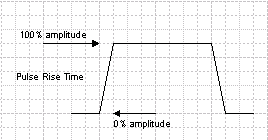
Sets the rise time for the 0 to 100% amplitude level.
Rise Time is the time taken for the rising edge of the pulse to increase from 0% to 100% amplitude.
Range is a positive time value
|
SCPI Command |
[:SOURce]:RADio:PBUilding:WAVeform:PLLBrary:PULSe<pulseindex>:RTIMe <real> [:SOURce]:RADio:PBUilding:WAVeform:PLLBrary:PULSe<pulseindex>:RTIMe? |
|
SCPI Example |
RADio:PBUilding:WAVeform:PLLBrary:PULSe:RTIMe 3e-8 RADio:PBUilding:WAVeform:PLLBrary:PULSe:RTIMe? |
|
Couplings |
|
|
Preset |
30 ns |
|
State Saved |
Yes |
|
Min |
0 |
|
Max |
The maximum value of Rise time depends on other parameters such as Fall time, Pulse width, and Sample rate. The maximum number of samples supported is 1Gsamples. Object Length * Sample Rate should not exceed 1GSamples. |
|
Initial S/W Revision |
A.18.00 |
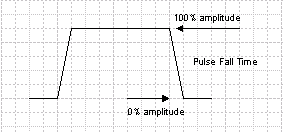
Sets the fall time of the 100 to 0% amplitude level.
Fall Time is the time taken for the falling edge of the pulse to decrease from 100% to 0% amplitude.
Range is a positive time value
|
SCPI Command |
[:SOURce]:RADio:PBUilding:WAVeform:PLLBrary:PULSe<pulseindex>:FTIMe <real> [:SOURce]:RADio:PBUilding:WAVeform:PLLBrary:PULSe<pulseindex>:FTIMe? |
|
SCPI Example |
RADio:PBUilding:WAVeform:PLLBrary:PULSe:FTIMe 3e-8 RADio:PBUilding:WAVeform:PLLBrary:PULSe:FTIMe? |
|
Couplings |
|
|
Preset |
30 ns |
|
State Saved |
Yes |
|
Min |
0 |
|
Max |
The maximum value of Fall time depends on other parameters such as Rise time, pulse width and sample rate. The maximum number of samples supported is 1Gsamples. Object Length * Sample Rate should not exceed 1GSamples. |
|
Initial S/W Revision |
A.18.00 |
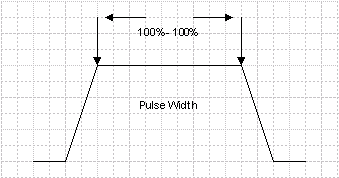
Sets the time of the pulse in the range of 100% to 100% of the amplitude.
Width is the on time of the pulse specified from 100% to 100% of the amplitude.
Range is a positive time value
|
SCPI Command |
[:SOURce]:RADio:PBUilding:WAVeform:PLLBrary:PULSe<pulseindex>:WIDTh <real> [:SOURce]:RADio:PBUilding:WAVeform:PLLBrary:PULSe<pulseindex>:WIDTh? |
|
SCPI Example |
RADio:PBUilding:WAVeform:PLLBrary:PULSe:WIDTh 0.000002 RADio:PBUilding:WAVeform:PLLBrary:PULSe:WIDTh? |
|
Couplings |
The Width property is coupled to the Pulse Width Type property and is used to help define Pulse Width Patterns. |
|
Preset |
2 us |
|
State Saved |
Yes |
|
Min |
0 s |
|
Max |
The maximum value of Pulse Width depends on other parameters like Rise time, Fall Time and Sample Rate. The maximum number of samples supported is 1Gsamples. Object Length * Sample Rate should not exceed 1GSamples. |
|
Initial S/W Revision |
A.18.00 |
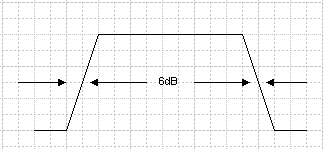
Displays the pulse width measured at the 50% voltage levels of the rising and falling edges.
The Width (6dB) parameter is the width of the pulse from the 6dB point on the rising edge to the 6dB point on the falling edge. This field is read-only and is calculated from the Rise Time, Fall Time and Width (100% - 100%) parameters.
|
SCPI Command |
[:SOURce]:RADio:PBUilding:WAVeform:PLLBrary:PULSe<pulseindex>:W6DB? |
|
SCPI Example |
RADio:PBUilding:WAVeform:PLLBrary:PULSe:W6DB? |
|
Couplings |
|
|
Preset |
2.03 us |
|
State Saved |
Yes |
|
Initial S/W Revision |
A.18.00 |
This setting is available when you set Pulse Type as Custom Profile or Custom IQ.
The re-sampling is accomplished using an FFT and IFFT. The process is designed to preserve the shape of the user provided data and minimize distortion at the end points. The amount of re-sampled data required is calculated as follows:
datanew = Round(datauser * SRpattern/SRuser)
where:
datanew = the amount of re-sampled data needed by the application
datauser = the original amount of user Custom I/Q or profile data
SRuser = the original user data sample rate
SRpattern = the current pattern sample rate
|
SCPI Command |
[:SOURce]:RADio:PBUilding:WAVeform:PLLBrary:PULSe<pulseindex>:SRATe <real> [:SOURce]:RADio:PBUilding:WAVeform:PLLBrary:PULSe<pulseindex>:SRATe? |
|
SCPI Example |
RADio:PBUilding:WAVeform:PLLBrary:PULSe2:SRATe 3000000000 |
|
Couplings |
|
|
Preset |
3 GHz |
|
State Saved |
Yes |
|
Min |
1 MHz |
|
Max |
4.5 GHz |
|
Initial S/W Revision |
A.18.00 |
This setting is available when you set Pulse Type as Custom Profile.
|
SCPI Command |
[:SOURce]:RADio:PBUilding:WAVeform:PLLBrary:PULSe<pulseindex>:CUSTom:PROFile:ADD <amplitude;amplitude;amplitude> |
|
SCPI Example |
RADio:PBUilding:WAVeform:PLLBrary:PULSe:CUSTom:PROFile:ADD "0,1,0,1" |
|
Notes |
By default, no rows are added to the Custom Profile table. |
|
Preset |
|
|
State Saved |
Yes |
|
Min |
|
|
Max |
|
|
Initial S/W Revision |
A.18.00 |
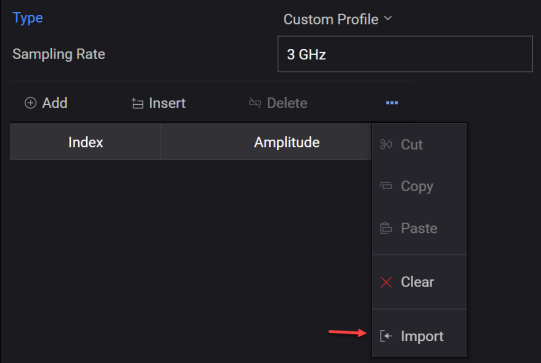
Imports the Custom Profile values from a .csv or .txt file to create a user-defined Custom Profile table. This setting is used by the Custom Profile pulse type and is applicable only when you select Custom Profile as the Pulse Type.
The Import menu option (shown below) opens the Open File dialog that allows you to import a .csv or .txt file containing Custom Profile data.
|
SCPI Command |
[:SOURce]:RADio:PBUilding:WAVeform:PLLBrary:PULSe<pulseindex>:CUSTom:PROFile:IMPort<filepath> |
|
SCPI Example |
RADio:PBUilding:WAVeform:PLLBrary:PULSe:CUSTom:PROFile:IMPort "C:\test\pb.txt" |
|
Couplings |
|
| Notes | |
|
Preset |
|
|
State Saved |
Yes |
|
Initial S/W Revision |
A.18.00 |
Allows you to edit the Custom Profile data values. This setting is used by the Custom Profile pulse type and is applicable only when you select Custom Profile as the Pulse Type.
|
SCPI Command |
[:SOURce]:RADio:PBUilding:WAVeform:PLLBrary:PULSe<pulseindex>:CUSTom:PROFile:EDIT<index,string> |
|
SCPI Example |
RADio:PBUilding:WAVeform:PLLBrary:PULSe:CUSTom:PROFile:EDIT 1,"1" |
|
Couplings |
|
| Notes | |
|
Preset |
|
|
State Saved |
Yes |
|
Initial S/W Revision |
A.18.00 |
Adds the specified number of new items to the end in the Custom IQ table.
This setting is available when you set Pulse Type as Custom IQ.
|
SCPI Command |
[:SOURce]:RADio:PBUilding:WAVeform:PLLBrary:PULSe<pulseindex>:CUSTom:IQ:ADD<icomponent,qcomponent;icomponent,qcomponent> |
|
SCPI Example |
RADio:PBUilding:WAVeform:PLLBrary:PULSe:CUSTom:IQ:ADD "0,0;0,1;1,1;1,0" |
|
Notes |
By default, no rows are added to the Custom IQ table. |
|
Preset |
|
|
State Saved |
Yes |
|
Min |
|
|
Max |
|
|
Initial S/W Revision |
A.18.00 |
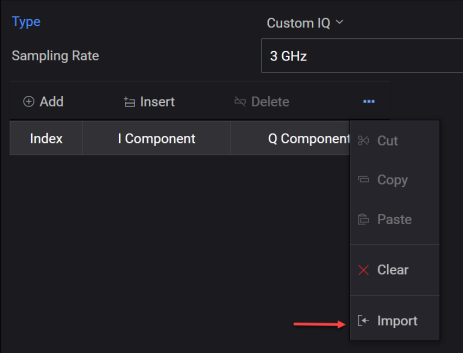
Imports the Custom IQ values from a .csv or .txt file to create a user-defined Custom IQ table. This setting is used by the Custom IQ pulse type and is applicable only when you select Custom IQ as the Pulse Type.
The Import menu option (shown below) opens the Open File dialog that allows you to import a .csv or .txt file containing Custom IQ data.
|
SCPI Command |
[:SOURce]:RADio:PBUilding:WAVeform:PLLBrary:PULSe<pulseindex>:CUSTom:IQ:IMPort<filepath> |
|
SCPI Example |
RADio:PBUilding:WAVeform:PLLBrary:PULSe:CUSTom:IQ:IMPort "C:\test\pb.txt" |
|
Couplings |
|
| Notes | |
|
Preset |
|
|
State Saved |
Yes |
|
Initial S/W Revision |
A.18.00 |
Allows you to edit the Custom IQ data values. This setting is used by the Custom IQ pulse type and is applicable only when you select Custom IQ as the Pulse Type.
|
SCPI Command |
[:SOURce]:RADio:PBUilding:WAVeform:PLLBrary:PULSe<pulseindex>:CUSTom:IQ:EDIT<index,string> |
|
SCPI Example |
RADio:PBUilding:WAVeform:PLLBrary:PULSe:CUSTom:IQ:EDIT 1,"1,1" |
|
Couplings |
|
| Notes | |
|
Preset |
|
|
State Saved |
Yes |
|
Initial S/W Revision |
A.18.00 |
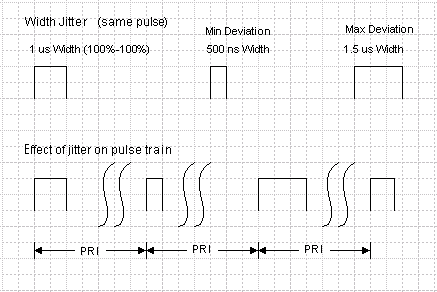
The Jitter Type parameter is described as the change in the time duration, or on-time, of the pulse. The width of the pulse is lengthened and shortened by jitter. The jitter is applied to the falling edge of the pulse; the leading edge is not changed by this parameter.
The Pulse Building application provides the following types of jitter:
- no jitter is applied to the pulse.
- jitter on the falling edge of the pulse is applied using a Gaussian probability distribution function model.
- jitter on the falling edge of the pulse is applied using a uniform probability distribution function model.
- jitter deviation is applied using a U-shaped distribution.
The figure below shows how a pulse with a 1 us Width (100%-100%) with jitter applied to the width will vary. In addition, the figure shows the effect of width jitter on a pulse train. Note that the pulse repetition rate remains constant. The maximum width excursion depends on the jitter deviation and type of deviation. In the figure below, the jitter deviation is 500 ns. The number of pulse widths generated with jitter is specified using the Repeat parameter set for the pattern.
|
SCPI Command |
[:SOURce]:RADio:PBUilding:WAVeform:PLLBrary:PULSe<pulseindex>:JITTer:TYPe NONe|GAUSsian|UNIForm|USHaped [:SOURce]:RADio:PBUilding:WAVeform:PLLBrary:PULSe<pulseindex>:JITTer:TYPe? |
|
SCPI Example |
RADio:PBUilding:WAVeform:PLLBrary:PULSe:JITTer:TYPe GAUS RADio:PBUilding:WAVeform:PLLBrary:PULSe:JITTer:TYPe? |
|
Couplings |
|
|
Preset |
NONe |
|
State Saved |
Yes |
|
Initial S/W Revision |
A.18.00 |
The Jitter Deviation parameter is specified as the maximum ± time excursion for any jitter. The width of the pulse (100%-100%) is changed by jittering the falling edge of the pulse using the selected probability model.
For jitter types, the jitter is applied on the falling edge of the pulse as follows.
- no jitter deviation is applied.
- the jitter deviation is centered around the falling edge of the pulse. Any deviation is probable within the time specified by the Jitter Deviation entry. Any jitter deviation has an equal probability of occurring during the time interval specified in the Jitter Deviation text box. The jitter is distributed uniformly around the falling edge of the pulse.
- the jitter deviation is centered around the falling edge of the pulse. Any deviation is probable within a one sigma of the limits of the jitter deviation time entry and follows a normal distribution model. The mean, mu, is the falling edge of the pulse and any jitter deviation has an equal probability of occurring during a one standard deviation (1 sigma) variance following the probability density function.
- the jitter deviation is centered around the falling edge of the pulse. Any deviation is probable within the time specified by the Jitter Deviation entry. Any jitter deviation has an equal probability of occurring during the time interval specified in the Jitter Deviation text box. The jitter follows a u-shaped distribution around the falling edge of the pulse.
|
SCPI Command |
[:SOURce]:RADio:PBUilding:WAVeform:PLLBrary:PULSe<pulseindex>:JITTer:DEViation <real> [:SOURce]:RADio:PBUilding:WAVeform:PLLBrary:PULSe<pulseindex>:JITTer:DEViation? |
|
SCPI Example |
RADio:PBUilding:WAVeform:PLLBrary:PULSe:JITTer:DEViation 0 RADio:PBUilding:WAVeform:PLLBrary:PULSe:JITTer:DEViation? |
|
Couplings |
|
|
Preset |
0 s |
|
State Saved |
Yes |
|
Min |
0 s |
|
Max |
1 s |
|
Initial S/W Revision |
A.18.00 |
Enum type in Pulse Width config.
Refer to Pulse Width Types to know more.
|
SCPI Command |
[:SOURce]:RADio:PBUilding:WAVeform:PLLBrary:PULSe<pulseindex>:WIDTh:TYPe NONe|LINRamp|STAGgered|STEPped [:SOURce]:RADio:PBUilding:WAVeform:PLLBrary:PULSe<pulseindex>:WIDTh:TYPe? |
|
SCPI Example |
RADio:PBUilding:WAVeform:PLLBrary:PULSe:WIDTh:TYPe LINRamp RADio:PBUilding:WAVeform:PLLBrary:PULSe:WIDTh:TYPe? |
|
Couplings |
|
|
Preset |
NONe |
|
State Saved |
Yes |
|
Initial S/W Revision |
A.18.00 |
This setting is used by the Linear Ramp and Stepped pulse width patterns. It also maps to the Width (100% - 100%) setting.
This field is displayed only when you select Linear Ramp or Stepped as the Pulse Width Type.
|
SCPI Command |
[:SOURce]:RADio:PBUilding:WAVeform:PLLBrary:PULSe<pulseindex>:WIDTh:STARt <real> [:SOURce]:RADio:PBUilding:WAVeform:PLLBrary:PULSe<pulseindex>:WIDTh:STARt? |
|
SCPI Example |
RADio:PBUilding:WAVeform:PLLBrary:PULSe:WIDTh:STARt 0.000002 RADio:PBUilding:WAVeform:PLLBrary:PULSe:WIDTh:STARt? |
|
Couplings |
|
|
Preset |
2 us |
|
State Saved |
Yes |
|
Min |
0 s |
|
Max |
1 s |
|
Initial S/W Revision |
A.18.00 |
This setting is used by the Linear Ramp pulse width pattern. Changing the Pulse Width Type resets this setting.
This field is displayed only when you select Linear Ramp as the Pulse Width Type.
|
SCPI Command |
[:SOURce]:RADio:PBUilding:WAVeform:PLLBrary:PULSe<pulseindex>:WIDTh:STOP <real> [:SOURce]:RADio:PBUilding:WAVeform:PLLBrary:PULSe<pulseindex>:WIDTh:STOP? |
|
SCPI Example |
RADio:PBUilding:WAVeform:PLLBrary:PULSe:WIDTh:STOP 0.000005 RADio:PBUilding:WAVeform:PLLBrary:PULSe:WIDTh:STOP? |
|
Couplings |
|
|
Preset |
5 us |
|
State Saved |
Yes |
|
Min |
0 s |
|
Max |
1 s |
|
Initial S/W Revision |
A.18.00 |
This setting is used only by the Stepped pulse width pattern. Changing the Pulse Width Type resets this setting.
This setting is displayed only when you select Stepped as the Pulse Width Type.
|
SCPI Command |
[:SOURce]:RADio:PBUilding:WAVeform:PLLBrary:PULSe<pulseindex>:WIDTh:STEP <real> [:SOURce]:RADio:PBUilding:WAVeform:PLLBrary:PULSe<pulseindex>:WIDTh:STEP? |
|
SCPI Example |
RADio:PBUilding:WAVeform:PLLBrary:PULSe:WIDTh:STEP 0.000001 RADio:PBUilding:WAVeform:PLLBrary:PULSe:WIDTh:STEP? |
|
Couplings |
|
|
Preset |
1 us |
|
State Saved |
Yes |
|
Min |
-1 s |
|
Max |
1 s |
|
Initial S/W Revision |
A.18.00 |
Specifies the number of pulse widths.
This field is displayed only when you select Linear Ramp as the Pulse Width Type.
|
SCPI Command |
[:SOURce]:RADio:PBUilding:WAVeform:PLLBrary:PULSe<pulseindex>:NUMBer:PULSes <integer> [:SOURce]:RADio:PBUilding:WAVeform:PLLBrary:PULSe<pulseindex>:NUMBer:PULSes? |
|
SCPI Example |
RADio:PBUilding:WAVeform:PLLBrary:PULSe:NUMBer:PULSes 5 RADio:PBUilding:WAVeform:PLLBrary:PULSe:NUMBer:PULSes? |
|
Couplings |
|
|
Preset |
5 |
|
State Saved |
Yes |
|
Min |
1 |
|
Max |
100000000 |
|
Initial S/W Revision |
A.18.00 |
This setting is used by the Stepped pulse width pattern. The total pulses in the pattern equals Pulses Per Step × Number of Steps.
This field is displayed only when you select Stepped as the Pulse Width Type.
|
SCPI Command |
[:SOURce]:RADio:PBUilding:WAVeform:PLLBrary:PULSe<pulseindex>:NUMBer:STEPs <integer> [:SOURce]:RADio:PBUilding:WAVeform:PLLBrary:PULSe<pulseindex>:NUMBer:STEPs? |
|
SCPI Example |
RADio:PBUilding:WAVeform:PLLBrary:PULSe:NUMBer:STEPs 4 RADio:PBUilding:WAVeform:PLLBrary:PULSe:NUMBer:STEPs? |
|
Couplings |
|
|
Preset |
4 |
|
State Saved |
Yes |
|
Min |
0 |
|
Max |
100000000 |
|
Initial S/W Revision |
A.18.00 |
This setting is used by the Stepped pulse width pattern. The total pulses in the pattern equals Pulses Per Step × Number of Steps.
This field is displayed only when you select Stepped as the Pulse Width Type.
|
SCPI Command |
[:SOURce]:RADio:PBUilding:WAVeform:PLLBrary:PULSe<pulseindex>:PULSes:PER:STEP <integer> [:SOURce]:RADio:PBUilding:WAVeform:PLLBrary:PULSe<pulseindex>:PULSes:PER:STEP? |
|
SCPI Example |
RADio:PBUilding:WAVeform:PLLBrary:PULSe:PULSes:PER:STEP 100 RADio:PBUilding:WAVeform:PLLBrary:PULSe:PULSes:PER:STEP? |
|
Couplings |
|
|
Preset |
1 |
|
State Saved |
Yes |
|
Min |
1 |
|
Max |
100000000 |
|
Initial S/W Revision |
A.18.00 |
Adds the specified number of new items to the end in the pulse width data table. This setting is used by the Staggered pulse width pattern and is displayed only when you select Staggered as the Pulse Width Type.
|
SCPI Command |
[:SOURce]:RADio:PBUilding:WAVeform:PLLBrary:PULSe<pulseindex>:PWSTaggered:ADD<width;width;width> |
|
SCPI Example |
RADio:PBUilding:WAVeform:PLLBrary:PULSe:PWSTaggered:ADD "0,1,0,1" |
|
Couplings |
|
|
Note |
By default, Width value is 2 us. |
|
State Saved |
Yes |
|
Initial S/W Revision |
A.18.00 |
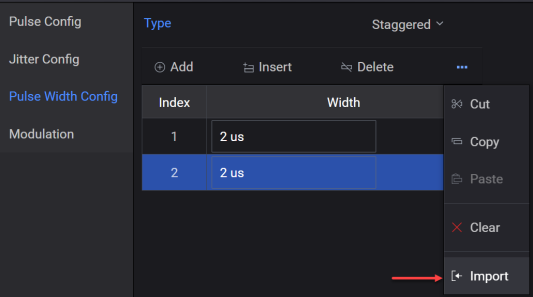
Imports the pulse width values from a .csv or .txt file to create a user-defined pulse width data table. This setting is used by the Staggered pulse width pattern and is displayed only when you select Staggered as the Pulse Width Type.
The Import menu option (shown below) opens the Open File dialog that allows you to import a .csv or .txt file containing pulse width data.
|
SCPI Command |
[:SOURce]:RADio:PBUilding:WAVeform:PLLBrary:PULSe<pulseindex>:PWSTaggered:IMPort<filepath> |
|
SCPI Example |
RADio:PBUilding:WAVeform:PLLBrary:PULSe:PWSTaggered:IMPort "C:\test\pb.csv" |
|
Couplings |
|
|
Note |
|
|
State Saved |
Yes |
|
Initial S/W Revision |
A.18.00 |
Allows you to edit the pulse width data values. This setting is used by the Staggered pulse width pattern and is applicable only when you select Staggered as the Pulse Width Type.
|
SCPI Command |
[:SOURce]:RADio:PBUilding:WAVeform:PLLBrary:PULSe<pulseindex>:PWSTaggered:EDIT<index,string> |
|
SCPI Example |
RADio:PBUilding:WAVeform:PLLBrary:PULSe:PWSTaggered:EDIT 1,"1" |
|
Couplings |
|
|
Note |
|
|
State Saved |
Yes |
|
Initial S/W Revision |
A.18.00 |
Sets the overshoot percentage for the 0 to 50% amplitude level. This pulse level configuration parameter can be applied only when the pulse type is Trapezoidal or Raised Cosine.
|
SCPI Command |
[:SOURce]:RADio:PBUilding:WAVeform:PLLBrary:PULSe:OVERshoot <real> [:SOURce]:RADio:PBUilding:WAVeform:PLLBrary:PULSe:OVERshoot? |
|
SCPI Example |
RADio:PBUilding:WAVeform:PLLBrary:PULSe:OVERshoot 20 RADio:PBUilding:WAVeform:PLLBrary:PULSe:OVERshoot? |
|
Couplings |
|
| Preset | 0 |
|
Min |
0% |
| Max | 50% |
|
State Saved |
Yes |
|
Initial S/W Revision |
A.20.01 |
Sets the overshoot decay rate. This pulse level configuration parameter can be applied only when the pulse type is Trapezoidal or Raised Cosine.
|
SCPI Command |
[:SOURce]:RADio:PBUilding:WAVeform:PLLBrary:PULSe:OVERshoot:DECay <real> [:SOURce]:RADio:PBUilding:WAVeform:PLLBrary:PULSe:OVERshoot:DECay? |
|
SCPI Example |
RADio:PBUilding:WAVeform:PLLBrary:PULSe:OVERshoot:DECay 10 RADio:PBUilding:WAVeform:PLLBrary:PULSe:OVERshoot:DECay? |
|
Couplings |
|
| Preset | 0 |
|
Min |
0 |
| Max | 100 |
|
State Saved |
Yes |
|
Initial S/W Revision |
A.20.01 |
Sets the droop percentage from 0 to 50%. This pulse level configuration parameter can be applied only when the pulse type is Trapezoidal or Raised Cosine.
|
SCPI Command |
[:SOURce]:RADio:PBUilding:WAVeform:PLLBrary:PULSe:LEVel:DROop <real> [:SOURce]:RADio:PBUilding:WAVeform:PLLBrary:PULSe:LEVel:DROop? |
|
SCPI Example |
RADio:PBUilding:WAVeform:PLLBrary:PULSe:LEVel:DROop 20 RADio:PBUilding:WAVeform:PLLBrary:PULSe:LEVel:DROop? |
|
Couplings |
|
| Preset | 0 |
|
Min |
0% |
| Max | 50% |
|
State Saved |
Yes |
|
Initial S/W Revision |
A.20.01 |
Sets the ripple percentage for 0 to 50%. This pulse level configuration parameter can be applied only when the pulse type is Trapezoidal or Raised Cosine.
|
SCPI Command |
[:SOURce]:RADio:PBUilding:WAVeform:PLLBrary:PULSe:RIPPle <real> [:SOURce]:RADio:PBUilding:WAVeform:PLLBrary:PULSe:RIPPle? |
|
SCPI Example |
RADio:PBUilding:WAVeform:PLLBrary:PULSe:RIPPle 20 RADio:PBUilding:WAVeform:PLLBrary:PULSe:RIPPle? |
|
Couplings |
|
| Preset | 0 |
|
Min |
0% |
| Max | 50% |
|
State Saved |
|
|
Initial S/W Revision |
A.20.01 |
Sets the ripple frequency from 0 Hz to 3 MHz. This pulse level configuration parameter can be applied only when the pulse type is Trapezoidal or Raised Cosine.
|
SCPI Command |
[:SOURce]:RADio:PBUilding:WAVeform:PLLBrary:PULSe:RIPPle:FREQuency <real> [:SOURce]:RADio:PBUilding:WAVeform:PLLBrary:PULSe:RIPPle:FREQuency? |
|
SCPI Example |
RADio:PBUilding:WAVeform:PLLBrary:PULSe:RIPPle:FREQuency 100000 RADio:PBUilding:WAVeform:PLLBrary:PULSe:RIPPle:FREQuency? |
|
Couplings |
|
| Preset | 0 Hz |
|
Min |
0 Hz |
| Max | 3000000 Hz |
|
State Saved |
|
|
Initial S/W Revision |
A.20.01 |
Each of the modulation types can have its own parameters such as step size, range and so forth and are unique to a modulation. You can add modulation by selecting a type from the Modulation Type drop down list box.
Refer to Modulation Types to know more.
|
SCPI Command |
[:SOURce]:RADio:PBUilding:WAVeform:PLLBrary:PULSe<pulseindex>:MODulation:TYPe NONe|BPSK|CBPSk|QPSK|CQPSk|BARKer|FMCHirp|CFMChirp|FMSTep|AMSTep|FRANkcode|P1Code|P2Code|P3Code|P4Code|CPHase [:SOURce]:RADio:PBUilding:WAVeform:PLLBrary:PULSe<pulseindex>:MODulation:TYPe? |
|
SCPI Example |
RADio:PBUilding:WAVeform:PLLBrary:PULSe:MODulation:TYPe BPSK RADio:PBUilding:WAVeform:PLLBrary:PULSe:MODulation:TYPe? |
|
Couplings |
|
|
Preset |
NONe |
|
State Saved |
Yes |
|
Initial S/W Revision |
A.18.00 |
This field is displayed only when you select Barker as Modulation Type.
Includes alternate bit patterns for code lengths of 2 and 4.
2: 1,0
3: 1,1,0
4: 1,1,0,1
5: 1,1,1,0,1
7: 1,1,1,0,0,1,0
11: 1,1,1,0,0,0,1,0,0,1,0
13: 1,1,1,1,1,0,0,1,1,0,1,0,1
|
SCPI Command |
[:SOURce]:RADio:PBUilding:WAVeform:PLLBrary:PULSe<pulseindex>:MODulation:BARKer:LENGth <integer> [:SOURce]:RADio:PBUilding:WAVeform:PLLBrary:PULSe<pulseindex>:MODulation:BARKer:LENGth? |
|
SCPI Example |
RADio:PBUilding:WAVeform:PLLBrary:PULSe:MODulation:BARKer:LENGth 13 RADio:PBUilding:WAVeform:PLLBrary:PULSe:MODulation:BARKer:LENGth? |
|
Couplings |
|
|
Range |
2 | 3 | 4 |5 | 7 | 11 | 13 |
|
Preset |
13 |
|
State Saved |
Yes |
|
Min |
|
|
Max |
|
|
Initial S/W Revision |
A.18.00 |
This field is displayed only when you select BPSK, Custom BPSK, QPSK, Custom QPSK, Barker, AM Step, or FM Step as Modulation Type.
Defined as 1/symbol rate, indicates the time duration of the phase shift for each on/off state.
|
SCPI Command |
[:SOURce]:RADio:PBUilding:WAVeform:PLLBrary:PULSe<pulseindex>:MODulation:STEP:SIZe <real> [:SOURce]:RADio:PBUilding:WAVeform:PLLBrary:PULSe<pulseindex>:MODulation:STEP:SIZe? |
|
SCPI Example |
RADio:PBUilding:WAVeform:PLLBrary:PULSe:MODulation:STEP:SIZe 0.000001 RADio:PBUilding:WAVeform:PLLBrary:PULSe:MODulation:STEP:SIZe? |
|
Couplings |
|
|
Preset |
1 us |
|
State Saved |
Yes |
|
Min |
0 |
|
Max |
1 s |
|
Initial S/W Revision |
A.18.00 |
Represents a step size list in the modulation segment.
When you select the Modulation Type as AM Step, the AM Step table is displayed to allow you to add, edit, delete, or import AM Step data into this table.
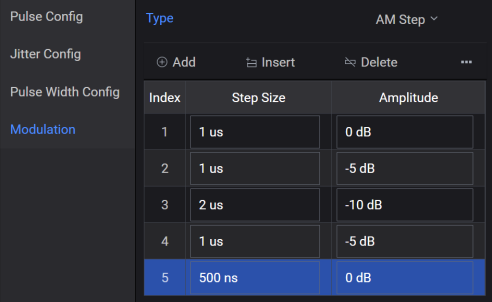
Valid Step Size: 0 to 1 s
Valid Amplitude: -300 db to 300 db
If your data has a larger value, multiple steps could be created when you import the data. Refer to Importing Settings from a CSV File to know more.
Adds the specified number of new items to the end in the AM Step table. This setting is used by the AM Step modulation and is applicable only when you select AM Step as the Modulation Type.
|
SCPI Command |
[:SOURce]:RADio:PBUilding:WAVeform:PLLBrary:PULSe<pulseindex>:MODulation:AMSTep:ADD <stepsize,amp;stepsize,amp> |
|
SCPI Example |
RADio:PBUilding:WAVeform:PLLBrary:PULSe:MODulation:AMSTep:ADD "1,2;1,5;1,6" |
|
Couplings |
|
| Notes | By default, Step size value will be 100 ns. |
|
Preset |
|
|
State Saved |
Yes |
|
Initial S/W Revision |
A.18.00 |
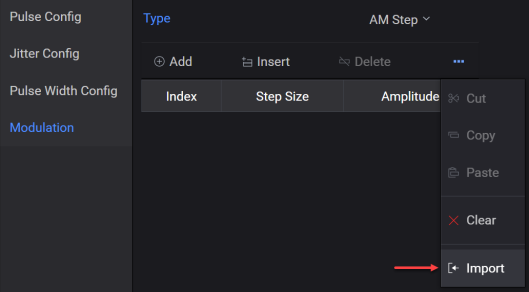
Imports the AM Step values from a .csv or .txt file to create a user-defined AM Step table. This setting is used by the AM Step modulation and is applicable only when you select AM Step as the Modulation Type.
The Import menu option (shown below) opens the Open File dialog that allows you to import a .csv or .txt file containing AM Step data.
|
SCPI Command |
[:SOURce]:RADio:PBUilding:WAVeform:PLLBrary:PULSe<pulseindex>:MODulation:AMSTep:IMPort<filepath> |
|
SCPI Example |
RADio:PBUilding:WAVeform:PLLBrary:PULSe:MODulation:AMSTep:IMPort "C:\test\ pb.csv" |
|
Couplings |
|
| Notes | |
|
Preset |
|
|
State Saved |
Yes |
|
Initial S/W Revision |
A.18.00 |
Allows you to edit the AM Step data values. This setting is used by the AM Step modulation and is applicable only when you select AM Step as the Modulation Type.
|
SCPI Command |
[:SOURce]:RADio:PBUilding:WAVeform:PLLBrary:PULSe<pulseindex>:MODulation:AMSTep:EDIT<index,string> |
|
SCPI Example |
RADio:PBUilding:WAVeform:PLLBrary:PULSe:MODulation:AMSTep:EDIT 1,"2,1" |
|
Couplings |
|
| Notes | |
|
Preset |
|
|
State Saved |
Yes |
|
Initial S/W Revision |
A.18.00 |
Represents a step size list in the modulation segment.
When you select the Modulation Type as FM Step, the FM Step table is displayed to allow you to add, edit, delete, or import FM Step data into this table.
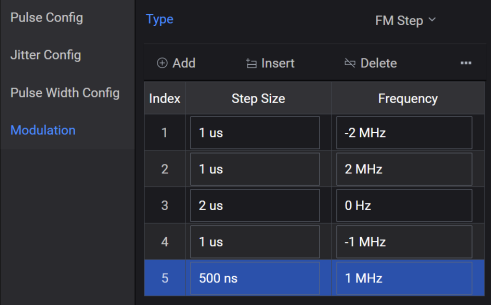
Valid Step Size: 0 to 1 s
Valid Frequency: -200 GHz to 200 GHz
If your data has a larger value, multiple steps could be created when you import the data. Refer to Importing Settings from a CSV File to know more.
Adds the specified number of new items to the end in the FM Step table. This setting is used by the FM Step modulation and is applicable only when you select FM Step as the Modulation Type.
|
SCPI Command |
[:SOURce]:RADio:PBUilding:WAVeform:PLLBrary:PULSe<pulseindex>:MODulation:FMSTep:ADD <stepsize,freq;stepsize,freq> |
|
SCPI Example |
RADio:PBUilding:WAVeform:PLLBrary:PULSe:MODulation:FMSTep:ADD "1,2;1,5;1,6" |
|
Couplings |
|
| Notes | By default, Step size value will be 100 ns. |
|
Preset |
|
|
State Saved |
Yes |
|
Initial S/W Revision |
A.18.00 |
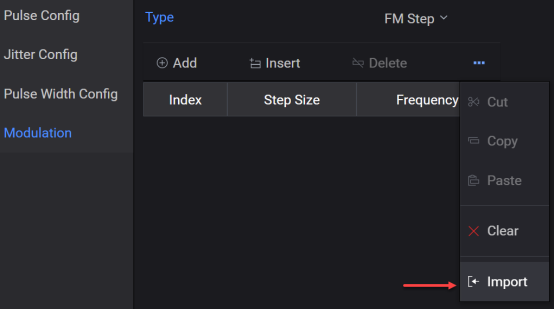
Imports the FM Step values from a .csv or .txt file to create a user-defined FM Step table. This setting is used by the FM Step modulation and is applicable only when you select FM Step as the Modulation Type.
The Import menu option (shown below) opens the Open File dialog that allows you to import a .csv or .txt file containing FM Step data.
|
SCPI Command |
[:SOURce]:RADio:PBUilding:WAVeform:PLLBrary:PULSe<pulseindex>:MODulation:FMSTep:IMPort<filepath> |
|
SCPI Example |
RADio:PBUilding:WAVeform:PLLBrary:PULSe:MODulation:FMSTep:IMPort "C:\test\pb.csv" |
|
Couplings |
|
| Notes | |
|
Preset |
|
|
State Saved |
Yes |
|
Initial S/W Revision |
A.18.00 |
Allows you to edit the FM Step data values. This setting is used by the FM Step modulation and is applicable only when you select FM Step as the Modulation Type.
|
SCPI Command |
[:SOURce]:RADio:PBUilding:WAVeform:PLLBrary:PULSe<pulseindex>:MODulation:FMSTep:EDIT<index,string> |
|
SCPI Example |
RADio:PBUilding:WAVeform:PLLBrary:PULSe:MODulation:FMSTep:EDIT 1,"2,1" |
|
Couplings |
|
| Notes | |
|
Preset |
|
|
State Saved |
Yes |
|
Initial S/W Revision |
A.18.00 |
This modulation type is similar to BPSK but allows for user-defined bit patterns. The step size is automatically determined by the number of state changes indicated by the index number listed in the Custom BPSK table.
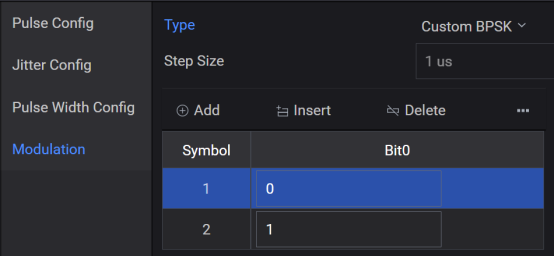
If your data has a larger value, multiple items could be created when you import the data. Refer to Importing Settings from a CSV File to know more.
Adds the specified number of new items to the end in the Custom BPSK table. This setting is used by the Custom BPSK modulation and is applicable only when you select Custom BPSK as the Modulation Type.
|
SCPI Command |
[:SOURce]:RADio:PBUilding:WAVeform:PLLBrary:PULSe<pulseindex>:MODulation:CUSTom:BPSK:ADD <Bit0,Bit0,Bit0> |
|
SCPI Example |
RADio:PBUilding:WAVeform:PLLBrary:PULSe:MODulation:CUSTom:BPSK:ADD "0,1,0,1" |
|
Couplings |
|
|
Preset |
|
|
State Saved |
Yes |
|
Initial S/W Revision |
A.18.00 |
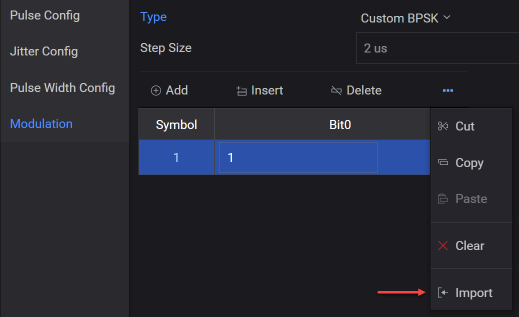
Imports the Custom BPSK values from a .csv or .txt file to create a user-defined Custom BPSK table. This setting is used by the Custom BPSK modulation and is applicable only when you select Custom BPSK as the Modulation Type.
The Import menu option (shown below) opens the Open File dialog that allows you to import a .csv or .txt file containing Custom BPSK data.
|
SCPI Command |
[:SOURce]:RADio:PBUilding:WAVeform:PLLBrary:PULSe<pulseindex>:MODulation:CUSTom:BPSK:IMPort<filepath> |
|
SCPI Example |
RADio:PBUilding:WAVeform:PLLBrary:PULSe:MODulation:CUSTom:BPSK:IMPort "C:\test\pb.csv" |
|
Couplings |
|
| Notes | |
|
Preset |
|
|
State Saved |
Yes |
|
Initial S/W Revision |
A.18.00 |
Allows you to edit the Custom BPSK data values. This setting is used by the Custom BPSK modulation and is applicable only when you select Custom BPSK as the Modulation Type.
|
SCPI Command |
[:SOURce]:RADio:PBUilding:WAVeform:PLLBrary:PULSe<pulseindex>:MODulation:CUSTom:BPSK:EDIT<index,string> |
|
SCPI Example |
RADio:PBUilding:WAVeform:PLLBrary:PULSe:MODulation:CUSTom:BPSK:EDIT 1, "1" |
|
Couplings |
|
| Notes | |
|
Preset |
|
|
State Saved |
Yes |
|
Initial S/W Revision |
A.18.00 |
The Custom QPSK table is used for the QPSK bit pattern.
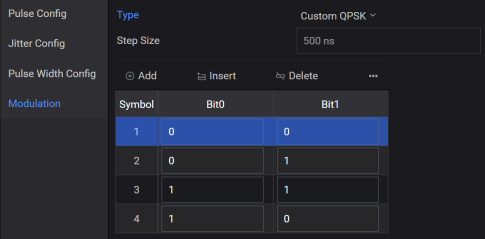
The symbol period is the pulse width (100%-100%) divided by the number of symbols. QPSK has two bits per symbol. The symbol mapping is as follows:
00 = 0°
01 = 90°
11 = 180°
10 = 270°
If your data has a larger value, multiple items could be created when you import the data. Refer to Importing Settings from a CSV File to know more.
Adds the specified number of new items to the end in the Custom QPSK table. This setting is used by the Custom QPSK modulation and is applicable only when you select Custom QPSK as the Modulation Type.
|
SCPI Command |
[:SOURce]:RADio:PBUilding:WAVeform:PLLBrary:PULSe<pulseindex>:MODulation:CUSTom:QPSK:ADD <Bit0,Bit1;Bit0,Bit1;Bit0,Bit1> |
|
SCPI Example |
RADio:PBUilding:WAVeform:PLLBrary:PULSe:MODulation:CUSTom:QPSK:ADD "0,1;0,1;0,1" |
|
Couplings |
|
| Notes | By default, 4 rows are added with values "0,0;0,1;1,1;1,0" to the Custom QPSK table. |
|
Preset |
|
|
State Saved |
Yes |
|
Initial S/W Revision |
A.18.00 |
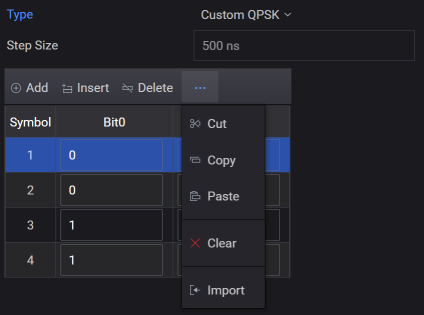
Imports the Custom QPSK values from a .csv or .txt file to create a user-defined Custom QPSK table. This setting is used by the Custom QPSK modulation and is applicable only when you select Custom QPSK as the Modulation Type.
The Import menu option (shown below) opens the Open File dialog that allows you to import a .csv or .txt file containing Custom QPSK data.
|
SCPI Command |
[:SOURce]:RADio:PBUilding:WAVeform:PLLBrary:PULSe<pulseindex>:MODulation:CUSTom:QPSK:IMPort<filepath> |
|
SCPI Example |
RADio:PBUilding:WAVeform:PLLBrary:PULSe:MODulation:CUSTom:QPSK:IMPort "C:\test\pb.csv" |
|
Couplings |
|
| Notes | |
|
Preset |
|
|
State Saved |
Yes |
|
Initial S/W Revision |
A.18.00 |
Allows you to edit the Custom QPSK data values. This setting is used by the Custom QPSK modulation and is applicable only when you select Custom QPSK as the Modulation Type.
|
SCPI Command |
[:SOURce]:RADio:PBUilding:WAVeform:PLLBrary:PULSe<pulseindex>:MODulation:CUSTom:QPSK:EDIT<index,string> |
|
SCPI Example |
RADio:PBUilding:WAVeform:PLLBrary:PULSe:MODulation:CUSTom:QPSK:EDIT 1, "1,1" |
|
Couplings |
|
| Notes | |
|
Preset |
|
|
State Saved |
Yes |
|
Initial S/W Revision |
A.18.00 |
The custom phase code modulation applies a user-provided phase pattern to the pulse. The user phase code is entered into a table and is assumed to be in degrees. Complex polyphase patterns can be generated with MatLab or other tools.
If your data has a larger value, multiple items could be created when you import the data. Refer to Importing Settings from a CSV File to know more.
Adds the specified number of new items to the end in the Custom Phase Pattern table. This setting is used by the Custom Phase Pattern modulation and is applicable only when you select Custom Phase Pattern as the Modulation Type.
|
SCPI Command |
[:SOURce]:RADio:PBUilding:WAVeform:PLLBrary:PULSe<pulseindex>:MODulation:CUSTom:PHASe:PATTern:ADD <patterndegree;patterndegree;patterndegree> |
|
SCPI Example |
RADio:PBUilding:WAVeform:PLLBrary:PULSe:MODulation:CUSTom:PHASe:PATTern:ADD "1,2,-45,90" |
|
Couplings |
|
| Notes | By default, no rows are added to the Custom Phase Pattern table. |
|
Preset |
|
|
State Saved |
Yes |
|
Initial S/W Revision |
A.18.00 |
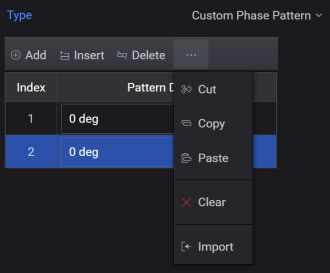
Imports the Custom Phase Pattern values from a .csv or .txt file to create a user-defined Custom Phase Pattern table. This setting is used by the Custom Phase Pattern modulation and is applicable only when you select Custom Phase Pattern as the Modulation Type.
The Import menu option (shown below) opens the Open File dialog that allows you to import a .csv or .txt file containing Custom Phase Pattern data.
|
SCPI Command |
[:SOURce]:RADio:PBUilding:WAVeform:PLLBrary:PULSe<pulseindex>:MODulation:CUSTom:PHASe:PATTern:IMPort<filepath> |
|
SCPI Example |
RADio:PBUilding:WAVeform:PLLBrary:PULSe:MODulation:CUSTom:PHASe:PATTern:IMPort "C:\test\pb.csv" |
|
Couplings |
|
| Notes | |
|
Preset |
|
|
State Saved |
Yes |
|
Initial S/W Revision |
A.18.00 |
Allows you to edit the Custom Phase Pattern data values. This setting is used by the Custom Phase Pattern modulation and is applicable only when you select Custom Phase Pattern as the Modulation Type.
|
SCPI Command |
[:SOURce]:RADio:PBUilding:WAVeform:PLLBrary:PULSe<pulseindex>:MODulation:CUSTom:PHASe:PATTern:EDIT<index,string> |
|
SCPI Example |
RADio:PBUilding:WAVeform:PLLBrary:PULSe:MODulation:CUSTom:PHASe:PATTern:EDIT 1, "1" |
|
Couplings |
|
| Notes | |
|
Preset |
|
|
State Saved |
Yes |
|
Initial S/W Revision |
A.18.00 |
Refers to the sequence of phase shifts within the code, which is typically structured as a grid where each element is defined by two indices (i, j) with both ranging from 1 to N, where N represents the number of phases in each dimension.
|
SCPI Command |
[:SOURce]:RADio:PBUilding:WAVeform:PLLBrary:PULSe<pulseindex>:MODulation:CODe:ORDer <integer> [:SOURce]:RADio:PBUilding:WAVeform:PLLBrary:PULSe<pulseindex>:MODulation:CODe:ORDer? |
|
SCPI Example |
RADio:PBUilding:WAVeform:PLLBrary:PULSe:MODulation:CODe:ORDer 4 RADio:PBUilding:WAVeform:PLLBrary:PULSe:MODulation:CODe:ORDer? |
|
Couplings |
|
| Notes | The default Code Order value is 16 for both P3 Code and P4 Code. |
|
Preset |
4 |
|
State Saved |
Yes |
|
Min |
1 |
|
Max |
10000 |
|
Initial S/W Revision |
A.18.00 |
The maximum change in the modulation frequency that occurs over the time period of the pulse Width (100%-100%) parameter for trapezoidal and raised-cosine pulse types and from the first point of data through the last point of data for custom profile and custom I/Q pulse types.
|
SCPI Command |
[:SOURce]:RADio:PBUilding:WAVeform:PLLBrary:PULSe<pulseindex>:MODulation:CHIRp:DEViation <real> [:SOURce]:RADio:PBUilding:WAVeform:PLLBrary:PULSe<pulseindex>:MODulation:CHIRp:DEViation? |
|
SCPI Example |
RADio:PBUilding:WAVeform:PLLBrary:PULSe:MODulation:CHIRp:DEViation 10000000 RADio:PBUilding:WAVeform:PLLBrary:PULSe:MODulation:CHIRp:DEViation? |
|
Couplings |
|
|
Preset |
10 MHz |
|
State Saved |
Yes |
|
Min |
0 |
|
Max |
5 GHz |
|
Initial S/W Revision |
A.18.00 |
Can be ascending or descending and indicates an increase or decrease in frequency during the FM chirp.
|
SCPI Command |
[:SOURce]:RADio:PBUilding:WAVeform:PLLBrary:PULSe<pulseindex>:MODulation:CHIRp:DIRection ASCending|DESCending [:SOURce]:RADio:PBUilding:WAVeform:PLLBrary:PULSe<pulseindex>:MODulation:CHIRp:DIRection? |
|
SCPI Example |
RADio:PBUilding:WAVeform:PLLBrary:PULSe:MODulation:CHIRp:DIRection ASC RADio:PBUilding:WAVeform:PLLBrary:PULSe:MODulation:CHIRp:DIRection? |
|
Couplings |
|
|
Preset |
ASCending |
|
State Saved |
Yes |
|
Initial S/W Revision |
A.18.00 |
Calculated and displayed as a read-only reference value. Chirp rate for a trapezoidal and raised-cosine pulse type is calculated as: Chirp Rate = Chirp Deviation / pulse width.
|
SCPI Command |
[:SOURce]:RADio:PBUilding:WAVeform:PLLBrary:PULSe<pulseindex>:MODulation:CHIRp:RATe <real> [:SOURce]:RADio:PBUilding:WAVeform:PLLBrary:PULSe<pulseindex>:MODulation:CHIRp:RATe? |
|
SCPI Example |
RADio:PBUilding:WAVeform:PLLBrary:PULSe:MODulation:CHIRp:RATe 10000000 RADio:PBUilding:WAVeform:PLLBrary:PULSe:MODulation:CHIRp:RATe? |
|
Couplings |
|
|
Preset |
10 MHz |
|
State Saved |
Yes |
|
Min |
|
|
Max |
|
|
Initial S/W Revision |
A.18.00 |
This mode allows you to define the Custom FM Chirp (non-linear) modulation within the pulse. The custom FM chirp is generated using a polynomial. This polynomial represents the instantaneous frequency versus time. Refer to Custom FM Chirp to know more.
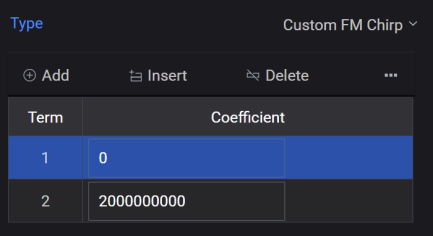
Adds the specified number of new items to the end in the Custom FM Chirp table. This setting is used by the Custom FM Chirp modulation and is applicable only when you select Custom FM Chirp as the Modulation Type.
|
SCPI Command |
[:SOURce]:RADio:PBUilding:WAVeform:PLLBrary:PULSe<pulseindex>:MODulation:CUSTom:FMCHirp:ADD |
|
SCPI Example |
RADio:PBUilding:WAVeform:PLLBrary:PULSe:MODulation:CUSTom:FMCHirp:ADD "0,1,0,1" |
|
Couplings |
|
|
Note |
By default, 2 rows with values "0,200000000 " are added to the Custom FM Chirp table. |
|
State Saved |
Yes |
|
Initial S/W Revision |
A.18.00 |
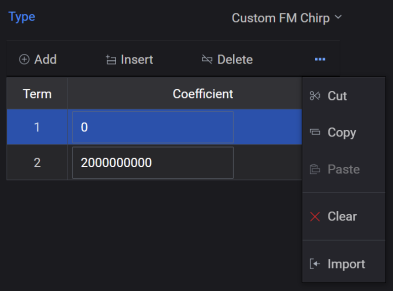
Imports the Custom FM Chirp values from a .csv or .txt file to create a user-defined Custom FM Chirp table. This setting is used by the Custom FM Chirp modulation and is applicable only when you select Custom FM Chirp as the Modulation Type.
The Import menu option (shown below) opens the Open File dialog that allows you to import a .csv or .txt file containing Custom FM Chirp data.
|
SCPI Command |
[:SOURce]:RADio:PBUilding:WAVeform:PLLBrary:PULSe<pulseindex>:MODulation:CUSTom:FMCHirp:IMPort<filepath> |
|
SCPI Example |
RADio:PBUilding:WAVeform:PLLBrary:PULSe:MODulation:CUSTom:FMCHirp:IMPort "C:\test\pb.csv" |
|
Couplings |
|
| Notes | |
|
Preset |
|
|
State Saved |
Yes |
|
Initial S/W Revision |
A.18.00 |
Allows you to edit the Custom FM Chirp data values. This setting is used by the Custom FM Chirp modulation and is applicable only when you select Custom FM Chirp as the Modulation Type.
|
SCPI Command |
[:SOURce]:RADio:PBUilding:WAVeform:PLLBrary:PULSe<pulseindex>:MODulation:CUSTom:FMCHirp:EDIT<index,string> |
|
SCPI Example |
RADio:PBUilding:WAVeform:PLLBrary:PULSe:MODulation:CUSTom:FMCHirp:EDIT 2,"2" |
|
Couplings |
|
| Notes | |
|
Preset |
|
|
State Saved |
Yes |
|
Initial S/W Revision |
A.18.00 |