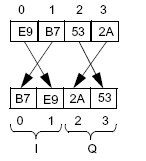
NORMal
This choice plays the waveform file reading the bytes in sequential order (Big Endian).
SWAPped
This choice plays the waveform file  swapping
every other byte position (Little Endian).
swapping
every other byte position (Little Endian).
The following list includes replaced PXB commands and commands that are not currently supported. The replaced commands have been replaced by newer commands, but they are still supported for backward compatibility.
Signal Studio backward-compatible commands are listed at the end of the respective Signal Studio real-time application's SCPI help topic:
Numerical Choice:
:RADio[1]2|3|4 – Refer to the block diagram for your system configuration to determine the baseband generator block that you want to configure.
:CONTrol:IO[1]|2|3|4|5|6|7|8:OUTPut:MCHannel "<mchannel name>"
:CONTrol:IO[1]|2|3|4|5|6|7|8:OUTPut:MCHannel?
Use with N5106A firmware version 1.3.xxx or earlier.
This command selects the master channel (which baseband channel or I/O input port) that will be used as the output marker data source. However, you can also use the marker source command to dynamically set an individual marker rather than using the marker data from this master channel.
[:SOURce]:RADio:ARB:ALL:LOAD ON|OFF|1|0
[:SOURce]:RADio:ARB:ALL:LOAD?
This command loads all waveforms to the respective baseband generator memory. This may be a time consuming process depending on the size of the waveform files. The LOAD command allows you to load a new or updated file to a specific baseband memory without downloading files that do not need updating.
|
On (1) |
This choice downloads all waveforms to the respective baseband blocks. |
|
Off (0) |
This choice stops the waveform download from continuing after the last waveform download in progress has completed. |
[:SOURce]:RADio:ARB:ALL:NCHannels?
This query returns the number of baseband blocks enabled in the current configuration. The firmware displays a message if the number of waveforms that are generated and downloaded from a Signal Studio application does not match the number of configured channels.
[:SOURce]:RADio[1]2|3|4:ARB:ENABle ON|OFF|1|0
[:SOURce]:RADio[1]2|3|4:ARB:ENABle?
This command controls the operating state of the baseband blocks. Turning the baseband generator off while the signal is playing effectively replaces the I/Q and marker data with zeros.
|
On (1) |
This choice turns on the state of the selected baseband block. |
|
Off (0) |
This choice turns off the state of the selected baseband block. |
[:SOURce]:RADio[1]2|3|4:ARB:FOFFset <val>
[:SOURce]:RADio[1]2|3|4:ARB:FOFFset?
This command moves the baseband signal above or below the carrier by the specified frequency. For Signal Studio waveforms, this value is extracted from the waveform header; however, it is a runtime parameter and may be changed during playback.
The variable <val> is expressed in Hz.
Range: –80E+06 to 80E+06
[:SOURce]:RADio[1]2|3|4:ARB:FORMat:BORDer NORMal|SWAPped
[:SOURce]:RADio[1]2|3|4:ARB:FORMat:BORDer?
This command sets the format to be used for the playing order of the waveform.
|
NORMal |
This choice plays the waveform file reading the bytes in sequential order (Big Endian). |
|
SWAPped |
This choice plays the waveform file |
[:SOURce]:RADio[1]2|3|4:ARB:LOAD ON|OFF|1|0
[:SOURce]:RADio[1]2|3|4:ARB:LOAD?
This command loads a waveform file to the selected baseband memory to be used for playback. The file will replace any waveform file that was previously loaded. The ALL:LOAD command, used without specifying a file name, loads all the currently assigned waveforms to the selected baseband generator. When all waveforms have been loaded, the system can be played.
On (1) | This choice downloads a waveform to a specific baseband block. |
Off (0) | This choice stops the waveform download after the last waveform download in progress has completed. (Effectively, it is equivalent to letting the current download complete.) |
[:SOURce]:RADio[1]2|3|4:ARB:LSTate HLValue|ZERO
[:SOURce]:RADio[1]2|3|4:ARB:LSTate?
This command sets the state that the output holds when the playback stops.
HLValue | This choice holds the last I and Q sample value (including markers) on the output when the waveform has completed playing. |
ZERO | This choice sets the output value to zero when the waveform has completed playing. |
[:SOURce]:RADio[1]2|3|4:ARB:NFORmat TWOS|OFFSet
[:SOURce]:RADio[1]2|3|4:ARB:NFORmat?
This command sets the binary format for the selected
waveform file. When a waveform file is played, the waveform data is read
from the file and scaled to 16 bits
of resolution. When a Signal Studio waveform is selected, this value is
read from the waveform header and should not be changed.
TWOS | This choice sets the data format to a |
OFFSet | This choice sets the data format to an |
[:SOURce]:RADio[1]2|3|4:ARB:RSCaling <val>
[:SOURce]:RADio[1]2|3|4:ARB:RSCaling?
This command sets the value for the runtime scaling. It adjusts the amplitude of both I and Q outputs and is primarily used to remove over-range errors. When a Signal Studio waveform file is selected, this value is read from the file header; however, it is a runtime parameter and may be adjusted during playback.
For the Signal Studio applications that support connection to the PXB, the runtime scaling for generated waveforms used in summing and MIMO configurations is automatically calculated from waveform header information when you select the number of antennas or output signals.
The variable <val> is expressed in %.
Range: 0 to 100
[:SOURce]:RADio:[1]2|3|4:ARB:RSRate?
This query returns the recorded sample rate. For Signal Studio waveforms, this value is extracted from the waveform header when a waveform file is played.
Range: 1000
to 200E+06
[:SOURce]:RADio[1]2|3|4:ARB:SAMPles?
This query returns the number of samples in the loaded waveform as an integer value.
Range: 256
to 9.223 X 10¹⁸ samples
[:SOURce]:RADio[1]2|3|4:ARB:SRATe <val>
[:SOURce]:RADio[1]2|3|4:ARB:SRATe?
This command sets the sample rate at which the waveform
is played back through the baseband memory. When
a Signal Studio waveform is played from the baseband generator, this value
is read from the file header. When an external
instrument is connected to the output, the output sample
rate
depends on the external instrument at the output.
Range: 100 Sa/s to 200 MSa/s
[:SOURce]:RADio[1]2|3|4:ARB:TRIGger:DELay <val>
[:SOURce]:RADio[1]2|3|4:ARB:TRIGger:DELay?
This command defines the time delay for a trigger being sent to the baseband generator.
Range: 0 to
100 ms
[:SOURce]:RADio[1]2|3|4:ARB:TRIGger:REPeat:COUNt <val>
[:SOURce]:RADio[1]2|3|4:ARB:TRIGger:REPeat:COUNt?
This command sets the number of times to play the waveform. If the repeat count is set to zero, the waveform is played continuously.
Range: 0
to 2,147,483,647
[:SOURce]:RADio[1]2|3|4:ARB:WAVeform "<file name>"
[:SOURce]:RADio[1]2|3|4:ARB:WAVeform?
This command specifies a waveform file to be used for playback on the selected baseband generator. The file name may be specified using the full directory path, for example, "D:\Waveforms\Channel2\mywaveform.bin" or using the MSUS format, "NVWFM2:mywaveform.bin"
The PXB defaults to the waveform file, default1.bin,
in the folder:
C:\<Program Files for Win XP><Program Files (x86) for Win 7>\Agilent\PXB\FactoryDefaultWaveforms. Refer to Factory
Default Waveform Files for a description of available default waveforms.
These commands set the marker properties for the waveform being played.
The Marker Source and
Marker File commands
apply to all markers. The other marker properties are set for individual
markers.
Numerical Choices:
:RADio[1]2|3|4 – Refer to the block diagram for your system configuration to determine the DSP playback block that you want to configure.
:MARKer[1]2|3|4 – The numerical choices correspond to the marker that you want to assign for playback. Marker 2 is reserved for internal use and will be ignored if it is set in the waveform.
[:SOURce]:RADio[1]2|3|4:ARB:MARKer[1]2|3|4:DELay <val>
[:SOURce]:RADio[1]2|3|4:ARB:MARKer[1]2|3|4:DELay?
This command sets the delay for the individual marker determined by the sample rate. The maximum delay is the time required to play 1,024 samples, as calculated using the following equation:

The variable <val> is expressed in seconds.
Range: 0 to Maximum
[:SOURce]:RADio[1]2|3|4:ARB:MARKer[1]2|3|4:ENABle ON|OFF|0|1
[:SOURce]:RADio[1]2|3|4:ARB:MARKer[1]2|3|4:ENABle?
This command turns the marker state on or off. When a marker is active (on), it provides an output trigger signal to the baseband generator block. This command is required when setting any marker related properties.
[:SOURce]:RADio[1]2|3|4:ARB:MARKer[1]2|3|4:POLarity POSitive|NEGative
[:SOURce]:RADio[1]2|3|4:ARB:MARKer[1]2|3|4:POLarity?
This command sets the output state for the selected marker.
POSitive | This choice sets the marker output signal to be high (1) when the marker points from the marker source are on. When the marker points from the marker source are off, the marker output signal is set to low (0). |
NEGative | This choice sets the marker output signal to be low (0) when the marker points from the marker source are on. When the marker points from the marker source are off, the marker output signal is set to high (1). |
[:SOURce]:RADio[1]|2|3|4|5|6|7|8:ARB:MARKer[1]|2|3|4:SOURce DYNamic|USER
[:SOURce]:RADio[1]|2|3|4|5|6|7|8:ARB:MARKer[1]|2|3|4:SOURce?
This command sets the source that is used to generate the markers.
DYNamic | This choice allows you to set a marker dynamically rather than using the marker source as selected in the MSOurce command. |
USER | This choice allows you to set a marker from a user-generated file instead of using an embedded marker as selected in the MSOurce command. |
[:SOURce]:RADio[1]2|3|4:ARB:MARKer[1]2|3|4:TYPE ZERO|RANGe|PERiodic
[:SOURce]:RADio[1]2|3|4:ARB:MARKer[1]2|3|4:TYPE?
This command allows you to control the events that will turn the generated marker on or off when the marker source is Dynamic.
ZERO | This choice sets the marker to active when the power is zero; otherwise, the marker is not active. It is mainly intended to detect when a bursted signal is on or off. |
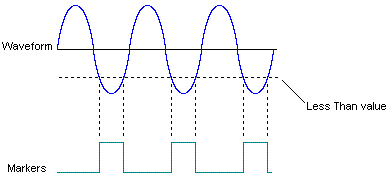
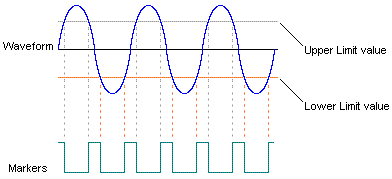
RANGe | This choice specifies the marker signal to be active when the waveform signal meets specific criteria that you define. To be effective, this command requires that the Range Relationship (Equal, Less, Greater, and Range), Range Data, and Range Units commands are executed. |
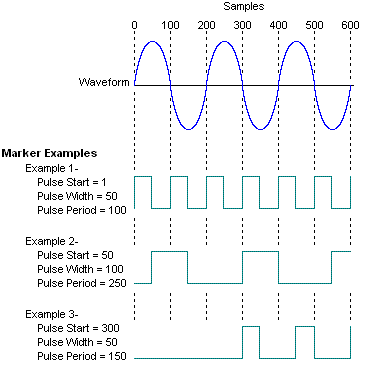
PERiodic | This choice selects the sample and duration where the marker will be
active. To be effective, this command requires that the Pulse Start (the
number of samples to wait until the first marker pulse is started), Pulse
Width (the number of samples that the marker pulse is turned on), and
Pulse Period (the number of samples for one complete cycle of the marker
pulse, which is number of samples of the pulse period plus the number
of samples of off time between two pulses) commands are executed. |
[:SOURce]:RADio[1]2|3|4:ARB:MARKer[1]2|3|4:TYPE:PERiodic:PPERiod <val>
[:SOURce]:RADio[1]2|3|4:ARB:MARKer[1]2|3|4:TYPE:PERiodic:PPERiod?
This command sets the total number of samples in the marker cycle (on plus off time). The pulse period is set as an even-numbered integer, greater than or equal to 4, representing the number of samples. This command is only valid when the Marker Source is Dynamic and the Marker Type is Periodic.
The variable <val> is number of samples.
Range: 4 to
999,999,999,999,998
samples
[:SOURce]:RADio[1]2|3|4:ARB:MARKer[1]2|3|4:TYPE:PERiodic:PSTart <val>
[:SOURce]:RADio[1]2|3|4:ARB:MARKer[1]2|3|4:TYPE:PERiodic:PSTart?
This command sets the sample on which the marker becomes active (on) when the Marker Type is Periodic. This command is only valid when the Marker Source is Dynamic and the Marker Type is Periodic.
The variable <val> is number of samples.
Range: 1
to 999,999,999,999,999
samples
[:SOURce]:RADio[1]2|3|4:ARB:MARKer[1]2|3|4:TYPE:PERiodic:PWIDth <val>
[:SOURce]:RADio[1]2|3|4:ARB:MARKer[1]2|3|4:TYPE:PERiodic:PWIDth?
This command sets the width of the active markers in the samples when the Marker Type is Periodic. This command is only valid when the Marker Source is Dynamic and the Marker Type is Periodic.
The variable <val> is number of samples.
Range: 1
to 999,999,999,999,998
samples
[:SOURce]:RADio[1]2|3|4:ARB:MARKer[1]2|3|4:TYPE:RRELation EQUal|GREater|LESS|RANGe
[:SOURce]:RADio[1]2|3|4:ARB:MARKer[1]2|3|4:TYPE:RRELation?
This command sets the relationship for the range limit that the marker must meet.
This command is only valid when the Marker Source is Dynamic and the Marker Type is Periodic.
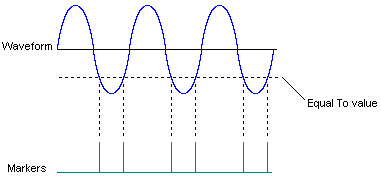
EQUal | This choice selects the range value equal to a specified limit. |
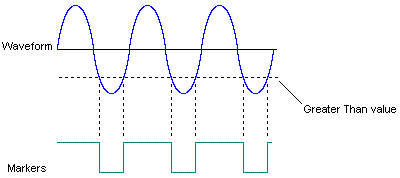
GREater | This choice selects the range value to be greater than the limit and
less than the maximum allowed value. |
LESS | This choice selects the range value to be less than the limit and greater
than the minimum allowed value. |
RANGe | This choice selects the range value to be set using a user designated
upper and lower limit. |
[:SOURce]:RADio[1]2|3|4:ARB:MARKer[1]2|3|4:TYPE:RRELation:EQUal <val>
[:SOURce]:RADio[1]2|3|4:ARB:MARKer[1]2|3|4:TYPE:RRELation:EQUal?
This command sets the value for the range markers when the desired range limit is equal to a specified value. This command is valid only if the Marker Source is Dynamic, and the Marker Type is Range.
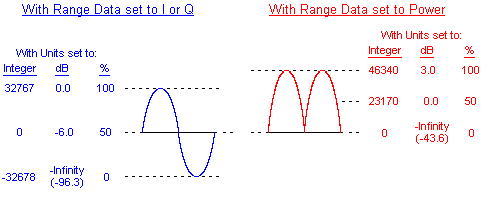
Range: Depends on marker units selected
–32768
to 32768 (Range unit is integer)
0 to –6 dB (Unit is
dB, Data is I or Q)
–Infinity to 3 dB (Unit
is dB, Data is Power)
0 to 46340 (Unit is integer; Data is Power)
0 to 100 (Range unit is %)
[:SOURce]:RADio[1]2|3|4:ARB:MARKer[1]2|3|4:TYPE:RRELation:GREater <val>
[:SOURce]:RADio[1]2|3|4:ARB:MARKer[1]2|3|4:TYPE:RRELation:GREater?
This command sets the value for the Range markers when the desired range limit is to be greater than a specified value. This command is valid only if the Marker Source is Dynamic, and the Marker Type is Range.
Range: Depends on marker units selected
–32768
to 32768 (Range unit is integer)
0 to – 6 dB (Unit is
dB, Data is I or Q)
–Infinity to 3 dB (Unit
is dB, Data is Power)
0 to 46340 (Unit is integer; Data is Power)
0 to 100 (Range unit is %)
[:SOURce]:RADio[1]2|3|4:ARB:MARKer[1]2|3|4:TYPE:RRELation:LESS <val>
[:SOURce]:RADio[1]2|3|4:ARB:MARKer[1]2|3|4:TYPE:RRELation:LESS?
This command sets the value for the Range markers when the desired range limit is to be less than a specified value. This command is valid only if the Marker Source is Dynamic, and the Marker Type is Range.
Range: Depends on marker units selected
–32768
to 32768 (Range unit is integer)
0 to –6 dB (Unit is
dB, Data is I or Q)
–Infinity to 3 dB (Unit
is dB, Data is Power)
0 to 46340 (Unit is integer; Data is Power)
0 to 100 (Range unit is %)
[:SOURce]:RADio[1]2|3|4:ARB:MARKer[1]2|3|4:TYPE:RRELation:LLIMit <val>
[:SOURce]:RADio[1]2|3|4:ARB:MARKer[1]2|3|4:TYPE:RRELation:LLIMit?
This command sets the lower limit when the range limit is selected as Range. This command is only valid when the Marker Type is Range and the Range Relationship Limit is Range.
Range: Depends on marker units selected
–32768
to 32768 (Range unit is integer)
0 to –6 dB (Unit is
dB, Data is I or Q)
–Infinity to 3 dB (Unit
is dB, Data is Power)
0 to 46340 (Unit is integer; Data is Power)
0 to 100 (Range unit is %)
[:SOURce]:RADio[1]2|3|4:ARB:MARKer[1]2|3|4:TYPE:RRELation:ULIMit <val>
[:SOURce]:RADio[1]2|3|4:ARB:MARKer[1]2|3|4:TYPE:RRELation:ULIMit?
This command sets the upper limit when the range limit is selected as Range. This command is only valid when the Marker Source is Dynamic and the Marker Type is Periodic.
Range: Depends on marker units selected
–32768
to 32768 (Range unit is integer)
0 to –6 dB (Unit is
dB, Data is I or Q)
–Infinity to 3 dB (Unit
is dB, Data is Power)
0 to 46340 (Unit is integer; Data is Power)
0 to 100 (Range unit is %)
[:SOURce]:RADio[1]2|3|4:ARB:MARKer[1]2|3|4:RDATa I|Q|POWer
[:SOURce]:RADio[1]2|3|4:ARB:MARKer[1]2|3|4:RDATa?
This command sets the type of sample data that the
range detection process will use for comparison when determining the marker
state. This command is only valid when the Marker Type is Range and the
Range Relation is Range. Example…
I | This choice dynamically generates the marker based on the I channel data using all 16 bits of data. |
Q | This choice dynamically generates the marker based on the Q channel data using all 16 bits of data. |
POWer | This choice dynamically generates the marker as a function of the waveform's power. |
[:SOURce]:RADio[1]2|3|4:ARB:MARKer[1]2|3|4:SOURce DYNamic|USER
[:SOURce]:RADio[1]2|3|4:ARB:MARKer[1]2|3|4:SOURce?
This command allows you to specify a source for an individual marker.
DYNamic | This choice generates markers in real time based on the I/Q data or sample count. Using the :TYPE command, you can set the marker type to Zero Detect, Range, or Periodic values. |
USER | This choice uses the source file specified in :MSOurce command to specify the marker state. |
[:SOURce]:RADio[1]2|3|4:ARB:MARKer[1]2|3|4:UNIT INT|DB|PCT
[:SOURce]:RADio[1]2|3|4:ARB:MARKer[1]2|3|4:UNIT?
This command selects the units to use for the range relationship parameters: Greater, Less, Equal, Range.
INT | This choice selects integer values to express the range relationship. |
DB | This choice selects decibels to express the range relationship. |
PCT | This choice selects percentage to express the range relationship. |
[:SOURce]:RADio[1]2|3|4:ARB:MFILename "<file name>"
[:SOURce]:RADio[1]2|3|4:ARB:MFILename?
This command selects a user-created file for the marker source settings when the Marker Source is FILE. This data will override any embedded marker data. Changing this source will require the waveform to be reloaded to baseband memory.
The PXB provides for three markers at each point
on the baseband generator waveform signal, Marker 1, Marker 3, and Marker
4. Marker 2 is not used by the PXB and will ignore attempts by the marker
file to turn on Marker 2. Because markers are set at each waveform point,
the marker file must contain the same number of bytes as there are waveform
points. (For an example of a user-created marker file, refer to Marker Files.)
[:SOURce]:RADio[1]2|3|4:ARB:MSOurce FILE|EMBedded
[:SOURce]:RADio[1]2|3|4:ARB:MSOurce?
This command identifies the marker source to use for all markers settings.
FILE | This choice selects a user-created file as the marker source for the waveform. The marker source file must have the same name as the waveform file. However, you can still set an individual marker dynamically which will override the user-file marker data using the SOURce command. |
EMBedded | This choice selects the markers as embedded in the waveform, such as a waveform generated using Signal Studio or using other waveform formats with markers embedded in the data. The PXB outputs three markers, Marker 1, Marker 3, and Marker 4. Marker 2 is reserved for internal use and will be ignored if it is set in the waveform. When you make this selection, you can still dynamically set an individual marker using the SOURce command which will override the embedded marker data for an individual marker. |
These commands set the power control settings for the waveform being played.
Numerical Choices:
:RADio[1]2|3|4 – Refer to the block diagram for your system configuration to determine the baseband generator block that you want to configure.
[:SOURce]:RADio[1]2|3|4:ARB:POWer:HCOunt <val>
[:SOURce]:RADio[1]2|3|4:ARB:POWer:HCOunt?
This command sets the hold-off sample count used to allow short intervals of samples below the threshold value to be included in the average. If the signal drops below the threshold value and remains there for fewer than the hold-off sample count, then those samples are included in the average. This command is only valid when the Input Power Source is Measure and the Power Meter Gating is Threshold.
The variable <val> is expressed in terms of samples.
Range: 0 to 216 – 1
[:SOURce]:RADio[1]2|3|4:ARB:POWer:IRMS <val>
[:SOURce]:RADio[1]2|3|4:ARB:POWer:IRMS?
This command sets the input RMS power when USER is selected for the source of the power measurement.
The value <val> is expressed in volts.
Range:
0 to 1.414214
[:SOURce]:RADio[1]2|3|4:ARB:POWer:PMGating THReshold|MARKers
[:SOURce]:RADio[1]2|3|4:ARB:POWer:PMGating?
This command sets the reference to be used for power meter gating.
THReshold | This choice selects the threshold as the reference for power meter gating. Power observations are only accumulated if they are greater than or equal to the specified threshold, or if the number of consecutive observations below the threshold has not exceeded the hold-off sample count value. |
MARKers | This choice uses the marked samples as the reference for power meter gating. Power observations are only accumulated for marked samples according to the specified marker selection. When the marker is turned on, the voltage for the waveform sample is used to determine the waveform RMS value. The marker control criteria is configured using the marker commands. |
[:SOURce]CONTrol:RADio[1]2|3|4:ARB:INPut:POWer:MARKer M1|M3|M4
[:SOURce]CONTrol:RADio[1]2|3|4:ARB:INPut:POWer:MARKer?
This command selects the marker to use for accepting samples for averaging when the Input Power Source is Measure and the Power Meter Gating is Marker.
[:SOURce]:RADio[1]2|3|4:ARB:POWer:SAVerage <val>
[:SOURce]:RADio[1]2|3|4:ARB::POWer:SAVerage?
This command sets the number of samples to average when calculating the RMS voltage when the power source is Measure. The value entered is rounded to the nearest power of 2. When the waveform is measured during the pre-play, the PXB measures the specified number of samples that meet the criteria set by the threshold or marker settings and then uses these sample RMS voltage values to calculate the mean RMS voltage for the subsequent power calibration. Ensure that the number of samples is equal to or greater than the part of the waveform that you want to measure.
Range: 4 to 223
[:SOURce]:CONTrol:RADio[1]2|3|4:ARB:POWer:SOURce MEASure|LAST|USER|WAVeform
[:SOURce]:CONTrol:RADio[1]2|3|4:ARB:POWer:SOURce?
This command selects the method to use for calculating the RMS voltage value of the waveform to ensure the correct amplitude of the waveform at the output of the signal generator. The RMS voltage is used to calculate the power of the system when the power calibration is performed.
MEASure | This choice selects an internal power meter calculation to measure the input RMS power level. When Measure is selected, the power meter gating can be set to use a voltage threshold value or a marker to identify the portions of the waveform that will be measured. |
LAST | This choice selects the value last used for the input RMS power level. |
USER | This choice allows you to set the RMS voltage to a known value directly rather than measuring its value. |
WAVeform | This choice selects the RMS voltage to be read from the waveform header. When using Signal Studio waveforms, the RMS voltage is contained in the header. |
[:SOURce]:RADio[1]2|3|4:ARB:POWer:THReshold <val>
[:SOURce]:RADio[1]2|3|4:ARB:POWer:THReshold?
This command sets the sample value to use as averaging criteria when the Power Source is Measure and the Power Meter Gating is Threshold. Only samples above this level are included in the power average.
The variable <val> is expressed in volts.
Range: 0 to 1.414214
These commands set the power control settings for the waveform being played.
Numerical Choices:
:RADio[1]2|3|4 – Refer to the block diagram for your system configuration to determine the baseband generator block that you want to configure.
[:SOURce]:RADio[1]2|3|4:ARB:POWer:HCOunt <val>
[:SOURce]:RADio[1]2|3|4:ARB:POWer:HCOunt?
This command sets the hold-off sample count used to allow short intervals of samples below the threshold value to be included in the average. If the signal drops below the threshold value and remains there for fewer than the hold-off sample count, then those samples are included in the average. This command is only valid when the Input Power Source is Measure and the Power Meter Gating is Threshold.
The variable <val> is expressed in terms of samples.
Range: 0 to 216 – 1
[:SOURce]:RADio[1]2|3|4:ARB:POWer:IRMS <val>
[:SOURce]:RADio[1]2|3|4:ARB:POWer:IRMS?
This command sets the input RMS power when USER is selected for the source of the power measurement.
The value <val> is expressed in volts.
Range:0 to 1.414214
[:SOURce]:RADio[1]2|3|4:ARB:POWer:PMGating THReshold|MARKers
[:SOURce]:RADio[1]2|3|4:ARB:POWer:PMGating?
This command sets the reference to be used for power meter gating.
THReshold | This choice selects the threshold as the reference for power meter gating. Power observations are only accumulated if they are greater than or equal to the specified threshold, or if the number of consecutive observations below the threshold has not exceeded the hold-off sample count value. |
MARKers | This choice uses the marked samples as the reference for power meter gating. Power observations are only accumulated for marked samples according to the specified marker selection. When the marker is turned on, the voltage for the waveform sample is used to determine the waveform RMS value. The marker control criteria is configured using the marker commands. |
[:SOURce]CONTrol:RADio[1]2|3|4:ARB:INPut:POWer:MARKer M1|M3|M4
[:SOURce]CONTrol:RADio[1]2|3|4:ARB:INPut:POWer:MARKer?
This command selects the marker to use for accepting samples for averaging when the Input Power Source is Measure and the Power Meter Gating is Marker.
[:SOURce]:RADio[1]2|3|4:ARB:POWer:SAVerage <val>
[:SOURce]:RADio[1]2|3|4:ARB::POWer:SAVerage?
This command sets the number of samples to average when calculating the RMS voltage when the power source is Measure. The value entered is rounded to the nearest power of 2. When the waveform is measured during the pre-play, the PXB measures the specified number of samples that meet the criteria set by the threshold or marker settings and then uses these sample RMS voltage values to calculate the mean RMS voltage for the subsequent power calibration. Ensure that the number of samples is equal to or greater than the part of the waveform that you want to measure.
Range: 4 to 223
[:SOURce]:CONTrol:RADio[1]2|3|4:ARB:POWer:SOURce MEASure|LAST|USER|WAVeform
[:SOURce]:CONTrol:RADio[1]2|3|4:ARB:POWer:SOURce?
This command selects the method to use for calculating the RMS voltage value of the waveform to ensure the correct amplitude of the waveform at the output of the signal generator. The RMS voltage is used to calculate the power of the system when the power calibration is performed.
MEASure | This choice selects an internal power meter calculation to measure the input RMS power level. When Measure is selected, the power meter gating can be set to use a voltage threshold value or a marker to identify the portions of the waveform that will be measured. |
LAST | This choice selects the value last used for the input RMS power level. |
USER | This choice allows you to set the RMS voltage to a known value directly rather than measuring its value. |
WAVeform | This choice selects the RMS voltage to be read from the waveform header. When using Signal Studio waveforms, the RMS voltage is contained in the header. |
[:SOURce]:RADio[1]2|3|4:ARB:POWer:THReshold <val>
[:SOURce]:RADio[1]2|3|4:ARB:POWer:THReshold?
This command sets the sample value to use as averaging criteria when the Power Source is Measure and the Power Meter Gating is Threshold. Only samples above this level are included in the power average.
The variable <val> is expressed in volts.
Range: 0 to 1.414214
:HCOPy
:SYST:SECurity