:FUNCtion:PARameters:DEConvolve:FMODel
Command Syntax
:FUNCtionN:PARameters:DEConvolve:FMODel {ON | OFF | 1 | 0}
Where N identifies one of up to 64 possible operators {1:64} that can be defined as part of a math function. The operators are numbered in the order that they were originally added to the function.
Query Syntax
:FUNCtion{1:64}:PARameters:DEConvolve:FMODel?
Query Response
{1 | 0}
Description
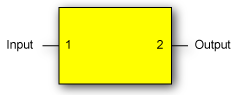
 Flips the S-parameters input to a Remove s2p operator (
:FUNCtion:FOPerator). If S-parameter file's data is not defined with the ports located as shown in the following diagram, flip the S-parameters to ensure that the S-parameter order is properly interpreted.
Example Command Sequence
:FUNCtion2:FOPerator DEConvolve
:FUNCtion2:PARameters:DEConvolve:FNAMe "C:\Users<user_name>\Documents\Keysight\Infiniium\S-Parameter Data\DUT_4.s2p"
:FUNCtion2:PARameters:DEConvolve:FMODel ON  // Flips  S-parameters ports
:FUNCtion2:COLor TCOLor4
:FUNCtion2:DISPlay ON
*OPC?
…  //  Your code to synchronize execution timing.