Differential (or Common-Mode) N Advanced Setup
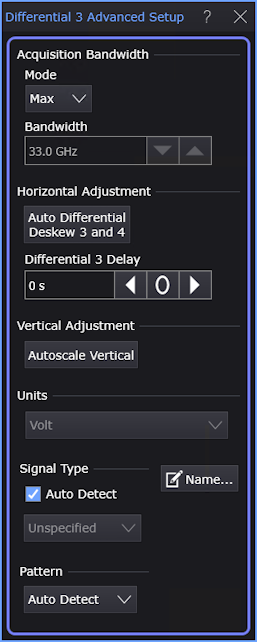
The Differential (or Common-Mode) N Advanced Setup dialog box contains advanced settings for oscilloscope input channels configured as differential or common-mode signals.
To open this dialog box:
- Click the colored portion of a differential or common-mode channel badge to open the channel Setup dialog box.
- In the channel Setup dialog box, click the Advanced... button.
A similar Advanced Setup dialog box is available for individual oscilloscope channels. See Channel N Advanced Setup.
Acquisition Bandwidth
These settings apply to the oscilloscope input channel's hardware bandwidth limit filter.
-
Mode — You can select either the Max available bandwidth or a Custom limited bandwidth.
-
Bandwidth — When the Custom option is selected for Bandwidth, enter the limited bandwidth value in this field.
Horizontal Adjustment
-
Auto Differential Dekew — This button automatically deskews the channels that combine to form the differential and common-mode signals, regardless of the source of the skew.
Skew can be introduced by fixtures, the device-under-test, or the transmitter. Use this feature if you want to remove the skew and you are not interested in measuring the skew.
See also: How Skew Affects Differential Signals and Changing Channel Bandwidth Affects Skew.
To manually apply hardware skew to individual channels, open the individual channel's Setup dialog box and click External HW....
Vertical Adjustment
-
Autoscale Vertical — This button automatically sets the vertical scale on the channels that combine to form the differential and common-mode signals for optimal use of the oscilloscope's dynamic range.
How the differential or common-mode signal is affected depends on the Tie to Channels setting in the differential or common-mode Setup dialog box:
- When Tie to Channels is selected, the vertical scale of the differential or common-mode signal is based on the vertical scales of the channels that are combined to form the signal.
- When Tie to Channels is cleared, the vertical scale of the differential or common-mode signal is based on the amplitude of the signal.
Units
When this field is active, you can change the magnitude units.
Signal Type and Pattern
These are the same controls that are in the Signal Type Setup dialog box. You can make signal type and pattern selections in either location. See Signal Type Setup.
Name…
 Waveforms displayed in tiled, stacked, or tab tile views include a waveform label. You can change the waveform's labels to your own more meaningful user name by clicking the Name... button. See also: Custom Waveform Names.