Open Setup Files
Opening a setup file restores the Infiniium application's settings to the ones that were previously saved to the setup file.
To open a setup file
-
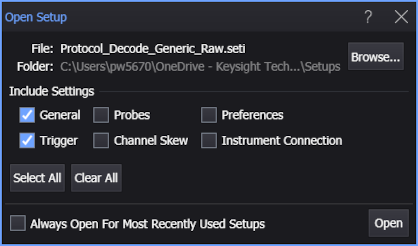
-
The default user data folder for saving setup files is \Setups.
-
-
General — General settings are all settings not included in other categories and include displayed channels, vertical scales, horizontal scales, acquisitions, content window layouts, and more.
-
Trigger — Trigger settings are important for capturing similar waveforms on different devices under test (DUTs) and on different oscilloscopes. It may be that you are interested only in restoring the trigger settings from a setup file.
-
Probes — Probe settings are tied to individual probes which are not likely to be the same on different oscilloscopes. Even when the same probe models are used on the same input channels, calibrations can make the settings different.
-
Channel Skew — Channel skew settings are tied to individual input channel hardware and are not likely to be valid for different oscilloscopes.
-
Preferences — Preferences are user settings that are not changed by a Default Setup but are changed by a Factory Default. For more information, see Default Setup and Factory Default.
-
Instrument Connection — Most often, you will be connected to a different oscilloscope and you do not want to have the setup file potentially change your instrument connection settings. However, if you are using Infiniium offline on remote computers and want to connect to the same oscilloscope, you may want to include these settings.
-
Opening From List of Recent Setup Files
The File > Recent Setups > menu has a list of recently saved or opened setup files. You can quickly open a setup file from this list.
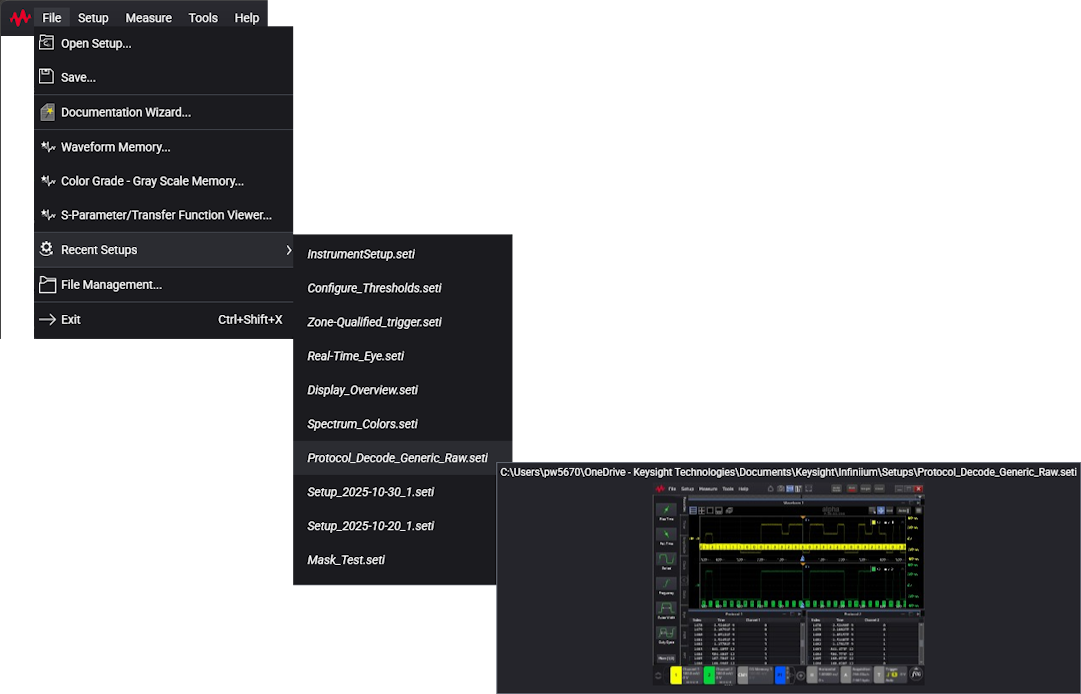
If the Always Open For Most Recently Used Setups option in the Open Setup dialog box is not selected, the chosen recent file is opened with the last-used include settings.
If the Always Open For Most Recently Used Setups option is selected, the Open Setup dialog box opens, and you can modify the include settings before clicking Open.