N1076A/B Electrical CDR Test Setups
The illustrations in this topic represent a variety of electrical clock recovery using the N1076/7A. In some situations, the length of the cables used can impact measurement accuracy. For more information, download the N1076/7A user's guide at www.keysight.com.
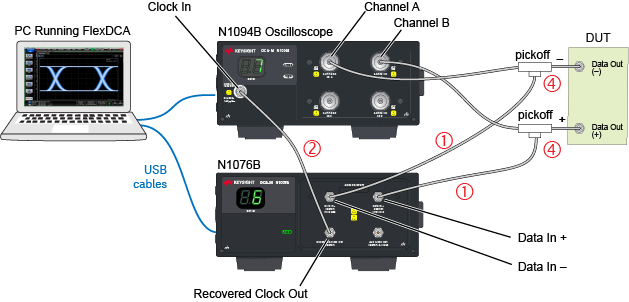
Circled numbers in this figure identify items from the electrical phase matching kits. Optional equalizers can be added to open a closed eye for clock recovery.
Precision Timebase and Trigger Connections from an N107x-Series DCA-M
When using an N107x-series DCA-M clock recovery module with an N1060A, know that the signal from the N107x's Aux Clock Out connector has significantly lower jitter than the signal from the N107x's Recovered Clock Out connector. Therefore:
- Connect the N107x's Aux Clock Out (lower jitter) to the DCA-X's or N1060A's Precision Timebase Input, and
- Connect the N107x's Recovered Clock Out to the DCA-X's Trigger Input.
Example Setup 1. Single-Ended Input with DCA-M Scope
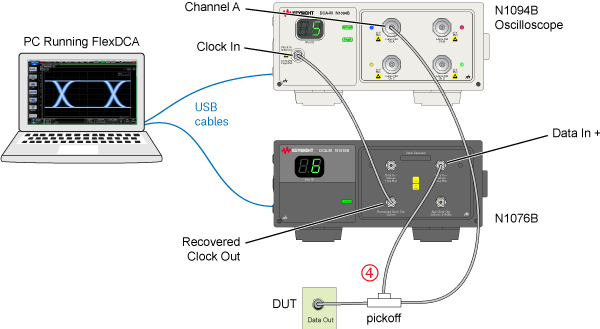
This example setup shows an N1076A/B connected to an N1094B oscilloscope with a single-ended electrical input signal. A microwave pickoff is used to tap a portion of the input signal as an input to the clock recovery module.
Example Setup 2. Differential Input with DCA-M Scope
This example setup shows an N1076A/B connected to an N1094B oscilloscope with a differential input signal. Two microwave pickoffs are used to tap a portion of the input signal as an input to the clock recovery module.