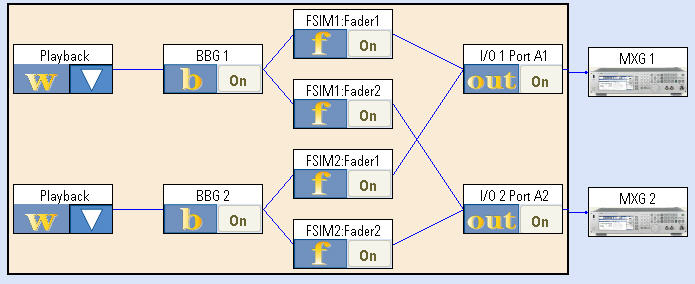
block diagram view.
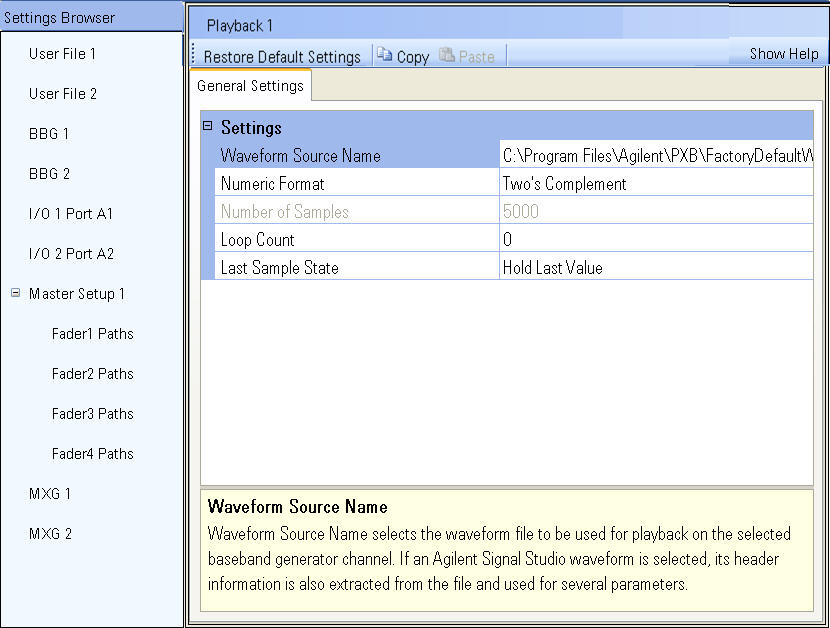
The Settings Browser provides access to the settings for the loaded
configuration. Each listed resources are also represented as blocks in
the block diagram view.
The resources displayed in the Settings Browser will vary depending on your configuration. You will see a combination of the following resource types:
ARB - Select a user waveform file for playback. It can be a Signal Studio-created arbitrary waveform file, or a custom user-created file.
Signal Studio real-time generation - Configure a real-time Signal Studio standard-based or custom signal for continuous play.
BBG n - Set the parameters for each baseband generator used in the configuration.
Master Setup n - Select the general fading parameters that apply to all fader resources.
Fader n Paths - Model the fading that results from multipath signals received from the surrounding environment for each fader.
Signal Capture n - Configure the settings for a signal capture operation.
I/O - Configure the settings for the interface to/from each of the external instruments. The ports correspond to the physical connection from the I/O card to the external instrument that is sending/receiving the signal.
External instruments displayed depend on the externally connected instruments.
Signal Generator for the E4438C ESG and N5182A MXG signal generators
Signal Analyzer for the N9010A EXA, N9020A MXA, or N90310 PXA for the signal analyzers
DSIM for the N5102A Digital Signal Interface Module