:LTESt:MEASure:MLIMit:SOURce:LOCation
Command Syntax
:LTESt:MEASure:MLIMitN:SOURce:LOCation <index>,<index>,<index>,…
Where N identifies one of sixteen {1:16} limit tests.
Where <index> is a panel's row number for a measurement.
Query Syntax
:LTESt:MEASure:MLIMitN:SOURce:LOCation?
Description
For the specified measurement limit test (1 through 16), selects the actual measurements on which to perform the limit test. To specify the measurement results panel on which the measurements result is displayed, use the :LTESt:MEASure:MLIMit:SOURce:TYPE command.
For most of Infiniium's results panels, the measurement index is a single integer. For example when selecting the Fall Time measurement in the Results panel, the index might be:
:LTESt:MEASure:MLIMit2:SOURce:TYPE EYE
:LTESt:MEASure:MLIMit2:SOURce:LOCation 3
Discovering an Index Programmatically
Programmatically, the easiest and most sure technique to get a measurement's location is to use the :LOCation? child query. This query is found for each measurement command in the :MEASure subsystem. For example, to query the location of a Rise Time measurement, use this command:
:MEASure:EYE:RTIMe:LOCation?
Then, you can simply pass (or append) this index as an argument to the :LTESt:MEASure:MLIMit:SOURceN:LOCation command. Also, sending the command to start a measurement, even if that measurement is already turned on, places the measurement at the top of the results table with location index 1. As a result, you don't need to query the index. Simply use index 1 the select the measurement for limit testing.
Discovering an Index from the GUI
- Click Tools > SCPI Programming Tools > SCPI Recorder....
- In the SCPI Recorder dialog box, start recording.
- In the measurement results panel, click the measurement for which you want the index.
- The SCPI Recorder shows a command for selecting the measurements. The correct index is shown at the end of this command.
Interpreting Index Values
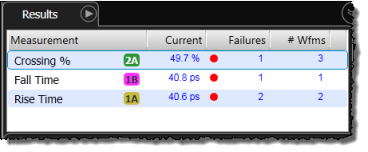
For row number only indexes, the first (top most) measurement is identified as 1, the second measurement from the top is identified as 2, and so forth. Since new measurements are added to the to the top of a panel, the index is numbered in the reverse order in which the measurement were turned on. For example, the last and 3rd measurement added to the following picture was Crossing % and it has a location index of 1.
- Crossing % (index 1)
- Fall Time (index 2)
- Rise Time (index 3)
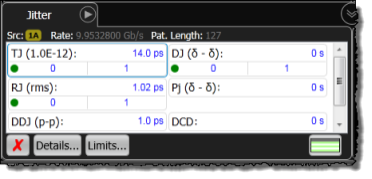
Measurements can be listed in columns, as shown by the following figure. In this case, the location index generally increases row-by-row from left to right. As a result, the first (top most) measurement in the following figure is identified as 1. It is the TJ measurement. The second measurement, identified as 2, is DJ. The third measurement, identified as 3, is RJ, and so forth.
For measurements on mask regions, use the following figure and table to identify the index, which can range from 1 to 64. Query the location index using the :MEASure subsystem's :LOCation queries listed in the following table.
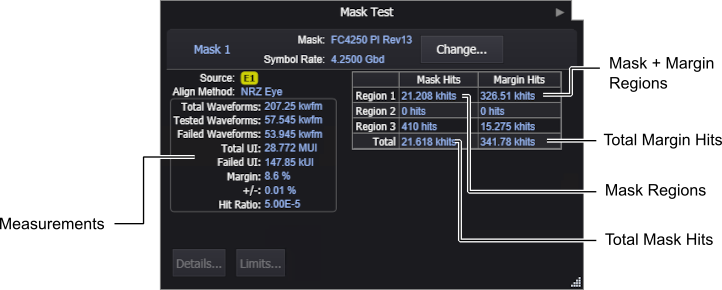
| Mask Limit Measurements | :MEASure Subsystem Query for Location Index |
|---|---|
| Mask Region (1 to 16) | :MEASure:MTESt:HREGion{1:16}:LOCation? |
| Mask + Margin Region (1 to 16) | :MEASure:MTESt:MHRegion{1:16}:LOCation? |
| Total Mask Hits | :MEASure:MTESt:HITS:LOCation? |
| Total Margin Hits | :MEASure:MTESt:MHITs:LOCation? |
| Total Waveforms | :MEASure:MTESt:NWAVeforms:LOCation? |
| Tested Waveforms | :MEASure:MTESt:TWAVeforms:LOCation? |
| Failed Waveforms | :MEASure:MTESt:FWAVeforms:LOCation? |
| Total UI | :MEASure:MTESt:UINTervals:LOCation? |
| Failed UI | :MEASure:MTESt:FUINtervals:LOCation? |
| Margin | :MEASure:MTESt:MARGin:LOCation? |
Example Command Sequence
This example returns the location of the rise time measurement, which in this example is "3". Then, later in the program, this location index is used to enable limit testing on the risetime measurement.
:MEASure:EYE:RTIMe:LOCation?  //  Discover risetime location in table.……
:LTESt:MEASure:MLIMit2:SOURce:TYPE EYE  //  Select an Eye test.
:LTESt:MEASure:MLIMit2:SOURce:LOCation 3  //  Select the risetime measurement.
:LTESt:MEASure:MLIMit2:STATe ON  //  turn on risetime limit test 2