:CALibrate Subsystem
Instrument:
N1000A
DCA-M
Meas. mode:
Scope
Eye
Jitter
TDR
Flex Apps:
FlexDCA
FlexRT
Use the :CALibrate subsystem to perform calibrations or confirm calibration status for N1000A mainframes and N1000A modules as well as N1092-series and N1093A/B DCA-M modules. This subsystem corresponds to FlexDCA's Calibrations dialog shown in the following picture. Click on the tabs in this picture to learn about the different calibrations.
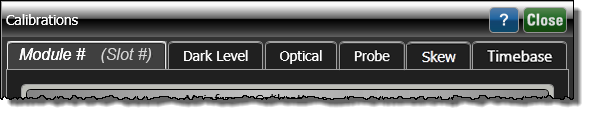
| Type of Calibration | Cal Dialog Tab | :CALibrate Subsystem SCPI Node |
|---|---|---|
| Module Vertical (input channel) | Module # | :CALibrate:SLOT:VERTical
|
| Module Clock Recovery | :CALibrate:SLOT:CRECovery
|
|
| Module Precision Timebase | :CALibrate:SLOT:PTIMebase
|
|
| TDR Step | :CALibrate:SLOT:STEP
|
|
| Dark Level | Dark Level | :CALibrate:DARK
|
| Optical Input Channel | Optical | :CALibrate:OPTical
|
| Skew | Skew | :CALibrate:SKEW:SLOT
|
| Timebase | Timebase | :CALibrate:FRAMe:PTIMebase
|
Example Command Sequence
The following commands are used for a typical vertical calibration. The :SDONe? query is used to detect when a portion of the calibration has completed. The :CONTinue command is used to dismiss dialogs that are displayed during a calibration. SLOT3 identifies a module that is installed in the right module bay.
The following commands are used for a typical vertical calibration.
:CALibrate:SLOT3:VERTical ENABled
:CALibrate:SLOT3:STARt
:CALibrate:SDONe?
:CALibrate:CONTinue    //  Dismiss the begin notice calibration dialog
:CALibrate:SDONe?
:CALibrate:CONTinue    //  Dismiss the disconnect notice dialog
:CALibrate:SDONe?
:CALibrate:CONTinue    //  Dismiss calibration complete dialog
*OPC?
:CALibrate:SLOT:VERTical:STATus?