Flex Frame Properties Dialog Box
The dialog box contains parameters to configure custom signals for EVM Error vector magnitude (EVM): A quality metric in digital communication systems. See the EVM metric in the Error Summary Table topic in each demodulator for more information on how EVM is calculated for that modulation format. measurement using a flexible frame building interface.
The Flex Frame measurement type must be selected before this dialog box is available. To enable the demodulator, click .
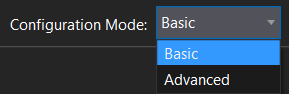
Flex Frame Modulation Analysis has two configuration modes: Basic and Advanced. The Basic mode offers a simplified user interface and fewer parameters for single-carrier signal configurations. Advanced mode provides a full set of parameters for configuring complex signals with multiple carriers. The Configuration Mode setting is available at the bottom of every tab in the Flex Frame Properties dialog box.
See Also
