:FUNCtion:PARameters:FFEQualizer:WIDTh
Command Syntax
:FUNCtionN:PARameters:FFEQualizer:WIDTh <pct_of_UI>
<pct_of_UI> is a Double.
Where N identifies one of up to 64 possible operators {1:64} that can be defined as part of a math function. The operators are numbered in the order that they were originally added to the function.
Query Syntax
:FUNCtionN:PARameters:FFEQualizer:WIDTh?
Description
 Specifies the percentage of the unit interval, centered on the clock location, to optimize taps for.
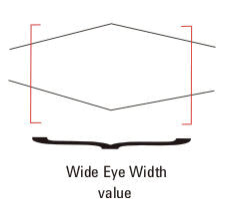
You can enter values from zero to one. For example, if the eye width is set to zero (0), taps are optimized for only the voltage specifically at the clock location of each unit interval. If the eye width is set to 0.2, taps are optimized for the voltage in 20% of the unit interval centered on the clock location. If the eye width is set to one (1), taps are optimized for voltage in the entire unit interval.
Typically with FFE, the receiver samples data not only at the location of the clock, but also in its vicinity. The default is set to 0.333 UI (unit interval) to account for this variance in the sample location. Typically values between 0.0 UI - 0.5 UI are the most useful.
If you are unsure about what value to enter here, but do not want to use the default, think about whether you have more margin vertically or horizontally (where is your uncertainty?). If you optimize the tap values for a narrow portion of the unit interval, your eye will have a greater peak, but only near its center.
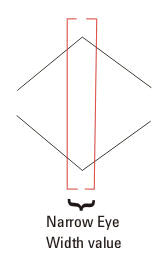
If you optimize the tap values for more of the unit interval, your eye will not be peaked as high, but will be more spread out horizontally.