Eye Contour Configuration Commands
Use the Eye Contour configuration commands to place a group of eye-contour lines on NRZ and PAM eye diagrams. As shown in the following picture, an Eye Contours legend is displayed that identifies the different eye-contour lines. You can display or hide all eye-contour legends using the :DISPlay:WINDow:ECLegend command. To expand or contract all displayed eye contour legends, use the :DISPlay:WINDow:TIME{N}:LEGend:ECEXpand command.
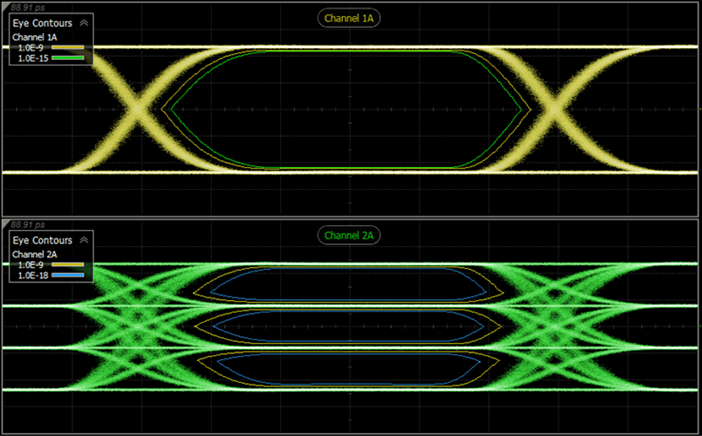
Example
This Python script (with PyVISA) displays a group of eye-contour lines on the connection 2 channel 1 waveform. The waveform must be displayed. The script opens a session with Infiniium 2026 Offline (localhost) that is running on the same PC as the script.
import pyvisa

rm = pyvisa.ResourceManager()
Infiniium = rm.open_resource("TCPIP0::localhost::hislip0::INSTR")

#Set Timeout - 10 seconds
Infiniium.timeout =  5000
Infiniium.read_termination = '\n'

Infiniium.write(":MEASure:EYE:CONTour2:SOURce ECHannel1")
Infiniium.write(":MEASure:EYE:CONTour2:PSPec BER")
Infiniium.write(":MEASure:EYE:CONTour2:BERates 1.0E-9,2.5E-15")
Infiniium.write(":MEASure:EYE:CONTour2:DISPlay ON")

Infiniium.write(':SYSTem:GTLocal')
Infiniium.close()