:MEASure:PEYE:FOVer2
Command Syntax
:MEASure:PEYE:FOVer2
Query Syntax
:MEASure:PEYE:FOVer2
Description

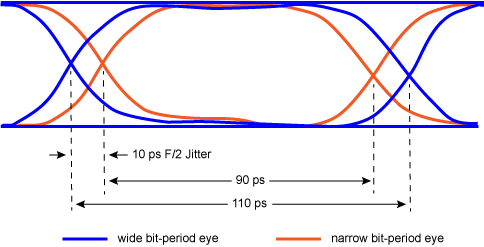
The following figure shows an eye diagram in which blue and orange colors identify the portions of an eye that are created with the signal's even or odd symbols. This is one signal; the colors do not represent different scope channels. The eyes, formed by the even and odd symbol periods, are overlaid on top of each other with example symbol periods of 90 ps and 110 ps.
F/2 jitter is the measure of the difference in edge positions of even/odd symbols. In the figure, F/2 jitter directly measures the difference in the edge positions identified by dotted lines in the figure, which in this case is 10 ps of F/2 jitter.
This measurement is only available in Jitter Mode. When measuring a simulated waveform, the pattern length in pattern lock setup must be set to an even number by doubling the pattern length setting in the simulator. On real signals, you must assure that the pattern is consistent with any measurement standard requirements.
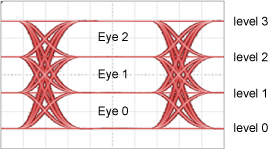
To select the eye in the PAM4 eye diagram on which to return the measurement, use the :MEASURE:PEYE:FOVer:EYE command.
| PAM Waveform |
|
Measurement Ready?
To confirm that the measurement is ready to read, you can query the measurement's status:
if ('CORR' in Flex.query(':MEASure:PEYE:FOVer2:STATus?')):
	measurement = Flex.query(':MEASure:PEYE:FOVer2?')
If averaging is turned on (:ACQuire:AVERaging), you can also confirm if the measurement result is ready by comparing the number of specified averages (:ACQuire:ECOunt?) versus the number of measurement sweeps that have occurred (:MEASure:PEYE:FOVer2:COUNt?). The technique uses the :COUNt? common measurement query. For example,
if (Flex.query(':MEASure:PEYE:FOVer2:COUNt?') >= Flex.query(':ACQuire:ECOUNt?')):
	measurement = Flex.query(':MEASure:PEYE:FOVer2?')
You can also use an acquisition limit lest to test that a number of waveform samples, or pattern acquisitions have completed before returning a measurement. Refer to the :LTESt:ACQuire:CTYPe command.
Common Measurement Child Queries
This command supports the use of the following common measurement queries: :LOCation?, :COUNt?, :MAXimum?, :MINimum?, :MEAN?, and :SDEViation?.
Measurement Identification
Avoid subtle programming errors! To ensure that the correct measurement is installed or queried, always explicitly identify a measurement when installing a measurement or querying a measured value, status, or detail. To identify a measurement, specify the measurement's source waveform (:SOURce child command). With some measurements, you may also need to specify other identifying values. Generally, when selecting a measurement using FlexDCA's GUI, if a dialog appears prompting you to select values, you should explicitly specify these values when remotely identifying the measurement. More information.
For example, to return the status of the measurement, :MEASure:PEYE:FOVer2
flex.write(':MEASure:PEYE:FOVer2:SOURce CHAN1A')
if flex.query(':MEASure:PEYE:FOVer2:STATus?') == 'CORR';
    measurement = flex.query(':MEASure:PEYE:FOVer2?')
else:
	details = flex.query(':MEASure:PEYE:FOVer2:STATus:DETails?')
	reason = flex.query(':MEASure:PEYE:FOVer2:STATus:REASon?')
Child commands for measurement identification:
:MEASure:PEYE:FOVer2:SOURce
Requires FlexDCA revision A.04.50 and above.