:MEASure:PLEVel:PMAX
Command Syntax
:MEASure:PLEVel:PMAX
Query Syntax
:MEASure:PLEVel:PMAX?
Description
For the Signal-to-Noise-and-Distortion Ratio (SNDR) measurement, returns the measured amplitude (p-max) term of the extracted linear pulse response used in the SNDR measurement. The p-max term is used when measuring SNDR for IEEE 802.3-2022 as shown in the following equation.
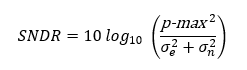
The p-max (and P-Signal) measured terms are always available regardless of how the SNDR measurement is configure using the :MEASure:AMPLitude:DEFine:SNDRatio:DEFinition command. To return the P-Signal) term use the :MEASure:PLEVel:PSIGnal? query, To run the SNDR measurement, use the :MEASure:PLEVel:SNDRatio.

You can run and return the p-max measurement even it the Signal-to-Noise-and-Distortion Ratio (SNDR) measurement is not running or displayed int FlexDCA's Level results table.
Prior to FlexDCA revision A.08.40, the p-max measurement could be returned by the :MEASure:PLEVel:PSIGnal command.
Requires FlexDCA revision A.08.40 and above.
Measurement Identification
Avoid subtle programming errors! To ensure that the correct measurement is installed or queried, always explicitly identify a measurement when installing a measurement or querying a measured value, status, or detail. To identify a measurement, specify the measurement's source waveform (:SOURce child command). With some measurements, you may also need to specify other identifying values. Generally, when selecting a measurement using FlexDCA's GUI, if a dialog appears prompting you to select values, you should explicitly specify these values when remotely identifying the measurement. More information.
For example, to return the status of the measurement, :MEASure:PLEVel:PMAX
flex.write(':MEASure:PLEVel:PMAX:SOURce CHAN1A')
if flex.query(':MEASure:PLEVel:PMAX:STATus?') == 'CORR';
    measurement = flex.query(':MEASure:PLEVel:PMAX?')
else:
	details = flex.query(':MEASure:PLEVel:PMAX:STATus:DETails?')
	reason = flex.query(':MEASure:PLEVel:PMAX:STATus:REASon?')
Measurement Ready?
To confirm that the measurement is ready to read, you can query the measurement's status:
if ('CORR' in Flex.query(':MEASure:PLEVel:PMAX:STATus?')):
	measurement = Flex.query(':MEASure:PLEVel:PMAX?')
If averaging is turned on (:ACQuire:AVERaging), you can also confirm if the measurement result is ready by comparing the number of specified averages (:ACQuire:ECOunt?) versus the number of measurement sweeps that have occurred (:MEASure:PLEVel:PMAX:COUNt?). The technique uses the :COUNt? common measurement query. For example,
if (Flex.query(':MEASure:PLEVel:PMAX:COUNt?') >= Flex.query(':ACQuire:ECOUNt?')):
	measurement = Flex.query(':MEASure:PLEVel:PMAX?')
You can also use an acquisition limit lest to test that a number of waveform samples, or pattern acquisitions have completed before returning a measurement. Refer to the :LTESt:ACQuire:CTYPe command.
Common Measurement Child Queries
This command supports the use of the following common measurement queries: :LOCation?, :COUNt?, :MAXimum?, :MINimum?, :MEAN?, and :SDEViation?.
Example Command
:MEASure:PLEVel:PMAX