:WAVeform:CGRade:INTeger:DATA?
Query Syntax
:WAVeform:CGRade:INTeger:DATA?
Description
This query returns eye diagram data as definite-length binary block data. The color grade/gray scale database values are returned in 32-bit integer format. Color grade/gray scale data is transferred as a two dimensional array consisting of 1024 rows by 1280 columns for a total number of 1,310,720 points (5,242,880 bytes). This array corresponds to the graticule display, where each point contains a sample hit count. The array is transferred column by column, starting with the lower left corner of the graticule.
The time for any column of data points can be calculated as:
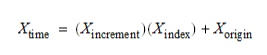
where,
- Xincrement is the time spacing between database columns and is returned with the
:WAVeform:CGRade:XINCrement?query. - Xindex is the column count index, starting at zero and ending at 1279, the value returned by the
:WAVeform:CGRade:COLumns?query. - Xorigin is the time position of the first column and is returned using the
:WAVeform:CGRade:XORigin?query.
The voltage for any data point at a given row (that contains a hit count) is determined by using the following equation:

where,
- Yincrement is the amplitude spacing between database rows and is returned with the
:WAVeform:CGRade:YINCrement?query. - Yindex is the row count index, starting at zero and ending at 1023, the value returned by the
:WAVeform:CGRade:ROWS?query. - Yorigin is a voltage value of the top row and is returned using the
:WAVeform:CGRade:YORigin?query.
To transfer the data in ASCII values, use the :WAVeform:CGRade:ASCii:DATA? query.
See Definite-Length Block Response Data for more information.
Returned Data Type
The :WAVeform:CGRade:INTeger:DATA? query returns long int (unsigned) values as definite-length block data. You must specify this data type in your program language's command that you use to query the data. The specifier for this data type in your programming language will likely be "L" and it is identified in this example with red text. Confirm this with your programming language's documentation. The following is an example of the command used in Python using PyVISA.
endianness = Infiniium.query(':SYSTem:BORDer?')
Infiniium.write(':SYSTem:BORDer LENDian')
data = Infiniium.query_binary_values(':WAVeform:CGRade:INTeger:DATA?',
	datatype='L',
	container=list,
	is_big_endian=False,
	header_fmt='ieee')
Infiniium.write(':SYSTem:BORDer ' + endianness)
Endianness of Returned Block Data
To correctly interpret block data, you must know the endianness (byte order) of the returned data (integers or real), and you will most likely have to specify this same endianness in your program language's command that is used to query the data. Endianness can be set to "little endian" order in which the least significant byte is sent first and the most significant byte sent last. Or, the endianness can be set to "big endian" order in which the most significant byte is sent first and the least significant byte sent last.
To specify or query the endianness setting for binary block data, use the :SYSTem:BORDer command. The endianness setting applies to all binary queries except for :DISK:FILE:READ? query.
If you plan to change Infiniium's current endian setting, it is a good practice to query Infiniium's current endian setting and restore the setting when your program completes. This will avoid other programs having errors due to assuming a particular endianness setting.
After a factory default (:SYSTem:FACTory), little endian is set. A default setup (:SYSTem:DEFault) does not affect endianness.
Be aware that VXI plug-and-play drivers can change the endianness setting. As a result always explicitly set the endianness in your program before transferring any binary data.