Sequence Triggers
Sequence triggers let you trigger on an event that follows another event.
The first event is called the Sequence A event. The second event is called the Sequence B event.
You can optionally reset the trigger sequence after the Sequence A event occurs, but before the Sequence B event occurs, if a certain amount of time passes.
You can also optionally specify a delay time after the Sequence A event occurs before searching for the Sequence B event.
To set up a sequence trigger:
-
Select the colored portion of the Trigger badge.
-
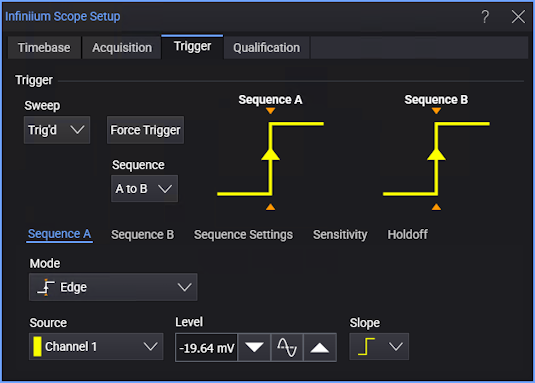
In the Infiniium Scope Setup dialog box , in the Sequence drop-down list, select A to B.
Notice where the Trigger Settings subtab was, there are now three new subtabs: Sequence A, Sequence B, and Sequence Settings.
-
Select the Sequence A subtab; then, use the controls to select the mode and options for Sequence A.
These modes are available for sequence triggers:
With the limitations described in Sequence Trigger Limitations. The High Bandwidth Edge and Edge Then Edge trigger modes are not available in sequence triggers.
-
Similarly, select the Sequence B subtab; then, use the controls to select the mode and options for Sequence B.
-
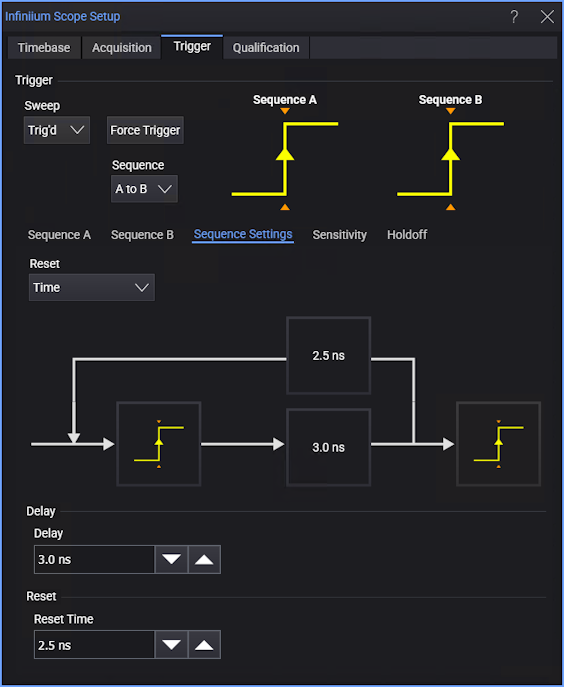
To specify a delay time or reset time, select the Sequence Settings subtab.
-
To specify an amount of time to wait after the Sequence A event occurs before searching for the Sequence B event, enter that value in the Delay field.
-
To specify an amount of time to wait, after any delay time, before resetting the sequence, in the Reset drop-down list, select Time.Then, enter the time value in the Reset Time field.
If you do not want to specify a reset time, in the Reset drop-down list, select None.
-