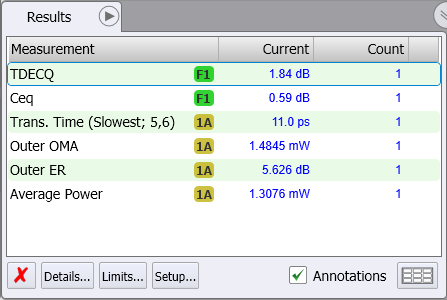
Step 8. Measure TDECQ
Instrument
UXR Scope
Flex Apps:
N1010A
FlexRT
License:
L-RND
Meas. mode:
Scope
Eye
To make the TDECQ measurement, perform these steps:
- At the top of FlexRT's window, click the Single button.
- Find the TDECQ result in the Results table shown beneath the waveform window. In the Results table, notice that the Count (waveform acquisition) entry for the measurement is "1".

The TDECQ measurement is made using a single waveform.