Reference Rx (Pulse)
 The Reference Receiver's Pulse Response tab allows you to configure Pulse Delay and Pulse Length whenever a DFE equalizer is installed as the Non-Linear Equalizer and the Use Pulse Response Optimization setting is selected in the Reference Receiver Setup dialog.
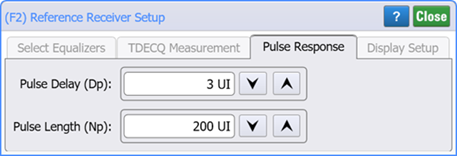
You can configure the optimization using these two settings:
- Pulse Delay (Dp)
- The pulse delay can be set from 1 to 10 UIs with the default being 3 UI.
- Pulse Lengh (Np)
- The pulse length can be set from 9 to 1,000 UIs with the default being 200 UI.
To view the display the Pulse Response tab:
- Click the Reference Receiver Setup dialog's Select Equalizers tab. This tab is shown in the above picture.
- In the tab's Non-Linear Equalizer field, click the down arrow and select the DFE equalizer.
- In the tab's graphical view of the Reference Receiver which is located just above the Non-Linear Equalizer field, click on the DFE graphic.
- In the displayed DFE Setup dialog, select Use Pulse Response Optimization. The Pulse Response tab is now visible.

You can enter pulse delay and length in either the Reference Receiver Setup dialog's Pulse Response tab, or by clicking on the DFE graphic and using the DFE Setup dialog.
The Reference RX operator requires FlexDCA revision A.07.80 and above.