Vertical Eye Closure
 The Vertical Eye Closure (VEC) measurement for PAM4, PAM6, PAM8, or NRZ waveforms is based on an Eye Height measurement at a probability of 1E-5 and level measurements (used to determine AV). Eye Height is measured with the same algorithm as is used for the PAM Eye Heights measurement. This measurement can also be used for NRZ coded signals. VEC is measured for each of the eyes. The higher the result (decibels) the more the eye is closed.
Settings Dialog for Zero Hits
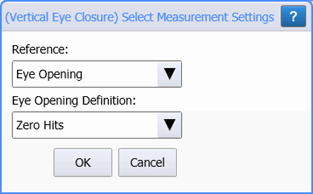
When the measurement button is first clicked, the (Vertical Eye Closure) Select Measurement Settings dialog is shown. Use this dialog to select the measurement's Reference and Eye Opening Definition.
Reference
The VEC measurement is Referenced to either Optical Modulation Amplitude (OMA) or Eye Opening. When OMA is selected, the OMA is calculated in Eye mode's normal manner where pattern lock is used to find long sequences of the top and bottom levels. If long sequences are not available, OMA is estimated at the crossings and a questionable status notice is displayed in the results. The ideal opening is then the OMA divided by the number of eyes (1 for NRZ, 3 for PAM4, 5 for PAM6, or 7 for PAM8).
When Eye Opening is selected, the ideal opening is the spacing between the measured levels surrounding the eye. The levels are measured using the same algorithm as is used in the PAM Levels measurement.
Eye Opening Definition
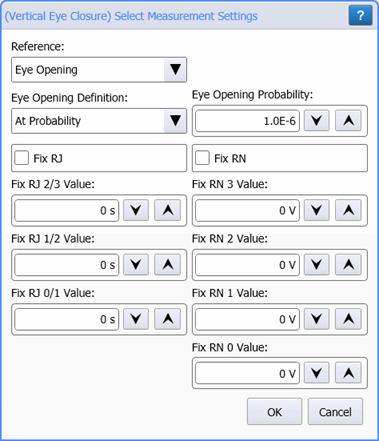
The Eye Opening Definition can be set to Zero Hits, shown in the above picture, or At Probability, which is shown in the following example picture for a PAM4 waveform. When At Probability is selected the dialog is expanded to give access to the Eye Opening Probability, Fixed RJ, and Fixed RN settings. The default Eye Opening Probability is 10–6.
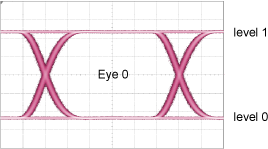
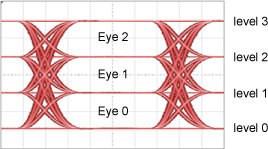
In the VEC Select Measurement Settings dialog, the number of Fixed RJ and Fixed RN settings varies based on the waveform's format.
Settings Dialog for At Probability
| Random Noise | Random Jitter | Description |
|---|---|---|
| RN 1 Value (level 1) |
|
|
| RN 0 Value (level 0) | RJ 0/1 (eye 0) |
| Random Noise | Random Jitter | Description |
|---|---|---|
| RN 3 Value (level 3) |
|
|
| RN 2 Value (level 2) | RJ 2/3 (eye 2) | |
| RN 1 Value (level 1) | RJ 1/2 (eye 1) | |
| RN 0 Value (level 0) | RJ 0/1 (eye 0) |
| Random Noise | Random Jitter | Description |
|---|---|---|
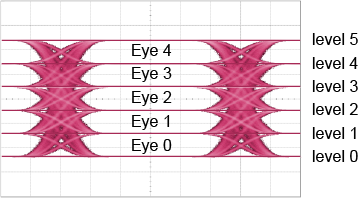
| RN 5 Value (level 5) |
|
|
| RN 4 Value (level 4) | RJ 3/4 (eye 4) | |
| RN 3 Value (level 3) | RJ 2/3 (eye 3) | |
| RN 2 Value (level 2) | RJ 2/3 (eye 2) | |
| RN 1 Value (level 1) | RJ 1/2 (eye 1) | |
| RN 0 Value (level 0) | RJ 0/1 (eye 0) |
| Random Noise | Random Jitter | Description |
|---|---|---|
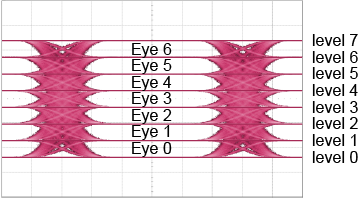
| RN 7 Value (level 7) |
|
|
| RN 6 Value (level 6) | RJ 5/6 (eye 6) | |
| RN 5 Value (level 5) | RJ 4/5 (eye 5) | |
| RN 4 Value (level 4) | RJ 3/4 (eye 4) | |
| RN 3 Value (level 3) | RJ 2/3 (eye 3) | |
| RN 2 Value (level 2) | RJ 2/3 (eye 2) | |
| RN 1 Value (level 1) | RJ 1/2 (eye 1) | |
| RN 0 Value (level 0) | RJ 0/1 (eye 0) |
The IEEE method of measuring VEC in Eye mode would be to select the Reference to Eye Opening and the Eye Opening Definition to At Probability with a probability of 1.0E–5,Keysight recommends using Jitter Mode's PAM VEC measurements whenever possible.
To measure
- Select Eye/Mask Mode.
- Click Auto Scale in the menu toolbar.
- Click the toolbar's PAM tab.
- On the toolbar, locate and click the Vertical Eye Closure button.
SCPI Command
:MEASure:EYE:PAM:VECLosure