:SPRocess:RRX:LIMits:BALance:LIMit
Command Syntax
:SPRocessN:RRX:LIMits:BALance:LIMit <coefficient-difference-limit>
Where <coefficient-difference-limit> is the limiting value. For example, 0.25.
Where N identifies one of up to 64 possible operators {1:64} that can be defined as part of a math function. The operators are numbered in the order that they were originally added to the function.
Query Syntax
:SPRocess:RRX:LIMits:BALance:LIMit?
Query Response
<coefficient-difference-limit>
Description
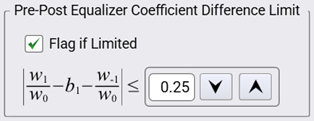
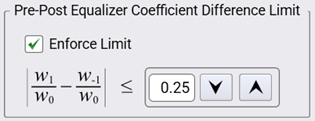
 For the Reference Rx operator, this command sets or returns the Pre-Post Equalizer Coefficient Difference Limit. The following figures show the affected fields in the Reference Receiver Setup dialog. The default limit is 0.25, the maximum limit is 1.00 and the minimum limit is 0.100. The field's settings and algorithm differ depending on whether a DFB secondary operator is installed. However, both situations have the same settings limits. To turn on or off the Flag if Limited (or Enforce Limit) setting, use the
:SPRocess:RRX:LIMits:BALance:STATe command.
| Field is Affected by Secondary DFB Operator | |
|---|---|
| DFB Installed (compliant with specification) |
DFB Not Installed (not compliant with specification) |
|
|