:MEASure:TDEC:LRUSe
Command Syntax
:MEASure:TDEC:LRUSe {MRAStart | MWIDth}
Query Syntax
:MEASure:TDEC:LRUSe?
Description
This command specifies how to treat runs that are longer than the minimum. The MWIDth argument (legacy setting Maximum Run) uses all data from the runs excluding the margin at the start and end of the run. The argument MRAStart is the Min Run at Start setting which uses only the 2UI immediately after the margin for the measurement.
Levels Definition
The following paragraphs describe how this command relates to and works with related commands. Both the associated remote SCPI commands and the related settings in the TDECQ operator dialog's TDEC Measurement tab are noted.
Minimum Zero Level and One Level Run Settings
The Minimum Zero Level Run and the Minimum One Level Run settings enter the minimum number of consecutive UIs that must be present in the waveform pattern in order to measure the amplitude of the level. Enter the minimum number of consecutive zero or one UIs that must be present in the waveform. If the runs are shorter, the measurement is marked a questionable (a "?" character annotates the measurement's results). This number includes the actual 2 UIs where the measurement is made plus margin UIs on either side.
| Settings | SCPI Command | Default Values |
|---|---|---|
| Minimum Zero Level Run1 | :MEAS:TDEC:MRUN:ZERO
|
72 |
| Minimum One Level Run1 | :MEAS:TDEC:MRUN:ONE
|
72 |
| Run Measure Length | :MEAS:TDEC:LMLength
|
50 UI |
Setting includes 2 measured UIs plus margin UIs.
For default minimum setting of zero level runs:


For default minimum setting of level three runs:


If the runs present in the pattern are shorter than this setting, the measurement is marked a questionable (a "?" character annotates the measurement's results). The default values are 6 runs of zero and 7 runs of level 3. The values can range from 5 to 1024 UIs.
Longer Runs Use and Location Method Settings
The IEEE 802.3dj Draft 3.2 standard introduced changes to the TDEC/VECP measurement algorithm when performing TDEC measurements. To support this change, the new Longer Runs Use and Location Method settings were added to FlexDCA A.08.40.
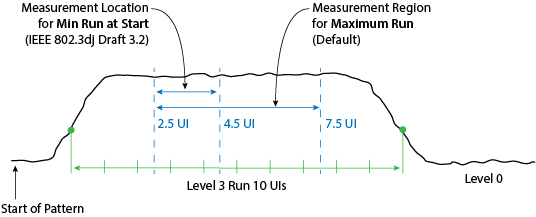
When performing measurements, you can select to use either legacy or new IEEE 802.3dj Draft 3.2 settings as shown in the following table. The legacy settings are the default selections. In the dialog's Preset drop down, if you select an IEEE 802.3dj Draft 3.2 preset, the Longer Runs Use and Location Method settings are set to the correct algorithm setting. Selecting any other preset will set these two settings to their default legacy values. Figure 3 illustrates the differences between the Maximum Run and Min Run at Start settings.
The Longer Runs Use setting specifies how to treat runs that are longer than the minimum. The legacy setting Maximum Run uses all data from the runs excluding the margin at the start and end of the run. The new Min Run at Start setting uses only the 2UI immediately after the margin for the measurement. See Figure 3 below.
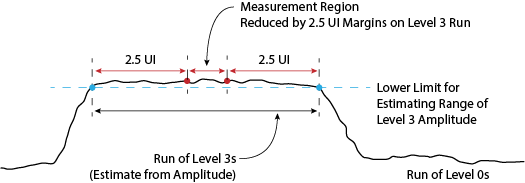
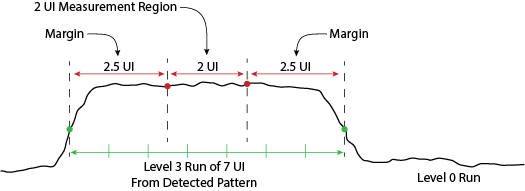
The Location Method setting determines how level three runs and level zeros runs are located within the waveform. The legacy algorithm was not pattern aware so it estimated the locations of level three and level zero runs by measuring amplitudes. The legacy algorithm can be selected as Estimate From Amplitude. See Figure 1 below. The new Use Pattern setting causes FlexDCA to first detect the symbol pattern based on the input pattern settings. The detected pattern is used to determine the measurement location. See Figure 2 below.
| Settings | SCPI Command | Legacy Default Values (SCPI Argument) |
IEEE 802.3dj Draft 3.2 Default Values (SCPI Argument) |
|---|---|---|---|
| Longer Runs Use | :MEAS:TDEC:LRUSe
|
Maximum Run ( MWIDth) |
Min Run at Start ( MRAStart) |
| Location Method | :MEAS:TDEC:LMEThod
|
Estimate From Amplitude ( EFAMplitude) |
Use Pattern ( UPATtern) |
FlexDCA's legacy measurement algorithm for 0 level and 3 levels, could locate level 3/0 pattern runs based on the waveform value exceeding a lower limit for 3 levels or dropping below an upper limit for 0 levels. Figure 1 and Figure 2 illustrate the two methods.
Requires FlexDCA revision A.08.40 and above.